Перейти к основному содержанию
Присоединяйся к сообществу ремонтников - Создай аккаунт

Logitech G27 C-Clamp Replacement

Выберете то, что вам нужно

  1. Logitech G27 C-Clamp  Replacement, Steering Wheel: шаг 1, изображение 1 из 1
    • Remove the six gray 25mm hex screws with a 4mm allen wrench.

    • Watch out when you lift the wheel up, as there are fragile wires connected to the bottom side.

    • Carefully lift up the wheel, but do not disconnect it from the rest of the device.

    Спросите у FixBot

    Добавить комментарий

  2. Logitech G27 C-Clamp  Replacement: шаг 2, изображение 1 из 1
    • Carefully lift the wheel off of the hub, exposing the 2 shifter paddle wires and PCB board.

    Спросите у FixBot

    Добавить комментарий

  3. Logitech G27 C-Clamp  Replacement: шаг 3, изображение 1 из 1
    • Remove the two 7.5 mm silver screws holding the green PCB board in the wheel with a Phillips #1 screwdriver.

    Спросите у FixBot

    Добавить комментарий

  4. Logitech G27 C-Clamp  Replacement: шаг 4, изображение 1 из 1
    • Carefully remove the PCB board from the wheel hub.

    Спросите у FixBot

    Добавить комментарий

  5. Logitech G27 C-Clamp  Replacement: шаг 5, изображение 1 из 1
    • Carefully pinch and unplug the large 7-pin connector under the PCB board.

    • Be careful when unplugging this adapter, try not to pull on the wires to avoid damaging them. Instead, wiggle around the plastic connector while pulling on it to loosen it.

    Спросите у FixBot

    Добавить комментарий

  6. Logitech G27 C-Clamp  Replacement: шаг 6, изображение 1 из 1
    • You can now fully remove the wheel from the hub. Set it aside until you put the wheel back together.

    • Remove the innermost three 37.5mm silver screws with a Phillips #2 screwdriver.

    • Remove the wheel hub and push the connector through the center of the hub.

    Спросите у FixBot

    Добавить комментарий

  7. Logitech G27 C-Clamp  Replacement: шаг 7, изображение 1 из 1
    • The wheel hub can now be set aside and flip over the steering wheel housing to reveal the under side.

    • Remove the eight 15.9mm silver surrounding screws underneath the wheel housing with a Phillips #1 screwdriver.

    Спросите у FixBot

    Добавить комментарий

  8. Logitech G27 C-Clamp  Replacement: шаг 8, изображение 1 из 1
    • Rotate the housing back over and remove the top half of the housing revealing the majority of the components of the wheel.

    • The housing cover can be set aside until you put the wheel back together.

    Спросите у FixBot

    Добавить комментарий

  9. Logitech G27 C-Clamp  Replacement: шаг 9, изображение 1 из 1
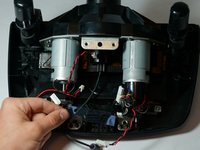
    • Remove the four 7.3mm silver screws attaching the green PCB board to the motor housing with a Phillips #2 screwdriver.

    Спросите у FixBot

    Добавить комментарий

  10. Logitech G27 C-Clamp  Replacement: шаг 10, изображение 1 из 1
    • Unplug the three plastic connectors on the left side of the PCB board.

    • Unplug the two plastic connectors on the top of the PCB board.

    • Unplug the three plastic connectors on the right side of the PCB board.

    • Pulling the plastic connectors requires a lot of force, but be careful and don't pull directly on the wires. Try to wedge or push the male side of the connector out.

    • If you need some extra leverage when removing these connectors, try using a plastic opening tool to pry off the connectors.

    • Removing these connectors allows easier access to the four screws attaching the PCB board mount to the motor housing.

    Спросите у FixBot

    Добавить комментарий

  11. Logitech G27 C-Clamp  Replacement: шаг 11, изображение 1 из 1
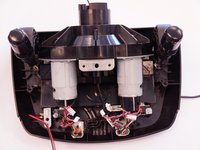
    • Remove the PCB board after all of the plastic connectors are disconnected.

    • You can now set it aside.

    Спросите у FixBot

    Добавить комментарий

  12. Logitech G27 C-Clamp  Replacement: шаг 12, изображение 1 из 1
    • Remove the two 12.3mm upper black screws with a Phillips #2 screwdriver.

    • Remove the two 15.5mm bottom silver screws with a Phillips #1 screwdriver.

    Спросите у FixBot

    Добавить комментарий

  13. Logitech G27 C-Clamp  Replacement: шаг 13, изображение 1 из 2 Logitech G27 C-Clamp  Replacement: шаг 13, изображение 2 из 2
    • Remove the PCB board mount and remove the clear plastic piece underneath.

    • Set them aside until you reassemble the wheel.

    Спросите у FixBot

    Добавить комментарий

  14. Logitech G27 C-Clamp  Replacement, C-Clamp: шаг 14, изображение 1 из 1
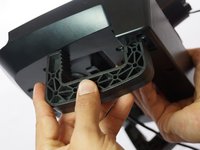
    • Unscrew the piece holding the C-Clamp in place with your hand.

    Спросите у FixBot

    Добавить комментарий

  15. Logitech G27 C-Clamp  Replacement: шаг 15, изображение 1 из 2 Logitech G27 C-Clamp  Replacement: шаг 15, изображение 2 из 2
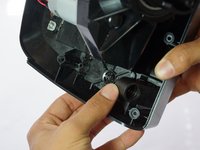
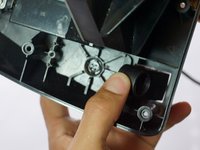
    • Push the remaining nob forward and then inward through the slot.

    Спросите у FixBot

    Добавить комментарий

  16. Logitech G27 C-Clamp  Replacement: шаг 16, изображение 1 из 2 Logitech G27 C-Clamp  Replacement: шаг 16, изображение 2 из 2
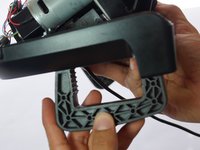
    • The C-Clamp can now be easily pulled out of the bottom of the device.

    Спросите у FixBot

    Добавить комментарий

Заключение

To reassemble your device, follow these instructions in reverse order.

Отменить: Я не выполнил это руководство.

24 человек успешно провели ремонт по этому руководству.

Daniel Louis

Участник с: 04/28/15

758 Репутация

1 руководство автора

Команда

Cal Poly, Team 15-4, Amido Spring 2015 Участник Cal Poly, Team 15-4, Amido Spring 2015

CPSU-AMIDO-S15S15G4

4 членов

Автор 25 руководств

15 Комментарии к руководству

Where would I buy the replacement C-Clamps from because one of mine are broken and I need to install a new one.

Mumin Mazhar - Ответить Поделиться

Look for it at eBay.

Eduardo - Ответить Поделиться

I also need to find a place to buy replacement C-clamps from

hockeyjockone - Ответить Поделиться

Can you tell me where I can buy these clamps?

kholiwen - Ответить Поделиться

step 9 to 13 not needed ... please confirm

Matt Na - Ответить Поделиться

Добавить комментарий

Статистика просмотров:

За последние 24 часов: 7

За последние 7 дней: 37

За последние 30 дней: 181

За всё время: 50,186