Этот перевод был сделан машиной и пока не проверен человеком. Говорите на этом языке? Просмотрите его.
Введение
С помощью этого подробного руководства вы узнаете, как заменить колесо прокрутки в Logitech G305 за 7 простых шагов. Замена колеса прокрутки в мыши не так проста, как кажется, и требует наличия нескольких инструментов.
Эти инструменты играют важную роль в процессе и помогают успешно выполнить работу. Данный ремонт — неотъемлемая часть комплексного обслуживания мыши, он помогает убедиться, что колесо прокрутки работает так, как должно. Используя это руководство, вы поймете, как успешно заменить колесо прокрутки в вашей мыши Logitech G305 с помощью инструментов, перечисленных ниже.
Выберете то, что вам нужно
-
-
Инструмент, используемый на этом этапе:Flathead 1.5 mm Screwdriver$1.99
-
Используйте отвертку с плоским шлицем 1,5 мм, чтобы снять четыре ножки с нижней части мыши.
 Спросите у FixBot
-
-
-
Используйте отвертку Phillips #00, чтобы открутить четыре винта нижней крышки.
-
-
-
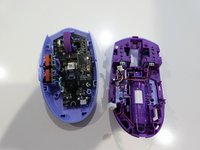
Снимите крышку панели для ладоней, просто сдвинув её вниз. Извлеките аккумулятор и USB-адаптер Bluetooth.
-
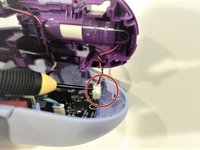
Используйте плоскую отвертку 1,5 мм не для того, чтобы поддеть, а чтобы отрегулировать разъем. Это позволит вам открыть внутреннюю часть устройства.
-
-
-
-
Используя плоскую отвертку 1,5 мм, вы можете отстегнуть зажим, удерживающий проводку на месте.
-
-
-
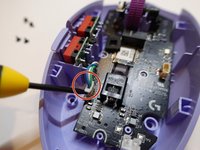
Одну сторону колеса прокрутки удерживает металлическая пружина; снимите её с помощью плоской отвертки 1,5 мм, приподняв при этом колесо прокрутки.
-
-
-
С помощью плоской отвертки 1,5 мм отсоедините фиксатор зеленого и синего проводов.
-
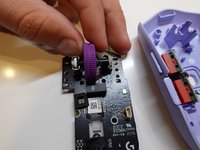
Извлеките материнскую плату из корпуса.
-
Колесо мыши можно извлечь только одним способом. Сдвиньте его вправо, чтобы освободить колесо мыши.
-
-




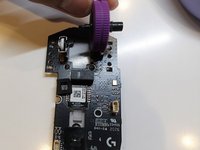
Для сборки устройства выполните эти инструкции в обратном порядке.
Отменить: Я не выполнил это руководство.
10 человек успешно провели ремонт по этому руководству.

Команда

University of North Texas, Team 1-12, Smith Spring 2022 Участник University of North Texas, Team 1-12, Smith Spring 2022
UNT-SMITH-S22S1G12
2 членов
Автор 10 руководств
1 Комментарий к руководству
Should you encounter issues with a malfunctioning scroll wheel, consider cleaning it using a can of compressed air and then applying a small amount of PTFE-based multi-use synthetic oil to the scroll wheel housing.
