Перейти к основному содержанию
Присоединяйся к сообществу ремонтников - Создай аккаунт

Logitech Mouse MX1000 Disassembly

Выберете то, что вам нужно

    1. Logitech Mouse MX1000 Disassembly, Open the housing: шаг 1, изображение 1 из 2 Logitech Mouse MX1000 Disassembly, Open the housing: шаг 1, изображение 2 из 2
      • There are four screws hidden on the bottom part of the mouse. Two are below the sticker, the last two are below the bottom pads.

      Спросите у FixBot

      Добавить комментарий

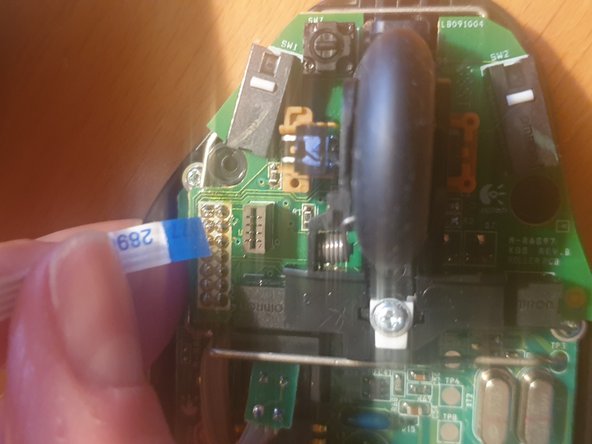
    2. Logitech Mouse MX1000 Disassembly, Disconnect the cables: шаг 2, изображение 1 из 3 Logitech Mouse MX1000 Disassembly, Disconnect the cables: шаг 2, изображение 2 из 3 Logitech Mouse MX1000 Disassembly, Disconnect the cables: шаг 2, изображение 3 из 3
      • Once the scews removed, carefully open the housing. Some cables hold both pieces together

      • First remove the tricolor battery cable

      • Then carefully remove the ribbon cable

      Спросите у FixBot

      Добавить комментарий

    3. Logitech Mouse MX1000 Disassembly, Remove the battery: шаг 3, изображение 1 из 1
      • To remove the battery cover, two more screws need to be removed.

      • The battery is then held in place with a sticker within the housing.

      Спросите у FixBot

      Добавить комментарий

    4. Logitech Mouse MX1000 Disassembly, Remove the board from the housing: шаг 4, изображение 1 из 3 Logitech Mouse MX1000 Disassembly, Remove the board from the housing: шаг 4, изображение 2 из 3 Logitech Mouse MX1000 Disassembly, Remove the board from the housing: шаг 4, изображение 3 из 3
      • Remove the three screws (red circles) holding the board in place

      • Remove the wheel and the white piece of plastic holding it down

      • A clip (yellow circle) further holds it down

      • Finally you need to unsolder the charging pads (orange circles)

      Спросите у FixBot

      Добавить комментарий

    5. Logitech Mouse MX1000 Disassembly, You are done: шаг 5, изображение 1 из 1
      • Congrats, you now fully dissassembled your logitech mouse!

      Спросите у FixBot

      Добавить комментарий

Заключение

To reassemble your device, follow these instructions in reverse order.

Отменить: Я не выполнил это руководство.

lija31415

Участник с: 12/17/20

313 Репутация

1 руководство автора

0 Комментарии к руководству

Добавить комментарий

Статистика просмотров:

За последние 24 часов: 2

За последние 7 дней: 18

За последние 30 дней: 56

За всё время: 1,793