Введение
This guide is for the Logitech UE Boom 3 - model number: S-00171. Alternative model numbers could be S-00171-A, S-00171-B, S-00171-C.
The primary objective of this guide is to provide step-by-step instructions for replacing the battery of the Logitech UE BOOM 3. By following these instructions carefully, users can address issues such as low battery life, device not turning on, or poor speaker function.
The battery is essential as it provides the power needed for its portable operation.
Выберете то, что вам нужно
-
-
-
Flip the speaker so the base is facing upwards.
-
Place the iFixit opening picks in the gaps of the speaker.
-
Use the picks to pry open the speaker.
 Спросите у FixBot
-
-
-
Use a Jimmy to completely pry the base away from the rest of the speaker.
-
-
-
-
-
-
Remove the adhesive strap holding the battery in place.
-
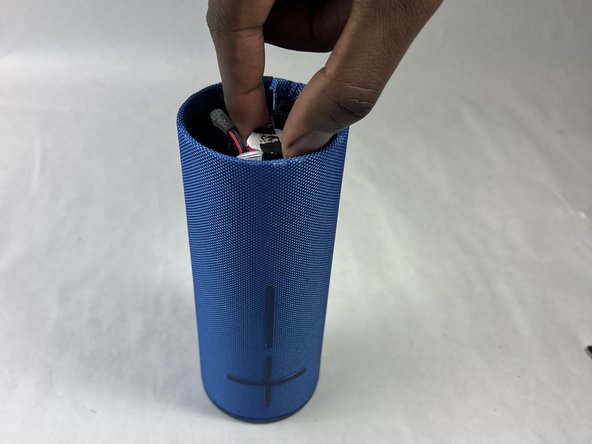
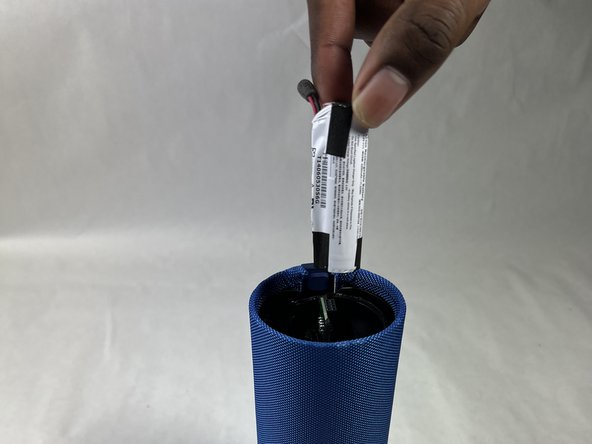
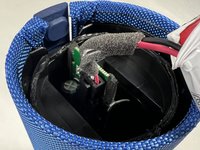
Pull out the battery by hand until it is out of the casing and being held by the cable only.
-
-
-
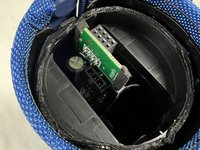
Carefully press down on the lever on the end of the cable and disconnect it from the motherboard.
-
Remove the battery from the motherboard.
-
-





To reassemble your device, follow these instructions in reverse order.
Отменить: Я не выполнил это руководство.
Еще один человек закончил это руководство.

Команда

UMass Dartmouth, Team 1-4, Konn Spring 2024 Участник UMass Dartmouth, Team 1-4, Konn Spring 2024
UMASSD-KONN-S24S1G4
4 членов
Автор 32 руководств
