Введение
Use this prerequisite guide as an initial step before accessing the internal components of the speaker.
Выберете то, что вам нужно
-
-
-
Unscrew the two black flat-top screws that attach the handle to the speaker with your hands.
 Спросите у FixBot
-
-
-
-
-
-
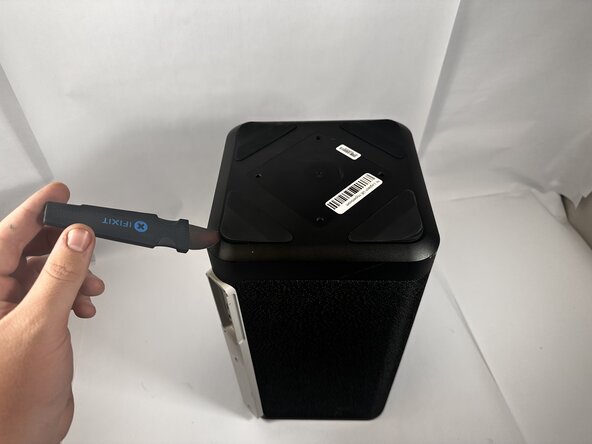
Use the Jimmy to pry off the four rubber feet on the bottom of the speaker.
-
-
-
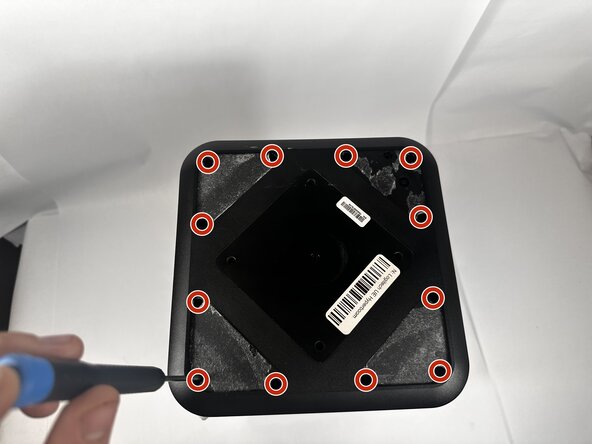
Use a Phillips #0 screwdriver to remove all twelve 11.7mm screws from the bottom panel of the speaker.
-
Pull the panel off to access the internal components.
-
-






To reassemble your device, follow these instructions in reverse order.
Отменить: Я не выполнил это руководство.
Еще один человек закончил это руководство.

Команда

Idaho State University, Team 1-2, Watkins Spring 2026 Участник Idaho State University, Team 1-2, Watkins Spring 2026
ISU-WATKINS-S26S1G2
3 членов
Автор 64 руководств
