Введение
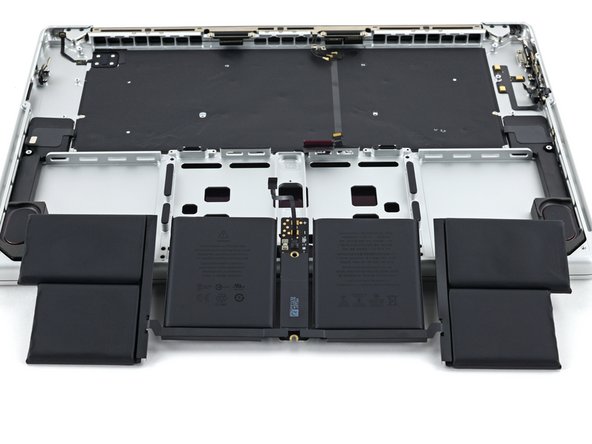
Use this guide to replace the battery, after removing the logic board and fans, in your MacBook Pro 16" 2021.
For your safety, discharge the battery below 25% before disassembling your MacBook. This reduces the risk of fire if the battery is accidentally damaged during the repair. If your battery is swollen, take appropriate precautions.
You'll need replacement adhesive in order to complete this repair.
This is a prerequisite-only guide! This guide is part of another procedure and is not meant to be used alone.
Выберете то, что вам нужно
-
-
Use a T5 Torx driver to remove the two screws securing the battery board:
-
One 4.4 mm screw
-
One 3.8 mm screw
-
-
-
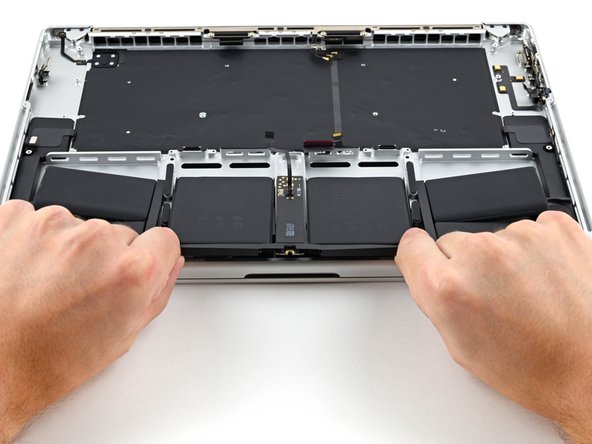
There are eight adhesive strips that are accessed from the bottom of the device.
-
There are six more adhesive strips accessed from the trackpad's location on the frame.
-
-
-
Инструмент, используемый на этом этапе:Tweezers$4.99
-
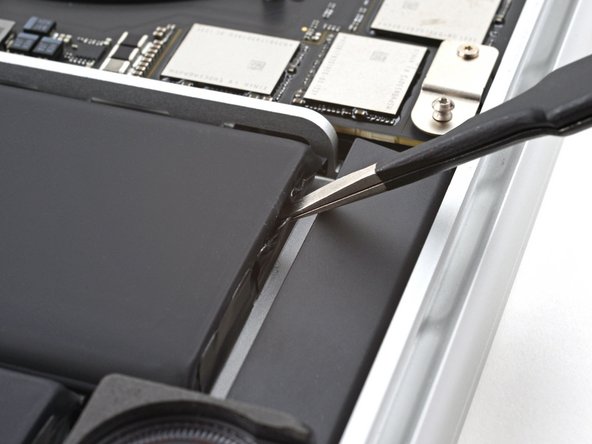
Use tweezers, or your fingers, to grasp the black pull-tab on one of the adhesive strips.
-
-
-
Pull the strip out slowly and steadily at a low angle. Give it plenty of time to stretch and un-stick from under the battery.
-
If the adhesive strip breaks off, try to retrieve it using your fingers or blunt tweezers, and continue pulling—but do not pry under the battery.
-
Repeat the process for all 14 stretch release adhesive strips.
-





To reassemble your device, follow these instructions in reverse order.
For optimal performance, calibrate your newly installed battery after completing this guide.
Compare your new replacement part to the original part—you may need to transfer remaining components or remove adhesive backings from the new part before you install it.
Take your e-waste to an R2 or e-Stewards certified recycler.
Repair didn’t go as planned? Try some basic troubleshooting, or ask our MacBook Pro 16" 2021 Answers community for help.


