Перейти к основному содержанию
Присоединяйся к сообществу ремонтников - Создай аккаунт

Minolta Maxxum STsi Viewfinder Replacement

Выберете то, что вам нужно

  1. Minolta Maxxum STsi Viewfinder Replacement, Main Battery: шаг 1, изображение 1 из 1
    • Use the edge of a coin to twist open the battery compartment on the bottom of the camera. (Twist counterclockwise)

    Спросите у FixBot
  2. Minolta Maxxum STsi Viewfinder Replacement: шаг 2, изображение 1 из 1
    • When the compartment opens, pull the AA battery out of its slot.

    Спросите у FixBot
  3. Minolta Maxxum STsi Viewfinder Replacement, Top Cover: шаг 3, изображение 1 из 1
    • Remove the black Phillips #00 5mm screw at the bottom of the battery chamber.

    • If it is too dark to see the screw, it may help to use a flashlight.

    Спросите у FixBot
  4. Minolta Maxxum STsi Viewfinder Replacement: шаг 4, изображение 1 из 1
    • Take out two silver Phillips #00 5.0 mm screws on each side of the viewfinder.

    Спросите у FixBot
  5. Minolta Maxxum STsi Viewfinder Replacement: шаг 5, изображение 1 из 1
    • Open the flash and take out the silver Phillips #00 4.0 mm screw underneath it.

    Спросите у FixBot
  6. Minolta Maxxum STsi Viewfinder Replacement: шаг 6, изображение 1 из 1
    • Open the back-cover of the camera using the back-cover release found on the lower right side of the camera.

    Спросите у FixBot
  7. Minolta Maxxum STsi Viewfinder Replacement: шаг 7, изображение 1 из 1
    • Remove the black Phillips #00 4.0 mm screw from the inside top right section of the camera.

    Спросите у FixBot
  8. Minolta Maxxum STsi Viewfinder Replacement: шаг 8, изображение 1 из 1
    • Remove the black Phillips #00 5.0 mm screw from the back of the film compartment.

    Спросите у FixBot
  9. Minolta Maxxum STsi Viewfinder Replacement: шаг 9, изображение 1 из 2 Minolta Maxxum STsi Viewfinder Replacement: шаг 9, изображение 2 из 2
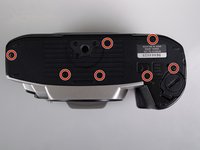
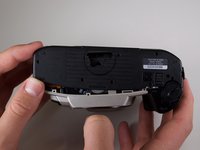
    • Remove the seven black Phillips #00 5.0 mm screws from the bottom panel. The bottom panel is now free to come off.

    Спросите у FixBot
  10. Minolta Maxxum STsi Viewfinder Replacement: шаг 10, изображение 1 из 1
    • Take out two black Phillips #00 2.5 mm screws on the right side panel of the camera.

    Спросите у FixBot
  11. Minolta Maxxum STsi Viewfinder Replacement: шаг 11, изображение 1 из 3 Minolta Maxxum STsi Viewfinder Replacement: шаг 11, изображение 2 из 3 Minolta Maxxum STsi Viewfinder Replacement: шаг 11, изображение 3 из 3
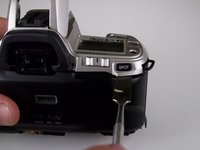
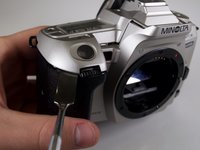
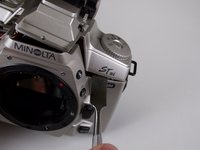
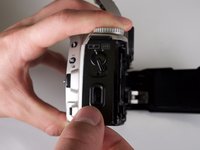
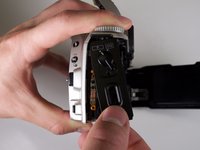
    • Starting beneath the "SPOT" button, use the round side of the metal spudger and firmly pry underneath the grey top panel of the camera. Work your way counterclockwise around the camera prying at different spots until the top panel starts to come loose. Pry all the way around until you reach the "STsi" logo.

    • This prying will not completely release the top cover. It is also necessary to take off the side panel, as explained in the next step.

    Спросите у FixBot
  12. Minolta Maxxum STsi Viewfinder Replacement: шаг 12, изображение 1 из 2 Minolta Maxxum STsi Viewfinder Replacement: шаг 12, изображение 2 из 2
    • Be careful when removing the right side panel. There is a plastic component underneath the side panel that will come free. Note the orientation of this plastic component for reassembly because it is connected to the back-cover release switch.

    • Also be gentle when removing the top panel because it is delicate and is connected by wires.

    • Carefully remove the right side panel by grasping it at the bottom and rotating is counter-clockwise. The top panel is now free to snap off.

    Спросите у FixBot
  13. Minolta Maxxum STsi Viewfinder Replacement, Viewfinder: шаг 13, изображение 1 из 1
    • Remove the two black Phillips #00 5.0 mm screws on the viewfinder panel to take off the viewfinder.

    Спросите у FixBot
Заключение

To reassemble your device, follow these instructions in reverse order.

Еще один человек закончил это руководство.

Brady Hill

Участник с: 04/23/15

234 Репутация

Автор 2 руководств

Команда

Cal Poly, Team 14-12, Amido Spring 2015 Участник Cal Poly, Team 14-12, Amido Spring 2015

CPSU-AMIDO-S15S14G12

3 членов

Автор 7 руководств

0 Комментарии к руководству

Добавить комментарий

Статистика просмотров:

За последние 24 часов: 2

За последние 7 дней: 14

За последние 30 дней: 71

За всё время: 1,568