Перейти к основному содержанию
Присоединяйся к сообществу ремонтников - Создай аккаунт

Motorola Moto E Display Assembly Replacement

Выберете то, что вам нужно

  1. Motorola Moto E Display Assembly Replacement, Motherboard: шаг 1, изображение 1 из 1
    • Turn off the device before beginning.

    • To remove the back cover, start at one corner and stick the plastic opening tool under the cover and pry it away from the phone.

    • With the plastic opening tool, pry all the way around the phone while lifting up on the cover.

    • You should hear a snapping sound at each corner.

    Спросите у FixBot
  2. Motorola Moto E Display Assembly Replacement: шаг 2, изображение 1 из 1
    • Unscrew the 14 4mm screws using a T4 Torx screwdriver.

    Спросите у FixBot
  3. Motorola Moto E Display Assembly Replacement: шаг 3, изображение 1 из 1
    • Using a plastic opening tool, pry up on the edges of the plastic back cover.

    • Be sure that all of the screws are out before lifting the cover. The plastic backing is fragile, and it may break.

    Спросите у FixBot
  4. Motorola Moto E Display Assembly Replacement: шаг 4, изображение 1 из 1
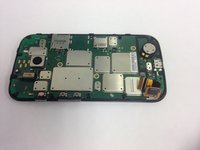
    • Gently lift the back plate away, exposing the motherboard. The battery will be stuck to the back of the cover, so be careful when lifting it off.

    • Do not touch the connections to the battery in the red square on the picture.

    Спросите у FixBot
  5. Motorola Moto E Display Assembly Replacement: шаг 5, изображение 1 из 1
    • Gently pull up on the red and black power cable to lift the connector out of the motherboard.

    • Move the battery and cover away from the motherboard.

    Спросите у FixBot
  6. Motorola Moto E Display Assembly Replacement: шаг 6, изображение 1 из 1
    • Remove the three 1 mm screws using a T4 Torx screwdriver.

    Спросите у FixBot
  7. Motorola Moto E Display Assembly Replacement: шаг 7, изображение 1 из 1
    • Lift up on the white plastic mount.

    • Pull the orange ribbon cable out gently.

    Спросите у FixBot
  8. Motorola Moto E Display Assembly Replacement: шаг 8, изображение 1 из 2 Motorola Moto E Display Assembly Replacement: шаг 8, изображение 2 из 2
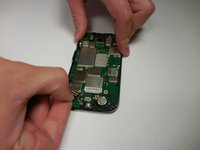
    • Gently pull the black ribbon cable out.

    Спросите у FixBot
  9. Motorola Moto E Display Assembly Replacement: шаг 9, изображение 1 из 1
    • Using the metal spudger, pry the motherboard away from the screen assembly.

    Спросите у FixBot
  10. Motorola Moto E Display Assembly Replacement, Display Assembly: шаг 10, изображение 1 из 1
    • Use a heat gun or hairdryer to heat up the edges. This will loosen the glue so the screen can be removed.

    • The phone will be extremely hot. Avoid direct contact with metal pieces.

    Спросите у FixBot
  11. Motorola Moto E Display Assembly Replacement: шаг 11, изображение 1 из 1
    • Gently slide the metal spudger underneath the screen and pry it away from the backing.

    • Move the metal spudger under the digitizer and along the entire length of the phone to separate the screen from the adhesive.

    • If the screen was broken, glass shards may come off of the screen and puncture skin.

    Спросите у FixBot
  12. Motorola Moto E Display Assembly Replacement: шаг 12, изображение 1 из 1
    • Continue to heat and separate until the screen comes completely apart from the rest of the phone.

    Спросите у FixBot
  13. Motorola Moto E Display Assembly Replacement: шаг 13, изображение 1 из 1
    • To put the new screen on, press the new screen and digitizer into place, and then reapply heat to adhere the new screen.

    Спросите у FixBot
Заключение

To reassemble your device, follow these instructions in reverse order.

24 человек успешно провели ремонт по этому руководству.

Alex Craig

Участник с: 03/11/15

2 611 Репутация

Автор 5 руководств

Команда

Colorado Springs, Team 5-7, Panko Spring 2015 Участник Colorado Springs, Team 5-7, Panko Spring 2015

UCCS-PANKO-S15S5G7

2 членов

Автор 10 руководств

0 Комментарии к руководству

Добавить комментарий

Статистика просмотров:

За последние 24 часов: 2

За последние 7 дней: 11

За последние 30 дней: 88

За всё время: 31,992