Перейти к основному содержанию
Присоединяйся к сообществу ремонтников - Создай аккаунт

Nintendo Wii Remote Main Buttons Replacement

Выберете то, что вам нужно

  1. Nintendo Wii Remote Main Buttons Replacement, Front Cover Plate and Batteries: шаг 1, изображение 1 из 2 Nintendo Wii Remote Main Buttons Replacement, Front Cover Plate and Batteries: шаг 1, изображение 2 из 2
    • Flip the Wii Remote over so the battery cover faces you.

    • Push up on the bottom tab.

    • Remove the battery cover.

    Спросите у FixBot

    Добавить комментарий

  2. Nintendo Wii Remote Main Buttons Replacement: шаг 2, изображение 1 из 1
    • Remove the first battery by pressing down on the positive end and pulling the battery out.

    • Remove the second battery by pushing up on the positive end and pulling the battery out.

    Спросите у FixBot

    Добавить комментарий

  3. Nintendo Wii Remote Main Buttons Replacement: шаг 3, изображение 1 из 1
    • Using a tri-point Y1 Screwdriver, remove the two center 7mm screws by turning them counterclockwise.

    • Repeat with the two bottom screws.

    Спросите у FixBot

    Добавить комментарий

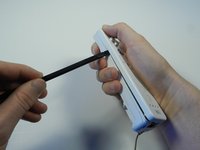
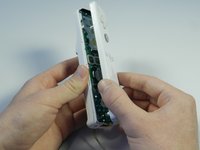
  4. Nintendo Wii Remote Main Buttons Replacement: шаг 4, изображение 1 из 2 Nintendo Wii Remote Main Buttons Replacement: шаг 4, изображение 2 из 2
    • With the flat end of a spudger, gently apply pressure to the tabs located on left side of the controller.

    • These tabs are breakable. However, if the tabs are broken the controller will still function.

    • Open the front plate like a book.

    • Small parts may fall out as you open the front plate.

    Спросите у FixBot

    Добавить комментарий

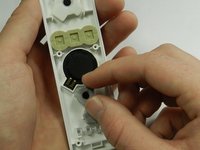
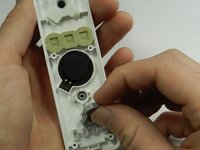
  5. Nintendo Wii Remote Main Buttons Replacement, Main Buttons: шаг 5, изображение 1 из 2 Nintendo Wii Remote Main Buttons Replacement, Main Buttons: шаг 5, изображение 2 из 2
    • Working on the inside of the front cover, peel off the three rubber pads covering the buttons.

    Спросите у FixBot

    Добавить комментарий

  6. Nintendo Wii Remote Main Buttons Replacement: шаг 6, изображение 1 из 1
    • Flip over the cover, allowing the buttons to fall into your hand.

    • Be ready to catch all the buttons, some are very small. If a button does not fall out apply gentle pressure from behind.

    • When reassembling, put each plastic button in its allocated slot. Each button only fits snugly in one slot.

    • The best option for you is rotate the Wii Controller by 180°. If you obey this note, the small parts wont fall off and then you can remove the buttons.

    Спросите у FixBot

    Добавить комментарий

Заключение

To reassemble your device, follow these instructions in reverse order.

Отменить: Я не выполнил это руководство.

27 человек успешно провели ремонт по этому руководству.

Emily

Участник с: 04/14/13

2 010 Репутация

Автор 6 руководств

Команда

Cal Poly, Team 3-44, Amido Spring 2013 Участник Cal Poly, Team 3-44, Amido Spring 2013

CPSU-AMIDO-S13S3G44

4 членов

Автор 29 руководств

5 Комментарии к руководству

Where did you get your replacement buttons? I can't find them online anywhere...

devannedloss - Ответить Поделиться

Me too, can’t find them.

Michael Velten - Ответить Поделиться

2024 and can't find them online ANYWHERE! I'm hoping a WiiUDpad fits on the wiimote. You'd think there'd be a bunch of wiimote shells of different colours available everywhere online, but they're nowhere to be found

how frustrating!

MartianIsotopes - Ответить Поделиться

Vinted is full of them. Although some people ask wayyy too much for them!

Sophie Nicholson - Ответить Поделиться

Yo tampoco los encuentro por ninguna parte

kinoto taller - Ответить Поделиться

Добавить комментарий

Статистика просмотров:

За последние 24 часов: 24

За последние 7 дней: 97

За последние 30 дней: 389

За всё время: 49,076