Перейти к основному содержанию
Присоединяйся к сообществу ремонтников - Создай аккаунт

Nokia 6030 Keypad Replacement

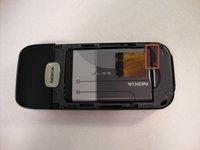
  1. Nokia 6030 Keypad Replacement, Battery: шаг 1, изображение 1 из 3 Nokia 6030 Keypad Replacement, Battery: шаг 1, изображение 2 из 3 Nokia 6030 Keypad Replacement, Battery: шаг 1, изображение 3 из 3
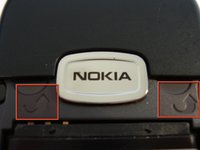
    • Press down on the grip on the back of the phone and slide the rear housing down towards the bottom of the phone.

    Спросите у FixBot

    Добавить комментарий

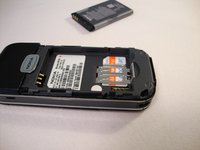
  2. Nokia 6030 Keypad Replacement: шаг 2, изображение 1 из 3 Nokia 6030 Keypad Replacement: шаг 2, изображение 2 из 3 Nokia 6030 Keypad Replacement: шаг 2, изображение 3 из 3
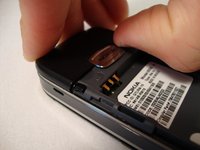
    • Use your finger to gently pull the bottom of the battery up by using the slip found at the bottom of the phone.

    • Lift out battery and remove.

    Спросите у FixBot

    Добавить комментарий

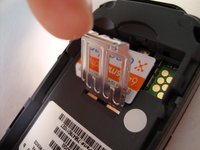
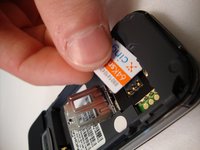
  3. Nokia 6030 Keypad Replacement, SIM Card: шаг 3, изображение 1 из 3 Nokia 6030 Keypad Replacement, SIM Card: шаг 3, изображение 2 из 3 Nokia 6030 Keypad Replacement, SIM Card: шаг 3, изображение 3 из 3
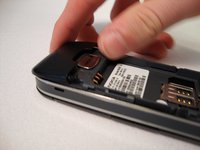
    • Use your finger to lift the metal cage up.

    • Remove SIM card.

    Спросите у FixBot

    Добавить комментарий

  4. Nokia 6030 Keypad Replacement: шаг 4, изображение 1 из 1
    • Use your finger to close the metal cage.

    Спросите у FixBot

    Добавить комментарий

  5. Nokia 6030 Keypad Replacement, Front Cover: шаг 5, изображение 1 из 3 Nokia 6030 Keypad Replacement, Front Cover: шаг 5, изображение 2 из 3 Nokia 6030 Keypad Replacement, Front Cover: шаг 5, изображение 3 из 3
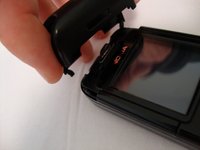
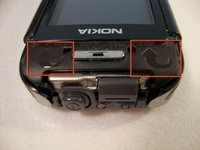
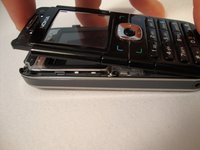
    • Insert your two fingers under the two tabs found at the top of the phone underneath the black casing, then pull the casing up and slide it out slowly.

    Спросите у FixBot

    Добавить комментарий

  6. Nokia 6030 Keypad Replacement: шаг 6, изображение 1 из 2 Nokia 6030 Keypad Replacement: шаг 6, изображение 2 из 2
    • After removing the top cover, turn the phone over so the screen is facing upwards.

    Спросите у FixBot

    Добавить комментарий

  7. Nokia 6030 Keypad Replacement: шаг 7, изображение 1 из 3 Nokia 6030 Keypad Replacement: шаг 7, изображение 2 из 3 Nokia 6030 Keypad Replacement: шаг 7, изображение 3 из 3
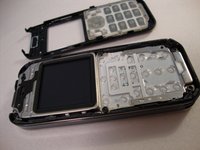
    • Use your fingers to slowly lift the screen back towards the bottom of the phone using the arrows found at the top of the phone.

    Спросите у FixBot

    Добавить комментарий

  8. Nokia 6030 Keypad Replacement, Keypad: шаг 8, изображение 1 из 2 Nokia 6030 Keypad Replacement, Keypad: шаг 8, изображение 2 из 2
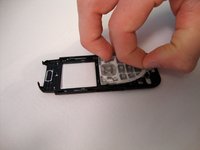
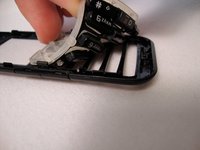
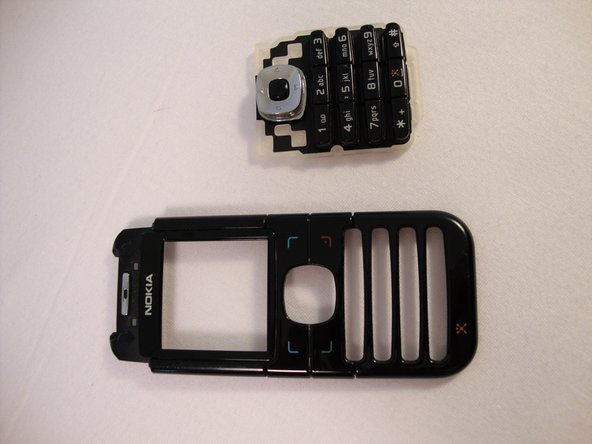
    • Gently pull the rubber away from the front screen and the buttons will detach from the plastic case.

    Спросите у FixBot

    Добавить комментарий

  9. Nokia 6030 Keypad Replacement: шаг 9, изображение 1 из 2 Nokia 6030 Keypad Replacement: шаг 9, изображение 2 из 2
    • Remove old keypad and replace it with new keypad.

    Спросите у FixBot

    Добавить комментарий

Заключение

To reassemble your device, follow these instructions in reverse order.

Отменить: Я не выполнил это руководство.

Еще один человек закончил это руководство.

Spencer Woodworth

Участник с: 04/14/10

346 Репутация

Автор 9 руководств

Команда

Cal Poly, Team 23-63, Johann Spring 2010 Участник Cal Poly, Team 23-63, Johann Spring 2010

CPSU-JOHANN-S10S23G63

3 членов

Автор 17 руководств

0 Комментарии к руководству

Добавить комментарий

Статистика просмотров:

За последние 24 часов: 0

За последние 7 дней: 10

За последние 30 дней: 58

За всё время: 3,177