Перейти к основному содержанию
Присоединяйся к сообществу ремонтников - Создай аккаунт

Nokia E90 Inside Screen Replacement

Выберете то, что вам нужно

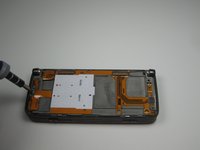
  1. Nokia E90 Inside Screen Replacement, Front Cover: шаг 1, изображение 1 из 1
    • Start with the phone in the flipped open position.

    • You must remove the sticker in the center, below the screen to reveal the center screw.

    • Use a T5 screwdriver to remove all three screws, loosening the front screen.

    Спросите у FixBot

    Добавить комментарий

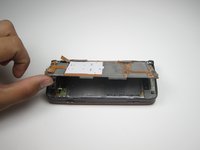
  2. Nokia E90 Inside Screen Replacement: шаг 2, изображение 1 из 2 Nokia E90 Inside Screen Replacement: шаг 2, изображение 2 из 2
    • Flip the phone to the closed position and turn to the front screen.

    • The front cover will now be loose enough for you to remove by grabbing the edges and lightly pulling the cover off.

    Спросите у FixBot

    Добавить комментарий

  3. Nokia E90 Inside Screen Replacement, Front Screen and Front Keypad: шаг 3, изображение 1 из 1
    • With the front cover off, the screen and keypad should be loose.

    Спросите у FixBot

    Добавить комментарий

  4. Nokia E90 Inside Screen Replacement: шаг 4, изображение 1 из 2 Nokia E90 Inside Screen Replacement: шаг 4, изображение 2 из 2
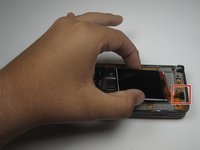
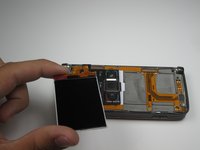
    • Using a plastic opening tool pry up the cable connecting the LCD screen to the rest of the phone.

    • With the cable disconnected, the screen should be free for removal or replacement.

    Спросите у FixBot

    Добавить комментарий

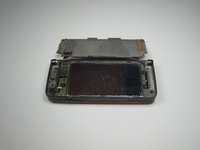
  5. Nokia E90 Inside Screen Replacement, Inside Screen: шаг 5, изображение 1 из 1
    • After removing the front screen and front keypad, your device should look like this.

    Спросите у FixBot

    Добавить комментарий

  6. Nokia E90 Inside Screen Replacement: шаг 6, изображение 1 из 3 Nokia E90 Inside Screen Replacement: шаг 6, изображение 2 из 3 Nokia E90 Inside Screen Replacement: шаг 6, изображение 3 из 3
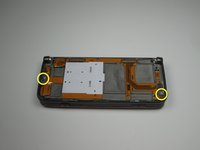
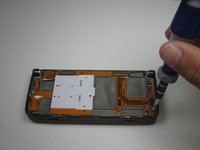
    • Using the T5 Screwdriver, remove the two screws shown.

    Спросите у FixBot

    Добавить комментарий

  7. Nokia E90 Inside Screen Replacement: шаг 7, изображение 1 из 1
    • Make sure to remove the connection shown by gently easing the plastic opening tool underneath the connection and lightly prying the connection apart.

    Спросите у FixBot

    Добавить комментарий

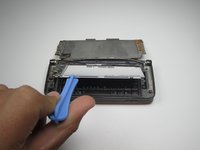
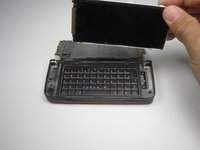
  8. Nokia E90 Inside Screen Replacement: шаг 8, изображение 1 из 2 Nokia E90 Inside Screen Replacement: шаг 8, изображение 2 из 2
    • Gently, lift the board up to reveal the front screen.

    Спросите у FixBot

    Добавить комментарий

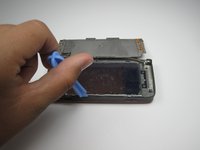
  9. Nokia E90 Inside Screen Replacement: шаг 9, изображение 1 из 3 Nokia E90 Inside Screen Replacement: шаг 9, изображение 2 из 3 Nokia E90 Inside Screen Replacement: шаг 9, изображение 3 из 3
    • Using the plastic opening tool, lift and remove the inside screen.

    Спросите у FixBot

    Добавить комментарий

Заключение

In order to install a new screen, simply follow the steps in reverse order with the new screen.

Отменить: Я не выполнил это руководство.

5 человек успешно провели ремонт по этому руководству.

Cameron Weinberg

Участник с: 04/12/11

591 Репутация

Автор 6 руководств

Команда

Cal Poly, Team 18-21, Garner Spring 2011 Участник Cal Poly, Team 18-21, Garner Spring 2011

CPSU-GARNER-S11S18G21

3 членов

Автор 9 руководств

0 Комментарии к руководству

Добавить комментарий

Статистика просмотров:

За последние 24 часов: 2

За последние 7 дней: 5

За последние 30 дней: 57

За всё время: 5,848