Перейти к основному содержанию
Присоединяйся к сообществу ремонтников - Создай аккаунт

Nokia N900 USB Replacement

Выберете то, что вам нужно

    1. Nokia N900 USB Replacement, USB: шаг 1, изображение 1 из 1
      • Turn the phone over so the screen is face down.

      Спросите у FixBot

      Добавить комментарий

    2. Nokia N900 USB Replacement: шаг 2, изображение 1 из 2 Nokia N900 USB Replacement: шаг 2, изображение 2 из 2
      • Remove the back cover by locating the slit on the bottom of the phone and lifting up.

      Спросите у FixBot

      Добавить комментарий

    3. Nokia N900 USB Replacement: шаг 3, изображение 1 из 1
      • Remove the battery by lifting it out of the device.

      Спросите у FixBot

      Добавить комментарий

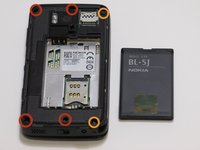
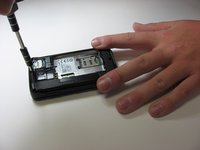
    4. Nokia N900 USB Replacement: шаг 4, изображение 1 из 2 Nokia N900 USB Replacement: шаг 4, изображение 2 из 2
      • Remove the two "L-shaped" antennas by unscrewing the following screws:

      • Four screw M1 .4x5.0

      • Two screw RF1 .4x4

      • In addition to unscrewing the screws, remove the B-Cover (which will fall right out without the screws).

      Спросите у FixBot

      Добавить комментарий

    5. Nokia N900 USB Replacement: шаг 5, изображение 1 из 1
      • You will now have two halves of the phone.

      • Grab the half of the phone that has the keyboard on it

      Спросите у FixBot

      Добавить комментарий

    6. Nokia N900 USB Replacement: шаг 6, изображение 1 из 1
      • Remove the keyboard by unsnapping the frame and then lifting the pad out from the device.

      • Place the key pad and cover to the side for the remaining steps.

      Спросите у FixBot

      Добавить комментарий

    7. Nokia N900 USB Replacement: шаг 7, изображение 1 из 1
      • Use a blue plastic opening tool lift the motherboard out of the back cover

      Спросите у FixBot

      Добавить комментарий

    8. Nokia N900 USB Replacement: шаг 8, изображение 1 из 1
      • Look at the bottom of the motherboard to find the:

      • USB Port

      • Once you've located the USB Port you can search online or call the manufacturer to replace it.

      Спросите у FixBot

      Добавить комментарий

Заключение

To reassemble your device, follow these instructions in reverse order.

Отменить: Я не выполнил это руководство.

3 человек успешно провели ремонт по этому руководству.

Troy Posey

Участник с: 03/13/14

349 Репутация

Автор 2 руководств

Команда

New Mexico State, Team 1-4, Easley Spring 2014 Участник New Mexico State, Team 1-4, Easley Spring 2014

NMSU-EASLEY-S14S1G4

4 членов

Автор 36 руководств

0 Комментарии к руководству

Добавить комментарий

Статистика просмотров:

За последние 24 часов: 1

За последние 7 дней: 11

За последние 30 дней: 38

За всё время: 3,326