Перейти к основному содержанию
Присоединяйся к сообществу ремонтников - Создай аккаунт

Nokia XL Dual SIM Disassembly

Абсолютно необходимое руководство
Это руководство только для предварительной подготовки! Этот гайд является частью другой процедуры и не предназначен для самостоятельного использования.

Выберете то, что вам нужно

  1. Nokia XL Dual SIM Disassembly, Back Cover Removal: шаг 1, изображение 1 из 1
    • You will first need to separate the back cover from the device.

    • Gently pry open each side of the device at the indicated locations. It is best to use a plastic opening tool or similar tool.

    Спросите у FixBot

    Добавить комментарий

  2. Nokia XL Dual SIM Disassembly, Battery Removal: шаг 2, изображение 1 из 2 Nokia XL Dual SIM Disassembly, Battery Removal: шаг 2, изображение 2 из 2
    • Remove the back cover.

    • Use a plastic opening tool to lift the battery. Then, remove it.

    Спросите у FixBot

    Добавить комментарий

  3. Nokia XL Dual SIM Disassembly, Screen Separation part 1: шаг 3, изображение 1 из 2 Nokia XL Dual SIM Disassembly, Screen Separation part 1: шаг 3, изображение 2 из 2
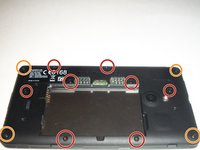
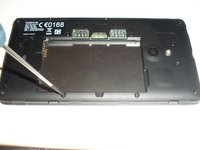
    • To access the inner components of the device, remove the various screws. Keep them separate, and organize them by size.

    • You will need a T5 Precision Torx screw driver to remove the screws.

    • The locations of the T5x3.4mm screws are indicated in the picture.

    • The locations of the T5x4.1mm screws are indicated in the picture.

    Спросите у FixBot

    Добавить комментарий

  4. Nokia XL Dual SIM Disassembly, Screen Separation part 2: шаг 4, изображение 1 из 3 Nokia XL Dual SIM Disassembly, Screen Separation part 2: шаг 4, изображение 2 из 3 Nokia XL Dual SIM Disassembly, Screen Separation part 2: шаг 4, изображение 3 из 3
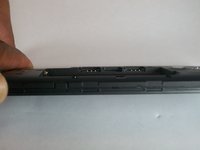
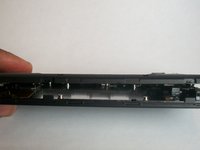
    • Use the plastic opening tool to gently pry the device apart.

    • There are flaps on both sides of the phone as indicated in the picture. This is what you will need to pry apart.

    • Please be cautious when opening the device. There are various connectors inside the device that must be handled with care.

    Спросите у FixBot

    Добавить комментарий

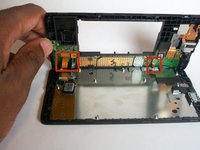
  5. Nokia XL Dual SIM Disassembly, System components: шаг 5, изображение 1 из 1
    • Once the device is open, take note of all the components.

    Спросите у FixBot

    Добавить комментарий

Заключение

To reassemble your device, follow these instructions in reverse order.

Отменить: Я не выполнил это руководство.

Еще один человек закончил это руководство.

Shadeed Bilal

Участник с: 09/25/14

231 Репутация

Автор 4 руководств

Команда

USF Tampa, Team 1-4, Brown Fall 2014 Участник USF Tampa, Team 1-4, Brown Fall 2014

USFT-BROWN-F14S1G4

3 членов

Автор 7 руководств

0 Комментарии к руководству

Добавить комментарий

Статистика просмотров:

За последние 24 часов: 0

За последние 7 дней: 4

За последние 30 дней: 22

За всё время: 435