Перейти к основному содержанию
Присоединяйся к сообществу ремонтников - Создай аккаунт

Nook Color Speaker Replacement

Выберете то, что вам нужно

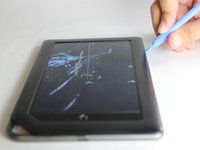
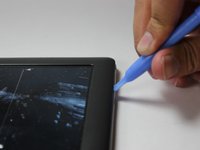
  1. Nook Color Speaker Replacement, Back Cover: шаг 1, изображение 1 из 2 Nook Color Speaker Replacement, Back Cover: шаг 1, изображение 2 из 2
    • Remove the two 3.8 mm screws located in the back right corner of the device using the T5 Torx screwdriver.

    Спросите у FixBot

    Добавить комментарий

  2. Nook Color Speaker Replacement: шаг 2, изображение 1 из 2 Nook Color Speaker Replacement: шаг 2, изображение 2 из 2
    • Pry off the back cover with the plastic opening tool. Go around the device with the tool to ensure complete detachment.

    Спросите у FixBot

    Добавить комментарий

  3. Nook Color Speaker Replacement, Front Cover: шаг 3, изображение 1 из 1
    • Remove the ten 4.0 mm screws from the device's perimeter using the T5 Torx screwdriver.

    Спросите у FixBot

    Добавить комментарий

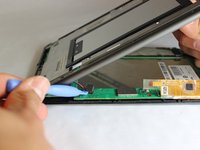
  4. Nook Color Speaker Replacement: шаг 4, изображение 1 из 2 Nook Color Speaker Replacement: шаг 4, изображение 2 из 2
    • Pry off the front panel using the plastic opening tool.

    Спросите у FixBot

    Добавить комментарий

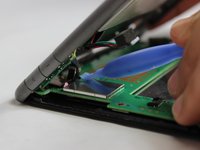
  5. Nook Color Speaker Replacement: шаг 5, изображение 1 из 2 Nook Color Speaker Replacement: шаг 5, изображение 2 из 2
    • Lift up on the connectors to disconnect them using the plastic opening tool.

    Спросите у FixBot

    Добавить комментарий

  6. Nook Color Speaker Replacement, Speaker: шаг 6, изображение 1 из 2 Nook Color Speaker Replacement, Speaker: шаг 6, изображение 2 из 2
    • Remove the protective lining located above the speaker.

    Спросите у FixBot

    Добавить комментарий

  7. Nook Color Speaker Replacement: шаг 7, изображение 1 из 3 Nook Color Speaker Replacement: шаг 7, изображение 2 из 3 Nook Color Speaker Replacement: шаг 7, изображение 3 из 3
    • Using a plastic opening tool, push on the speaker from the front of the panel to loosen the speaker. Some force will be required. Once loose, use your index finger to push it through.

    Спросите у FixBot

    Добавить комментарий

  8. Nook Color Speaker Replacement: шаг 8, изображение 1 из 1
    • Once pressed all the way through, the speaker will be loose and free to replace.

    Спросите у FixBot

    Добавить комментарий

Заключение

To reassemble your device, follow these instructions in reverse order.

Отменить: Я не выполнил это руководство.

John Goly

Участник с: 01/20/15

529 Репутация

Автор 3 руководств

Команда

USF Tampa, Team 11-5, Blackwell Winter 2015 Участник USF Tampa, Team 11-5, Blackwell Winter 2015

USFT-BLACKWELL-W15S11G5

3 членов

Автор 14 руководств

0 Комментарии к руководству

Добавить комментарий

Статистика просмотров:

За последние 24 часов: 0

За последние 7 дней: 6

За последние 30 дней: 38

За всё время: 552