Перейти к основному содержанию
Присоединяйся к сообществу ремонтников - Создай аккаунт

OLPC XO-4 Touch Screen Replacement

Выберете то, что вам нужно

    1. OLPC XO-4 Touch Screen Replacement, Battery: шаг 1, изображение 1 из 1
      • Turn the laptop upside-down, with the handle facing away from you.

      Спросите у FixBot

      Добавить комментарий

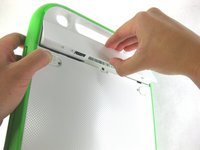
    2. OLPC XO-4 Touch Screen Replacement: шаг 2, изображение 1 из 2 OLPC XO-4 Touch Screen Replacement: шаг 2, изображение 2 из 2
      • Pull the lock tabs towards the green outer edges of the laptop.

      • Hold the left lock tab in the unlock position until the battery is completely removed in the next step.

      Спросите у FixBot

      Добавить комментарий

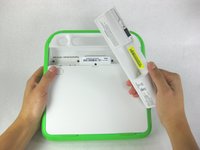
    3. OLPC XO-4 Touch Screen Replacement: шаг 3, изображение 1 из 2 OLPC XO-4 Touch Screen Replacement: шаг 3, изображение 2 из 2
      • Lift up on the middle of the battery to remove it from the device.

      Спросите у FixBot

      Добавить комментарий

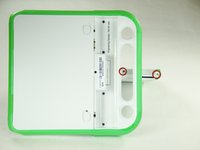
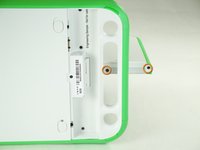
    1. OLPC XO-4 Touch Screen Replacement, Screen Frame: шаг 4, изображение 1 из 3 OLPC XO-4 Touch Screen Replacement, Screen Frame: шаг 4, изображение 2 из 3 OLPC XO-4 Touch Screen Replacement, Screen Frame: шаг 4, изображение 3 из 3
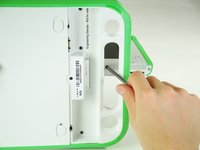
      • Remove the two 4mm Phillips #1 screws underneath the screen on the right-hand side.

      • Rotate the screen 180° and remove the other two screws.

      • You will have to put your screwdriver through the handle in order to reach the middle screw for both sides.

      Спросите у FixBot

      Добавить комментарий

    2. OLPC XO-4 Touch Screen Replacement: шаг 5, изображение 1 из 3 OLPC XO-4 Touch Screen Replacement: шаг 5, изображение 2 из 3 OLPC XO-4 Touch Screen Replacement: шаг 5, изображение 3 из 3
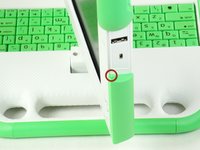
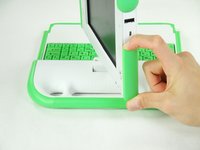
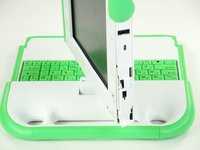
      • Remove the green side panel by pressing down on the small green button on the top and sliding the panel up.

      • Repeat the step above for the panel on the other side.

      Спросите у FixBot

      Добавить комментарий

    3. OLPC XO-4 Touch Screen Replacement: шаг 6, изображение 1 из 1
      • Be careful not to pull the bottom too far out because a ribbon cable is under the frame and can easily break.

      • Gently lift up the lower part of the frame and pull it down to free the screen frame.

      Спросите у FixBot

      Добавить комментарий

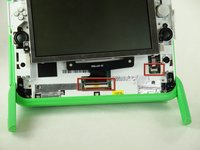
    4. OLPC XO-4 Touch Screen Replacement: шаг 7, изображение 1 из 2 OLPC XO-4 Touch Screen Replacement: шаг 7, изображение 2 из 2
      • Lift the black connector and pull the ribbon cable out by the purple tab, freeing the frame.

      Спросите у FixBot

      Добавить комментарий

    1. OLPC XO-4 Touch Screen Replacement, Screen: шаг 8, изображение 1 из 1
      • Remove the four 7.62mm screws using a Phillips #1 screwdriver.

      Спросите у FixBot

      Добавить комментарий

    2. OLPC XO-4 Touch Screen Replacement: шаг 9, изображение 1 из 2 OLPC XO-4 Touch Screen Replacement: шаг 9, изображение 2 из 2
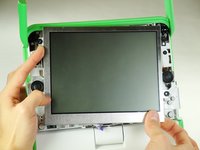
      • Be careful not to pull the screen out too far. There are two ribbon cables attached to the screen, and they can easily break.

      • Carefully lift the screen out.

      Спросите у FixBot

      Добавить комментарий

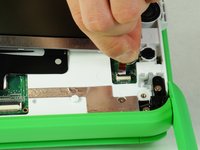
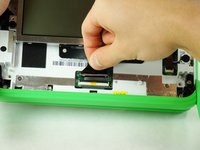
    3. OLPC XO-4 Touch Screen Replacement: шаг 10, изображение 1 из 3 OLPC XO-4 Touch Screen Replacement: шаг 10, изображение 2 из 3 OLPC XO-4 Touch Screen Replacement: шаг 10, изображение 3 из 3
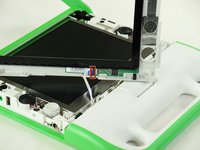
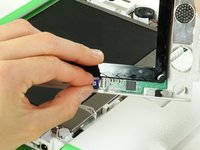
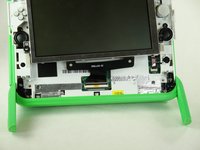
      • Notice that the laptop in this picture has been turned 180° with the antennas now below the screen.

      • For each ribbon cable, lift up the black connector and gently pull the ribbon cables out by the plastic tabs.

      Спросите у FixBot

      Добавить комментарий

    4. OLPC XO-4 Touch Screen Replacement: шаг 11, изображение 1 из 1
      • Remove the screen from the laptop.

      Спросите у FixBot

      Добавить комментарий

Заключение

To reassemble your device, follow these instructions in reverse order.

Отменить: Я не выполнил это руководство.

3 человек успешно провели ремонт по этому руководству.

Zach Yasuda

Участник с: 01/24/13

179 Репутация

Автор 2 руководств

Команда

Cal Poly, Team 3-29, Amido Winter 2013 Участник Cal Poly, Team 3-29, Amido Winter 2013

CPSU-AMIDO-W13S3G29

4 членов

Автор 90 руководств

0 Комментарии к руководству

Добавить комментарий

Статистика просмотров:

За последние 24 часов: 1

За последние 7 дней: 10

За последние 30 дней: 30

За всё время: 1,881