Перейти к основному содержанию
Присоединяйся к сообществу ремонтников - Создай аккаунт

One Education Infinity:One Keyboard Replacement

Выберете то, что вам нужно

    1. One Education Infinity:One Keyboard Replacement, Back Case: шаг 1, изображение 1 из 2 One Education Infinity:One Keyboard Replacement, Back Case: шаг 1, изображение 2 из 2
      • Use a spudger to pry the four rubber pads away from the bottom of the case.

      • Use a Phillips #00 screwdriver to unscrew the four 6.4 mm screws.

      Спросите у FixBot

      Добавить комментарий

    2. One Education Infinity:One Keyboard Replacement: шаг 2, изображение 1 из 2 One Education Infinity:One Keyboard Replacement: шаг 2, изображение 2 из 2
      • Insert a Jimmy or other prying tool into the seam on the edge of the casing.

      • Trace along the edges of the device until all clips are released.

      • Lift the back case away from the device.

      Спросите у FixBot

      Добавить комментарий

    3. One Education Infinity:One Keyboard Replacement: шаг 3, изображение 1 из 1
      • Use a Phillips #00 screwdriver to unscrew the four 6.4mm screws on the hinge mounts.

      Спросите у FixBot

      Добавить комментарий

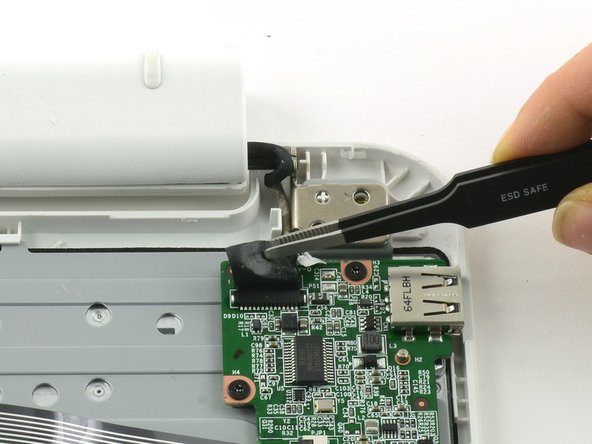
    4. One Education Infinity:One Keyboard Replacement: шаг 4, изображение 1 из 2 One Education Infinity:One Keyboard Replacement: шаг 4, изображение 2 из 2
      Инструмент, используемый на этом этапе:
      Tweezers
      $4.99
      • Use tweezers to lift the fabric cover and hinge connector away from the daughterboard.

      • Always use ESD safe tools when working with delicate electrical components.

      Спросите у FixBot

      Добавить комментарий

    1. One Education Infinity:One Keyboard Replacement, Daughterboard: шаг 5, изображение 1 из 2 One Education Infinity:One Keyboard Replacement, Daughterboard: шаг 5, изображение 2 из 2
      • Flip up the black retaining flap on the ZIF connector holding the large grey ribbon cable in place.

      • Pull the ribbon cable straight out of the ZIF connector.

      Спросите у FixBot

      Добавить комментарий

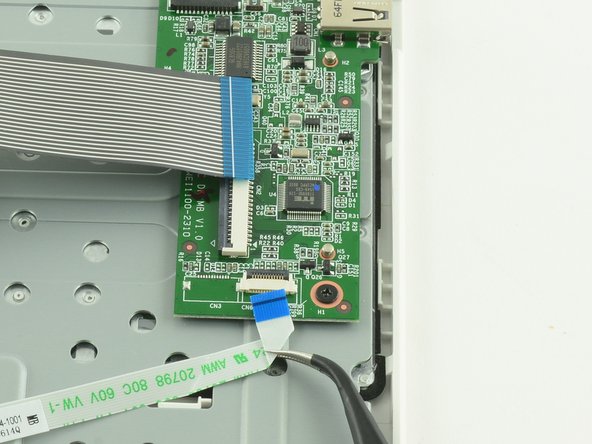
    2. One Education Infinity:One Keyboard Replacement: шаг 6, изображение 1 из 2 One Education Infinity:One Keyboard Replacement: шаг 6, изображение 2 из 2
      Инструмент, используемый на этом этапе:
      Tweezers
      $4.99
      • Use the flat end of a spudger to flip up the black tab on the smaller ZIF connector.

      • Use tweezers to pull the ribbon cable straight out of the connector.

      Спросите у FixBot

      Добавить комментарий

    3. One Education Infinity:One Keyboard Replacement: шаг 7, изображение 1 из 3 One Education Infinity:One Keyboard Replacement: шаг 7, изображение 2 из 3 One Education Infinity:One Keyboard Replacement: шаг 7, изображение 3 из 3
      • Use a Phillips #000 screwdriver to unscrew the three 3.4mm screws.

      • Lift the daughterboard away from the device to remove.

      Спросите у FixBot

      Добавить комментарий

    1. One Education Infinity:One Keyboard Replacement, Keyboard Frame Prerequisite: шаг 8, изображение 1 из 2 One Education Infinity:One Keyboard Replacement, Keyboard Frame Prerequisite: шаг 8, изображение 2 из 2
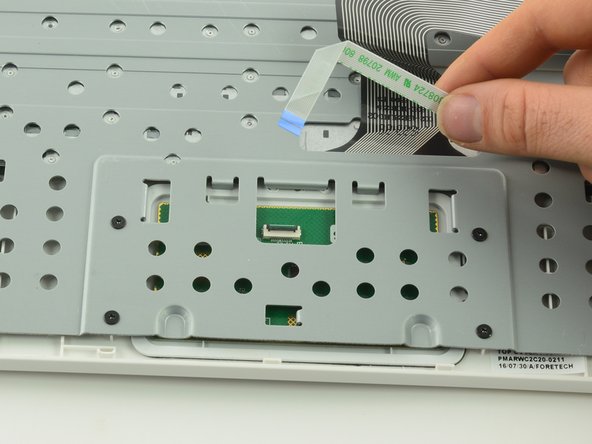
      • Use a spudger to lift up the black retaining flap on the touchpad's ZIF connector.

      • Pull the ribbon cable straight back to remove.

      Спросите у FixBot

      Добавить комментарий

    2. One Education Infinity:One Keyboard Replacement: шаг 9, изображение 1 из 1
      • Use a Phillips #00 screwdriver to unscrew the four 6.4mm screws holding the touchpad in place.

      Спросите у FixBot

      Добавить комментарий

    3. One Education Infinity:One Keyboard Replacement: шаг 10, изображение 1 из 2 One Education Infinity:One Keyboard Replacement: шаг 10, изображение 2 из 2
      • Feed the ribbon cable through the hole in the metal frame.

      • Left the metal frame away from the device.

      Спросите у FixBot

      Добавить комментарий

    1. One Education Infinity:One Keyboard Replacement, Keyboard: шаг 11, изображение 1 из 1
      • Lift one end of the keyboard up to peel it away from the case.

      • Don't be alarmed if you hear cracking sounds as you pry the keyboard away from the frame. There are dozens of plastic rivets holding the keyboard to the plastic frame.

      Спросите у FixBot

      Добавить комментарий

Заключение

To reassemble your device, follow these instructions in reverse order.

Отменить: Я не выполнил это руководство.

Taylor Bratsch

Участник с: 09/06/16

6 168 Репутация

Автор 14 руководств

0 Комментарии к руководству

Добавить комментарий

Статистика просмотров:

За последние 24 часов: 0

За последние 7 дней: 3

За последние 30 дней: 17

За всё время: 462