Перейти к основному содержанию
Присоединяйся к сообществу ремонтников - Создай аккаунт

PSP 300x Trigger Buttons Replacement

Выберете то, что вам нужно

  1. PSP 300x Trigger Buttons Replacement, Battery: шаг 1, изображение 1 из 3 PSP 300x Trigger Buttons Replacement, Battery: шаг 1, изображение 2 из 3 PSP 300x Trigger Buttons Replacement, Battery: шаг 1, изображение 3 из 3
    • Place the PSP face down and locate the battery cover on the left side of the device.

    • Lift and remove the battery cover to reveal the battery.

    • Remove the battery.

    Спросите у FixBot

    Добавить комментарий

  2. PSP 300x Trigger Buttons Replacement, Front Casing: шаг 2, изображение 1 из 1
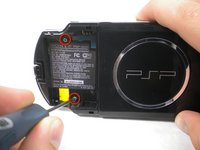
    • Peel back the warranty sticker that is behind the battery with a spudger or your fingernail.

    Спросите у FixBot

    Добавить комментарий

  3. PSP 300x Trigger Buttons Replacement: шаг 3, изображение 1 из 2 PSP 300x Trigger Buttons Replacement: шаг 3, изображение 2 из 2
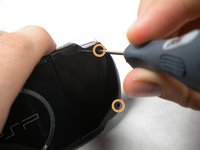
    • Unscrew all four screws from the back of the PSP with the Phillips #00 Screwdriver.

    • Two are located behind the battery's warranty sticker.

    • Two are located on the right side of the PSP.

    Спросите у FixBot

    Добавить комментарий

  4. PSP 300x Trigger Buttons Replacement: шаг 4, изображение 1 из 1
    • Next, unscrew the two screws located at the top of the PSP.

    Спросите у FixBot

    Добавить комментарий

  5. PSP 300x Trigger Buttons Replacement: шаг 5, изображение 1 из 1
    • Then, remove the single screw from the bottom edge of the PSP (which is positioned next to the barcode).

    Спросите у FixBot

    Добавить комментарий

  6. PSP 300x Trigger Buttons Replacement: шаг 6, изображение 1 из 2 PSP 300x Trigger Buttons Replacement: шаг 6, изображение 2 из 2
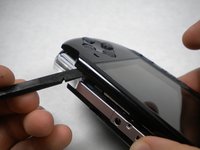
    • Slide the spudger in between the outer casing of the PSP, beginning at the "R" shoulder button, and gently pry off the casing.


    • Remove the front casing completely.

    Спросите у FixBot

    Добавить комментарий

  7. PSP 300x Trigger Buttons Replacement, LCD Screen: шаг 7, изображение 1 из 2 PSP 300x Trigger Buttons Replacement, LCD Screen: шаг 7, изображение 2 из 2
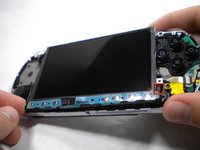
    • Push the homebar to the right to release the tab located on the right side of the LCD screen.

    • DO NOT completely remove the homebar, as it is still connected by ribbon cables.

    Спросите у FixBot

    Добавить комментарий

  8. PSP 300x Trigger Buttons Replacement: шаг 8, изображение 1 из 3 PSP 300x Trigger Buttons Replacement: шаг 8, изображение 2 из 3 PSP 300x Trigger Buttons Replacement: шаг 8, изображение 3 из 3
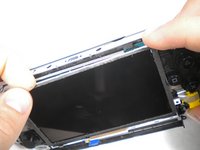
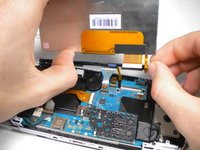
    • Slowly lift the LCD screen off the PSP starting at the top edge corner.

    • Again, the LCD screen is attached by ribbon cables, so do not remove it completely.

    • Orientation of PSP is flipped in photo.

    Спросите у FixBot

    Добавить комментарий

  9. PSP 300x Trigger Buttons Replacement: шаг 9, изображение 1 из 2 PSP 300x Trigger Buttons Replacement: шаг 9, изображение 2 из 2
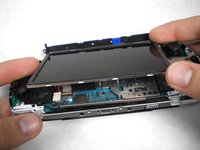
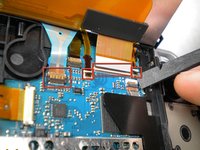
    • Flip the small brown locks on the four ribbon cable connectors up using a spudger or fingernail.

    • Pull all four ribbon cables out.

    • Now remove the LCD screen and homebar from the PSP.

    Спросите у FixBot

    Добавить комментарий

  10. PSP 300x Trigger Buttons Replacement: шаг 10, изображение 1 из 1
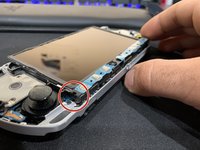
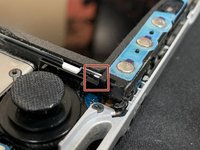
    • Remove the metal tab that lies above the LCD screen.

    • Upon reassembly, make note that the stamped lettering faces down, and the large tab fits just above the motherboard to the right hand side of the left trigger.

    Спросите у FixBot

    Добавить комментарий

  11. PSP 300x Trigger Buttons Replacement, Trigger Buttons: шаг 11, изображение 1 из 1
    • Remove the screw securing 'L' trigger to the PSP.

    Спросите у FixBot

    Добавить комментарий

  12. PSP 300x Trigger Buttons Replacement: шаг 12, изображение 1 из 1
    • Remove the white plastic piece that holds the 'L' trigger in place.

    Спросите у FixBot

    Добавить комментарий

  13. PSP 300x Trigger Buttons Replacement: шаг 13, изображение 1 из 1
    • Remove the 'L' trigger from the PSP.

    Спросите у FixBot

    Добавить комментарий

  14. PSP 300x Trigger Buttons Replacement: шаг 14, изображение 1 из 1
    • Remove the screw securing the 'R' trigger.

    Спросите у FixBot

    Добавить комментарий

  15. PSP 300x Trigger Buttons Replacement: шаг 15, изображение 1 из 1
    • Remove the white plastic piece that holds the 'R' trigger in place.

    Спросите у FixBot

    Добавить комментарий

  16. PSP 300x Trigger Buttons Replacement: шаг 16, изображение 1 из 1
    • Remove the 'R' trigger from the PSP.

    Спросите у FixBot

    Добавить комментарий

Заключение

To reassemble your device, follow these instructions in reverse order.

Отменить: Я не выполнил это руководство.

11 человек успешно провели ремонт по этому руководству.

cmcevill

Участник с: 11/05/09

541 Репутация

1 руководство автора

Команда

Cal Poly, Team 19-2, Maness Fall 2009 Участник Cal Poly, Team 19-2, Maness Fall 2009

CPSU-MANESS-F09S19G2

3 членов

Автор 13 руководств

0 Комментарии к руководству

Добавить комментарий

Статистика просмотров:

За последние 24 часов: 14

За последние 7 дней: 59

За последние 30 дней: 300

За всё время: 24,232