Перейти к основному содержанию
Присоединяйся к сообществу ремонтников - Создай аккаунт

PSP 300xc LCD Replacement

Выберете то, что вам нужно

    1. PSP 300xc LCD Replacement, Battery: шаг 1, изображение 1 из 2 PSP 300xc LCD Replacement, Battery: шаг 1, изображение 2 из 2
      • Press the button securing the battery door to the PSP 300xc, and lift the battery door off.

      • Lift the battery out of the PSP.

      Спросите у FixBot

      Добавить комментарий

    1. PSP 300xc LCD Replacement, Front Case: шаг 2, изображение 1 из 1
      • Use a spudger or your fingernail to remove the warranty sticker stuck to the inside of the battery tray

      Спросите у FixBot

      Добавить комментарий

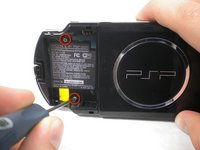
    2. PSP 300xc LCD Replacement: шаг 3, изображение 1 из 2 PSP 300xc LCD Replacement: шаг 3, изображение 2 из 2
      • Remove four Phillips screws from the back of the PSP.

      Спросите у FixBot

      Добавить комментарий

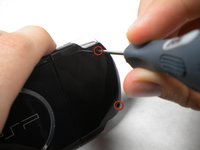
    3. PSP 300xc LCD Replacement: шаг 4, изображение 1 из 1
      • Remove two Phillips screws from the top of the PSP.

      Спросите у FixBot

      Добавить комментарий

    4. PSP 300xc LCD Replacement: шаг 5, изображение 1 из 1
      • Remove a single screw from the bottom edge of the PSP.

      Спросите у FixBot

      Добавить комментарий

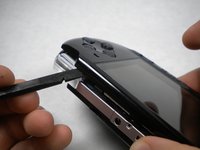
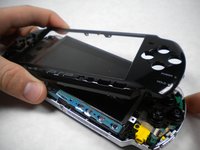
    5. PSP 300xc LCD Replacement: шаг 6, изображение 1 из 2 PSP 300xc LCD Replacement: шаг 6, изображение 2 из 2
      • Insert a spudger between the front case and PSP, and slide the spudger along the perimeter of the front case to remove it.

      Спросите у FixBot

      Добавить комментарий

    1. PSP 300xc LCD Replacement, LCD: шаг 7, изображение 1 из 1
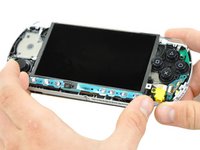
      • Remove a single Phillips screw securing the home bar to the PSP 300xc.

      Спросите у FixBot

      Добавить комментарий

    2. PSP 300xc LCD Replacement: шаг 8, изображение 1 из 2 PSP 300xc LCD Replacement: шаг 8, изображение 2 из 2
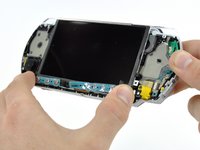
      • Push the home bar to the right about 1cm to release a tab, and begin to lift the right end of the home bar slightly.

      • Do not attempt to remove the home bar yet, it is still attached to the PSP 300xc.

      Спросите у FixBot

      Добавить комментарий

    3. PSP 300xc LCD Replacement: шаг 9, изображение 1 из 1
      • Insert a spudger under the LCD, beside the black plastic tab.

      • Push the LCD to the left and pry up to release the left edge of the LCD from under the plastic tab.

      Спросите у FixBot

      Добавить комментарий

    4. PSP 300xc LCD Replacement: шаг 10, изображение 1 из 1
      • Insert a spudger under the LCD, beside the black plastic tab.

      • Push the LCD to the right and pry up to release the right edge of the LCD from under the plastic tab.

      Спросите у FixBot

      Добавить комментарий

    5. PSP 300xc LCD Replacement: шаг 11, изображение 1 из 3 PSP 300xc LCD Replacement: шаг 11, изображение 2 из 3 PSP 300xc LCD Replacement: шаг 11, изображение 3 из 3
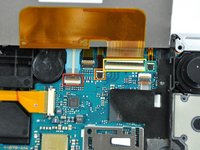
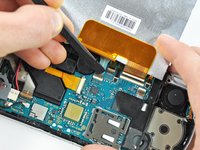
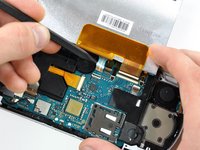
      • Rotate the LCD away from the PSP to reveal the LCD and home bar ribbon cables.

      • Use your fingernail or the edge of a plastic opening tool to flip up the retaining flap on the following four ZIF connectors:

      • Home bar cable

      • Microphone cable

      • LCD display data cable

      • Touchscreen cable

      • Be sure you are prying up on the retaining flap, not the socket itself

      • After flipping up the locking tabs on all four connectors, use your fingers or a spudger to gently pull the cables straight out of the connectors.

      Спросите у FixBot

      Добавить комментарий

    6. PSP 300xc LCD Replacement: шаг 12, изображение 1 из 1
      • Remove the LCD from the PSP 300xc.

      Спросите у FixBot

      Добавить комментарий

Заключение

To reassemble your device, follow these instructions in reverse order.

Отменить: Я не выполнил это руководство.

11 человек успешно провели ремонт по этому руководству.

Matthew Newsom

Участник с: 01/05/10

42 878 Репутация

Автор 67 руководств

1 Комментарий к руководству

the metal bar on the lcd of the revisioned 3000 is easily removable with a spudger while the first gen 3000s have metal bars like 2000s, repairing any psp 3000 brite units is the easiest one to repair among the 4 other models of psp

Ghost - Ответить Поделиться

Добавить комментарий

Статистика просмотров:

За последние 24 часов: 3

За последние 7 дней: 31

За последние 30 дней: 110

За всё время: 7,498