Перейти к основному содержанию
Присоединяйся к сообществу ремонтников - Создай аккаунт

PSP Go Trigger buttons Replacement

Выберете то, что вам нужно

  1. PSP Go Trigger buttons Replacement, Back Cover: шаг 1, изображение 1 из 2 PSP Go Trigger buttons Replacement, Back Cover: шаг 1, изображение 2 из 2
    • Unscrew the four Phillips screws on the back of the PSP Go.

    • Rotate the PSP so you can see the top of the device.

    • Unscrew the two Phillips screws next to the volume buttons.

    Спросите у FixBot
  2. PSP Go Trigger buttons Replacement: шаг 2, изображение 1 из 2 PSP Go Trigger buttons Replacement: шаг 2, изображение 2 из 2
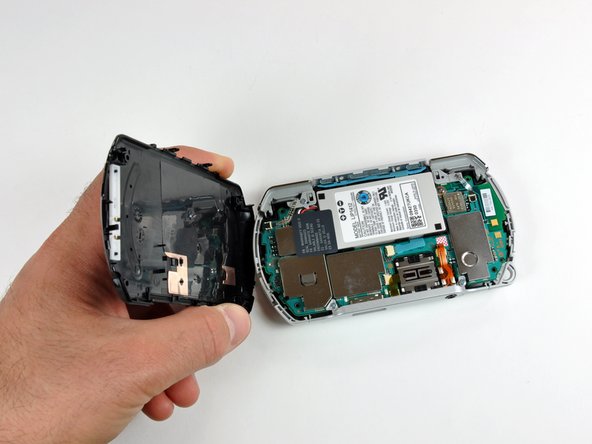
    • Use a plastic opening tool around the perimeter of the back cover to loosen it on all sides.

    • Open the back cover by gently lifting the right side, and rotating it to the left side (as if you were opening a book).

    • Be careful not to rotate the back cover from the bottom, as you will break the plastic screw holes on top of the device.

    Спросите у FixBot
  3. PSP Go Trigger buttons Replacement, Top Cover: шаг 3, изображение 1 из 1
    • Pull the top cover upwards gently from its housing.

    Спросите у FixBot
  4. PSP Go Trigger buttons Replacement, Trigger buttons: шаг 4, изображение 1 из 1
    • The top cover will most likely come off during the repair, so might as well take it off now. Pull it upwards gently from its housing.

    Спросите у FixBot
  5. PSP Go Trigger buttons Replacement: шаг 5, изображение 1 из 1
    • The procedure is exactly the same for the left trigger button.

    • Use a plastic opening tool to gently flip up the left trigger connector.

    Спросите у FixBot
  6. PSP Go Trigger buttons Replacement: шаг 6, изображение 1 из 2 PSP Go Trigger buttons Replacement: шаг 6, изображение 2 из 2
    • Unscrew the lone Phillips screw holding the trigger in place. Remove both trigger and retaining plate from the PSP Go.

    • If necessary, repeat steps 2 and 3 to remove the right trigger button.

    Спросите у FixBot
Заключение

To reassemble your device, follow these instructions in reverse order.

2 человек успешно провели ремонт по этому руководству.

0 Комментарии к руководству

Добавить комментарий

Статистика просмотров:

За последние 24 часов: 3

За последние 7 дней: 22

За последние 30 дней: 147

За всё время: 12,915