Перейти к основному содержанию
Присоединяйся к сообществу ремонтников - Создай аккаунт

Palm Pilot Professional 3com LCD Screen Replacement

Выберете то, что вам нужно

  1. Palm Pilot Professional 3com LCD Screen Replacement, Keypad: шаг 1, изображение 1 из 1
    • Unscrew the three screws on the back of the Palm Pilot.

    Спросите у FixBot

    Добавить комментарий

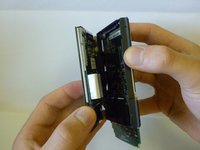
  2. Palm Pilot Professional 3com LCD Screen Replacement: шаг 2, изображение 1 из 2 Palm Pilot Professional 3com LCD Screen Replacement: шаг 2, изображение 2 из 2
    • Pull the back cover from the bottom of the device and separate the interlocking tabs on the top to remove the back cover.

    Спросите у FixBot

    Добавить комментарий

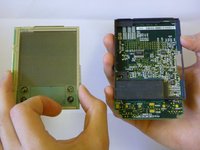
  3. Palm Pilot Professional 3com LCD Screen Replacement: шаг 3, изображение 1 из 1
    • The front plastic cover is now free to be removed from the rest of the device.

    Спросите у FixBot

    Добавить комментарий

  4. Palm Pilot Professional 3com LCD Screen Replacement: шаг 4, изображение 1 из 1
    • The keypad is now free to be removed from the rest of the device.

    Спросите у FixBot

    Добавить комментарий

  5. Palm Pilot Professional 3com LCD Screen Replacement, LCD Screen: шаг 5, изображение 1 из 1
    Инструмент, используемый на этом этапе:
    Tweezers
    $4.99
    • Looking at the back of the device hold one of the white tabs on the ribbon cable connector down and use tweezers to push in the other white tab toward the device at the same time.

    Спросите у FixBot

    Добавить комментарий

  6. Palm Pilot Professional 3com LCD Screen Replacement: шаг 6, изображение 1 из 1
    • The ribbon cable is now loose. Use the tweezers to carefully slide the ribbon cable out of the connector.

    Спросите у FixBot

    Добавить комментарий

  7. Palm Pilot Professional 3com LCD Screen Replacement: шаг 7, изображение 1 из 2 Palm Pilot Professional 3com LCD Screen Replacement: шаг 7, изображение 2 из 2
    • The screen is now disconnected from the rest of the device and can now be removed.

    Спросите у FixBot

    Добавить комментарий

Заключение

To reassemble your device, follow these instructions in reverse order.

Отменить: Я не выполнил это руководство.

Kevin Santos

Участник с: 03/09/12

1 Репутация

Автор 4 руководств

Команда

Clemson, Team 2-4, Benson Spring 2012 Участник Clemson, Team 2-4, Benson Spring 2012

CLEM-BENSON-S12S2G4

3 членов

Автор 5 руководств

0 Комментарии к руководству

Добавить комментарий

Статистика просмотров:

За последние 24 часов: 0

За последние 7 дней: 8

За последние 30 дней: 56

За всё время: 1,989