Перейти к основному содержанию
Присоединяйся к сообществу ремонтников - Создай аккаунт

Panasonic Lumix DMC-GF2 Back Panel Buttons Replacement

Выберете то, что вам нужно

    1. Panasonic Lumix DMC-GF2 Back Panel Buttons Replacement, Battery: шаг 1, изображение 1 из 1
      • On the bottom of the camera, use your finger to push the lock button to the open position which will cause the hinged door to swing open.

      Спросите у FixBot

      Добавить комментарий

    2. Panasonic Lumix DMC-GF2 Back Panel Buttons Replacement: шаг 2, изображение 1 из 2 Panasonic Lumix DMC-GF2 Back Panel Buttons Replacement: шаг 2, изображение 2 из 2
      • Push the small black tab that holds the battery with your finger to release the battery.

      • Use your fingers to pull the battery out of the camera.

      Спросите у FixBot

      Добавить комментарий

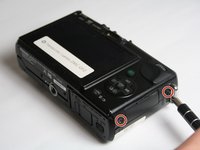
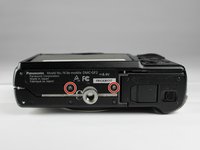
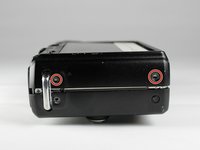
    1. Panasonic Lumix DMC-GF2 Back Panel Buttons Replacement, Back Cover: шаг 3, изображение 1 из 3 Panasonic Lumix DMC-GF2 Back Panel Buttons Replacement, Back Cover: шаг 3, изображение 2 из 3 Panasonic Lumix DMC-GF2 Back Panel Buttons Replacement, Back Cover: шаг 3, изображение 3 из 3
      • Using a Phillips #00 screwdriver, remove six 2.69mm, silver screws located on the two short sides of the camera and the bottom side.

      Спросите у FixBot

      Добавить комментарий

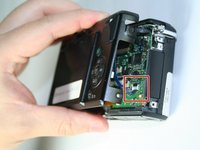
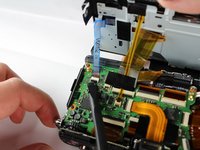
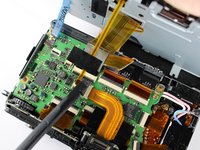
    2. Panasonic Lumix DMC-GF2 Back Panel Buttons Replacement: шаг 4, изображение 1 из 3 Panasonic Lumix DMC-GF2 Back Panel Buttons Replacement: шаг 4, изображение 2 из 3 Panasonic Lumix DMC-GF2 Back Panel Buttons Replacement: шаг 4, изображение 3 из 3
      • Gently lift up the back cover to access the ZIF connectors for the blue and yellow ribbons.

      • To unlock the ZIF connectors, gently push the black portion of the lock from a flat position to an upright position using a spudger.

      • Take caution not to rip the ribbons out of the ZIF connectors when lifting the back panel.

      Спросите у FixBot

      Добавить комментарий

    3. Panasonic Lumix DMC-GF2 Back Panel Buttons Replacement: шаг 5, изображение 1 из 1
      • Gently push the blue and yellow ribbons out of the unlocked ZIF connectors using your fingers.

      Спросите у FixBot

      Добавить комментарий

    4. Panasonic Lumix DMC-GF2 Back Panel Buttons Replacement: шаг 6, изображение 1 из 1
      • Using a Phillips #00 screwdriver, remove the 3.5 mm silver screw from the upper left hand corner of the back cover.

      Спросите у FixBot

      Добавить комментарий

    5. Panasonic Lumix DMC-GF2 Back Panel Buttons Replacement: шаг 7, изображение 1 из 1
      • Using a spudger, lift up and remove the plastic cover piece from the back cover.

      • Plastic cover may fall off without prying.

      Спросите у FixBot

      Добавить комментарий

    6. Panasonic Lumix DMC-GF2 Back Panel Buttons Replacement: шаг 8, изображение 1 из 1
      • Using a Phillips #00 screwdriver, remove the 2.69 mm silver screw located beneath the plastic piece that was previously removed.

      Спросите у FixBot

      Добавить комментарий

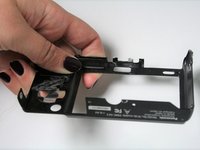
    7. Panasonic Lumix DMC-GF2 Back Panel Buttons Replacement: шаг 9, изображение 1 из 1
      • Using a spudger, lift up and separate the heavier metal cover from the light, plastic back cover.

      • Metal cover may fall off without prying.

      Спросите у FixBot

      Добавить комментарий

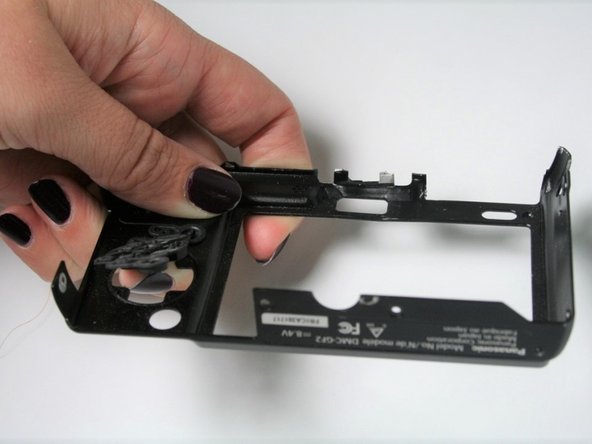
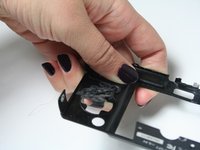
    1. Panasonic Lumix DMC-GF2 Back Panel Buttons Replacement, Back Panel Buttons: шаг 10, изображение 1 из 2 Panasonic Lumix DMC-GF2 Back Panel Buttons Replacement, Back Panel Buttons: шаг 10, изображение 2 из 2
      • Push on the back panel buttons from the frontside of the back cover.

      • There might be some adhesives holding the back panel buttons to the cover. Extra force may be necessary.

      Спросите у FixBot

      Добавить комментарий

Заключение

To reassemble your device, follow these instructions in reverse order.

Отменить: Я не выполнил это руководство.

Kingsley East

Участник с: 10/30/16

474 Репутация

Автор 4 руководств

Команда

Baylor, Team 5-9, Williams Fall 2016 Участник Baylor, Team 5-9, Williams Fall 2016

BU-WILLIAMS-F16S5G9

3 членов

Автор 11 руководств

0 Комментарии к руководству

Добавить комментарий

Статистика просмотров:

За последние 24 часов: 3

За последние 7 дней: 10

За последние 30 дней: 28

За всё время: 1,216