Перейти к основному содержанию
Присоединяйся к сообществу ремонтников - Создай аккаунт

Pentax PZ-10 Back Cover Locking Switch Spring Replacement

Выберете то, что вам нужно

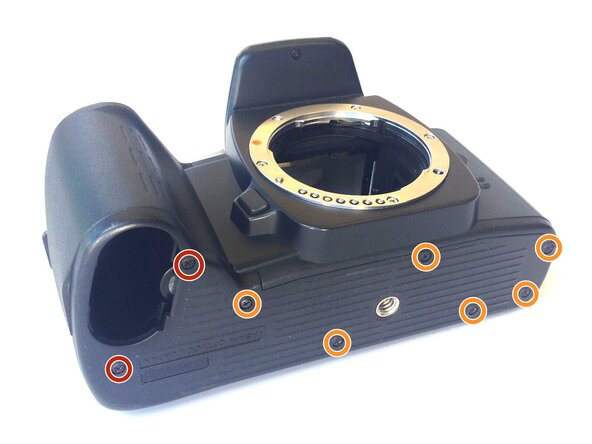
    1. Pentax PZ-10 Back Cover Locking Switch Spring Replacement, Removing the Bottom Cover: шаг 1, изображение 1 из 1
      • With the lens face up and the bottom panel of the camera facing you, remove the two 7mm screws on the left using the J0 screwdriver.

      • Remove the six 4.3mm screws in the middle and right of the panel using the J0 screwdriver.

      • Pull off the bottom casing to remove.

      Спросите у FixBot

      Добавить комментарий

    2. Pentax PZ-10 Back Cover Locking Switch Spring Replacement, Removing Bottom Casing: шаг 2, изображение 1 из 1
      • With the screws removed, the bottom casing should come off very easily by pulling on the casing.

      Спросите у FixBot

      Добавить комментарий

    3. Pentax PZ-10 Back Cover Locking Switch Spring Replacement, Removing the Back Cover: шаг 3, изображение 1 из 1
      • Place the camera on its side so the lens is facing left.

      • Press down on the locking switch on the side panel facing you.

      Спросите у FixBot

      Добавить комментарий

    4. Pentax PZ-10 Back Cover Locking Switch Spring Replacement: шаг 4, изображение 1 из 1
      • With the door unlocked, rotate the device to access the bottom.

      Спросите у FixBot

      Добавить комментарий

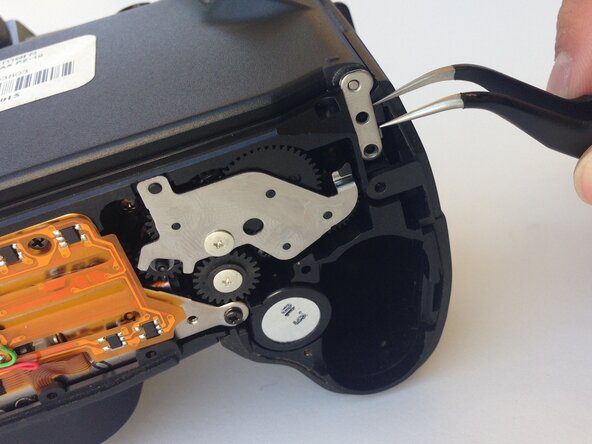
    5. Pentax PZ-10 Back Cover Locking Switch Spring Replacement: шаг 5, изображение 1 из 1
      Инструмент, используемый на этом этапе:
      Tweezers
      $4.99
      • Using a pair of tweezers, gently remove the metal tab securing the back door axle.

      • The door will come loose at this point, watch for any loose parts that may also come out.

      Спросите у FixBot

      Добавить комментарий

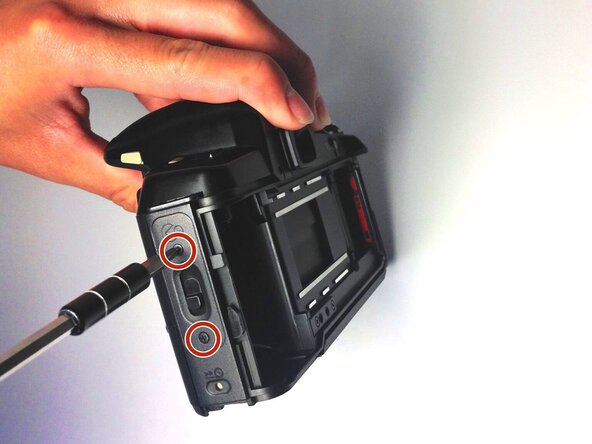
    6. Pentax PZ-10 Back Cover Locking Switch Spring Replacement, Removing the Side Panel: шаг 6, изображение 1 из 1
      • Once the back cover is fully removed, remove the two 4.35mm screws attaching the cover of the unlocking switch, and remove the plate.

      Спросите у FixBot

      Добавить комментарий

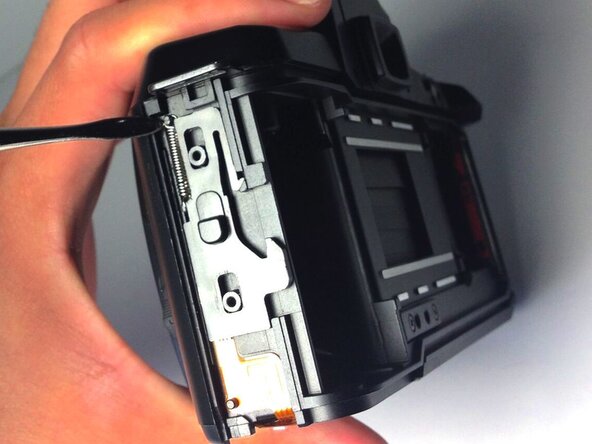
    7. Pentax PZ-10 Back Cover Locking Switch Spring Replacement, Removing the Spring: шаг 7, изображение 1 из 1
      • Locate the spring at the upper left corner of the face, and pull the rings of the spring off of the pins to remove it using plastic opening tools.

      • You are now ready to replace the spring.

      Спросите у FixBot

      Добавить комментарий

Заключение

To reassemble your device, follow these instructions in reverse order.

Отменить: Я не выполнил это руководство.

Еще один человек закончил это руководство.

Ryan Su

Участник с: 04/20/15

107 Репутация

1 руководство автора

0 Комментарии к руководству

Добавить комментарий

Статистика просмотров:

За последние 24 часов: 0

За последние 7 дней: 3

За последние 30 дней: 11

За всё время: 729