Перейти к основному содержанию
Присоединяйся к сообществу ремонтников - Создай аккаунт

Pentax PZ-10 Button Replacement

Выберете то, что вам нужно

    1. Pentax PZ-10 Button Replacement, Top Cover: шаг 1, изображение 1 из 1
      • The top cover is one piece encasing the top of the device except the shutter release button and flash.

      Спросите у FixBot

      Добавить комментарий

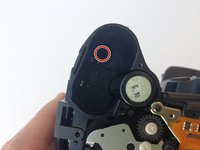
    2. Pentax PZ-10 Button Replacement, Removing Upper Right Housing Screw: шаг 2, изображение 1 из 2 Pentax PZ-10 Button Replacement, Removing Upper Right Housing Screw: шаг 2, изображение 2 из 2
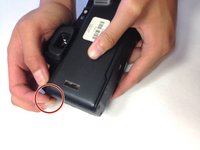
      • With the camera lens face down, locate the screw under the overhanging piece of the top casing on the right side of the back panel.

      • Using the J0 screwdriver, remove the 6.3 mm screw.

      Спросите у FixBot
      Добавить комментарий

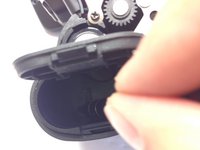
    3. Pentax PZ-10 Button Replacement, Removing Screw in Battery Compartment: шаг 3, изображение 1 из 2 Pentax PZ-10 Button Replacement, Removing Screw in Battery Compartment: шаг 3, изображение 2 из 2
      • Locate the next screw by holding the camera upside down with the battery compartment empty and face up.

      • Remove the 6.3 mm screw using a J0 screwdriver.

      Спросите у FixBot

      Добавить комментарий

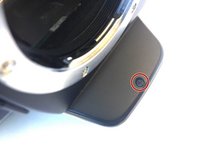
    4. Pentax PZ-10 Button Replacement, Removing Screw Under Flash Bulb: шаг 4, изображение 1 из 2 Pentax PZ-10 Button Replacement, Removing Screw Under Flash Bulb: шаг 4, изображение 2 из 2
      • The next screw is found in the overhanging piece just above the lens.

      • With the top of the camera facing down, remove the 3.4 mm screw with a J0 screwdriver.

      Спросите у FixBot

      Добавить комментарий

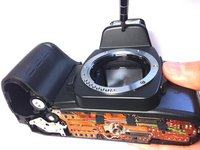
    5. Pentax PZ-10 Button Replacement, Pulling Off the Top Cover: шаг 5, изображение 1 из 2 Pentax PZ-10 Button Replacement, Pulling Off the Top Cover: шаг 5, изображение 2 из 2
      • Gently pull off the top cover with your hands by pulling on the tab on the left of the camera.

      Спросите у FixBot

      Добавить комментарий

    1. Pentax PZ-10 Button Replacement, Locate Rubber Tabs: шаг 6, изображение 1 из 2 Pentax PZ-10 Button Replacement, Locate Rubber Tabs: шаг 6, изображение 2 из 2
      Инструмент, используемый на этом этапе:
      Tweezers
      $4.99
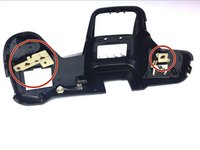
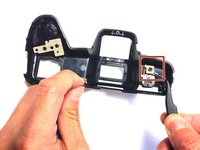
      • Gently remove the beige rubber tabs from under the casing by pulling each down using tweezers.

      Спросите у FixBot

      Добавить комментарий

    2. Pentax PZ-10 Button Replacement: шаг 7, изображение 1 из 1
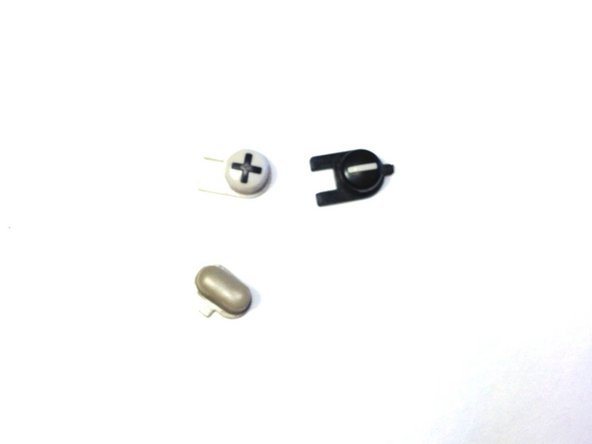
      • Remove the 3 buttons by pushing them from under the casing out through the top.

      • Each button is slotted differently, so pay attention to the orientation of each piece.

      Спросите у FixBot

      Добавить комментарий

    3. Pentax PZ-10 Button Replacement, Buttons: шаг 8, изображение 1 из 1
      • The buttons are now free to be replaced or cleaned.

      Спросите у FixBot

      Добавить комментарий

Заключение

To reassemble your device, follow these instructions in reverse order.

Отменить: Я не выполнил это руководство.

Jonathan Diaz

Участник с: 04/20/15

213 Репутация

Автор 2 руководств

0 Комментарии к руководству

Добавить комментарий

Статистика просмотров:

За последние 24 часов: 0

За последние 7 дней: 3

За последние 30 дней: 14

За всё время: 836