Перейти к основному содержанию
Присоединяйся к сообществу ремонтников - Создай аккаунт

Polaroid Cube Battery Replacement

Выберете то, что вам нужно

    1. Polaroid Cube Battery Replacement, Battery: шаг 1, изображение 1 из 1
      • Remove the SD card cover by twisting it using a Plastic Opening Tool

      Спросите у FixBot

      Добавить комментарий

    2. Polaroid Cube Battery Replacement: шаг 2, изображение 1 из 1
      • Use the Plastic Opening tool to pry off and remove the front cover.

      Спросите у FixBot

      Добавить комментарий

    3. Polaroid Cube Battery Replacement: шаг 3, изображение 1 из 1
      • Using a J00 head screwdriver, remove the four 3.27mm screws from the front of the camera near the lens.

      Спросите у FixBot

      Добавить комментарий

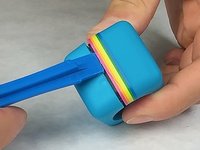
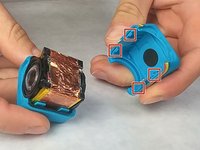
    4. Polaroid Cube Battery Replacement: шаг 4, изображение 1 из 2 Polaroid Cube Battery Replacement: шаг 4, изображение 2 из 2
      • Use the Plastic Opening Tool to pry open the shell of the camera.

      • There are four latches, one at each corner, that you will need to detach.

      Спросите у FixBot

      Добавить комментарий

    5. Polaroid Cube Battery Replacement: шаг 5, изображение 1 из 1
      • Remove shell from top and bottom of camera.

      Спросите у FixBot

      Добавить комментарий

    6. Polaroid Cube Battery Replacement: шаг 6, изображение 1 из 1
      • Remove the rubber seal wrapped around the camera.

      Спросите у FixBot

      Добавить комментарий

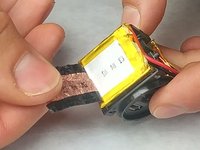
    7. Polaroid Cube Battery Replacement: шаг 7, изображение 1 из 2 Polaroid Cube Battery Replacement: шаг 7, изображение 2 из 2
      • Remove the tape wrapped around the battery.

      Спросите у FixBot

      Добавить комментарий

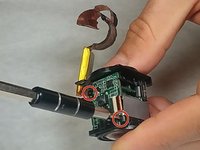
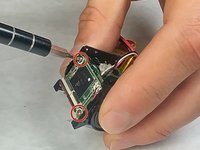
    8. Polaroid Cube Battery Replacement: шаг 8, изображение 1 из 3 Polaroid Cube Battery Replacement: шаг 8, изображение 2 из 3 Polaroid Cube Battery Replacement: шаг 8, изображение 3 из 3
      • Using a J00 head screwdriver, unscrew the four 3.46mm screws from the top and bottom circuit board.

      Спросите у FixBot

      Добавить комментарий

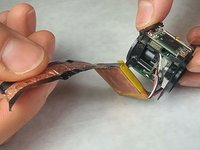
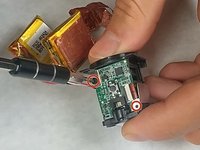
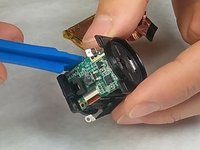
    9. Polaroid Cube Battery Replacement: шаг 9, изображение 1 из 2 Polaroid Cube Battery Replacement: шаг 9, изображение 2 из 2
      • Use the plastic opening tool to remove the circuit board that the battery is connected to.

      Спросите у FixBot

      Добавить комментарий

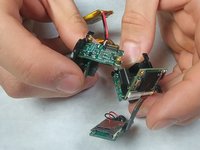
    10. Polaroid Cube Battery Replacement: шаг 10, изображение 1 из 1
      • Gently remove the battery pin connector from the circuit board.

      Спросите у FixBot

      Добавить комментарий

Заключение

To reassemble your device, follow these instructions in reverse order.

Отменить: Я не выполнил это руководство.

10 человек успешно провели ремонт по этому руководству.

heath lamkin

Участник с: 09/29/16

372 Репутация

1 руководство автора

Команда

IUPUI, Team 3-2, Harley Fall 2016 Участник IUPUI, Team 3-2, Harley Fall 2016

IUPUI-HARLEY-F16S3G2

4 членов

Автор 15 руководств

13 Комментарии к руководству

Any idea where to find the replacement batteries?

hooverhogg - Ответить Поделиться

Well described! Need to buy a replacement battery though but I have no idea about the specs of the battery. Any information?

seyhangul - Ответить Поделиться

Fuji 402424 Lithium ion (Pouch)battery 240mA 4.8V Can’t find it. Can anyone help with a source?

David F O'Connor - Ответить Поделиться

Was anyone able to to find the replacement batteries for the Cube?

yzorger - Ответить Поделиться

the cube requires a two-pack battery which has a single plug for both of them and so they have to be wired together in just the right way to be able to fit inside the cube. i guess it's not possible to buy replacement batt. and paying minimum $16 for it? u could just buy a new one for too close to $16. or a used one.

Timothy Davenport - Ответить Поделиться

Добавить комментарий

Статистика просмотров:

За последние 24 часов: 2

За последние 7 дней: 17

За последние 30 дней: 71

За всё время: 10,950