Перейти к основному содержанию
Присоединяйся к сообществу ремонтников - Создай аккаунт

Polk MagniFi Soundbar Bluetooth Cable Replacement

Выберете то, что вам нужно

    1. Polk MagniFi Soundbar Bluetooth Cable Replacement, Bluetooth Cable: шаг 1, изображение 1 из 3 Polk MagniFi Soundbar Bluetooth Cable Replacement, Bluetooth Cable: шаг 1, изображение 2 из 3 Polk MagniFi Soundbar Bluetooth Cable Replacement, Bluetooth Cable: шаг 1, изображение 3 из 3
      • To reveal the control button, first, carefully remove the front cover of the Sound Bar.

      • Use the plastic iFixit opening tool to lift up the front surface. Insert the tool between the cover and the body to open it.

      • After the cover is fully removed, it will be able to see the interior speaker.

      • Carefully unscrew all 16 screws to release the panel.

      • There are total 16 screws that secures the panel onto the cover. Each screw is approximately 1.50 centimeter.

      Спросите у FixBot

      Добавить комментарий

    2. Polk MagniFi Soundbar Bluetooth Cable Replacement: шаг 2, изображение 1 из 3 Polk MagniFi Soundbar Bluetooth Cable Replacement: шаг 2, изображение 2 из 3 Polk MagniFi Soundbar Bluetooth Cable Replacement: шаг 2, изображение 3 из 3
      • To remove the cover behind the control buttons, insert the iFixit opening tool between the cover and the body

      • Push the opening tool along the edge of the cover to fully open it.

      Спросите у FixBot

      Добавить комментарий

    3. Polk MagniFi Soundbar Bluetooth Cable Replacement: шаг 3, изображение 1 из 1
      • Underneath the cover, there is a black panel screwed onto the cover with two sets of wires plugged into it.

      Спросите у FixBot

      Добавить комментарий

    4. Polk MagniFi Soundbar Bluetooth Cable Replacement: шаг 4, изображение 1 из 2 Polk MagniFi Soundbar Bluetooth Cable Replacement: шаг 4, изображение 2 из 2
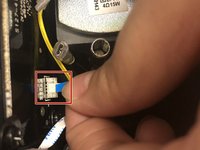
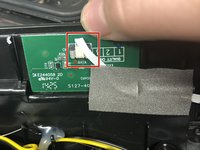
      • Grasp the wire firmly close to the base and pull straight out. Repeat this for the other end of the wire.

      • This wire is easily broken. Handle with care.

      Спросите у FixBot

      Добавить комментарий

Заключение

To reassemble your device, follow these instructions in reverse order.

Отменить: Я не выполнил это руководство.

[deleted]

Участник с: 10/22/18

695 Репутация

Автор 4 руководств

1 Комментарий к руководству

Can you pair it with Beats headphones.?

wayne rivers - Ответить Поделиться

Добавить комментарий

Статистика просмотров:

За последние 24 часов: 1

За последние 7 дней: 3

За последние 30 дней: 22

За всё время: 2,834