Введение
This guide will show you how to replace the entire top cover and button assembly on the top of the camera This guide is useful if the buttons have been damaged.
Выберете то, что вам нужно
-
-
-
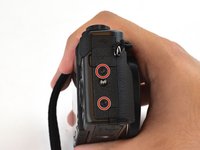
Use a Phillips #000 screwdriver to remove four 4mm screws from the NFC panel cover on the bottom of the camera.
 Спросите у FixBot
-
-
-
Use a Phillips #000 screwdriver to remove five screws from under the LCD screen:
-
Three 2.4 mm screws
-
Two 3 mm screws
-
-
-
Use a Phillips #000 screwdriver to remove two 3mm screws on the left of the camera.
-
-
-
-
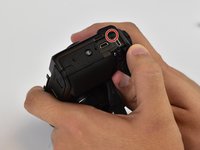
Use a Phillips #000 screwdriver to remove one 3mm and one 4mm screw on the surface of the right face of the camera, and one under the USB/HDMI cover.
-
-
-
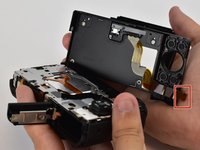
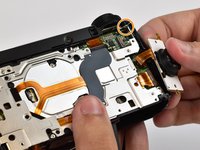
Carefully remove the back cover off of the camera by hand. Press the brown actuator in the FFC socket to release the FPC (Flexible Printed Circuit - brown cable attached to the back cover) and pull the FPC out of the socket.
-
If the FPC doesn't come out easily, you haven't yet released it. Do not force it. Do not use a spudger because it will break the socket. A broken socket cannot be fixed and has to be replaced by a skilled technician.
-
-
-
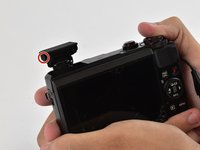
Use a Phillips #000 screwdriver to remove two 3mm screws on the pop-up flash.
-
-
-
Use a Phillips #000 screwdriver to remove two 2mm screws attaching the button panel to the camera body.
-
Use a Phillips #000 screwdriver to remove a 3mm screw from beneath the mode dial.
-
-
-
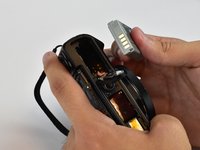
Open the battery compartment and remove the battery by flipping the small latch holding it in.
-
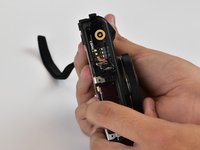
Use a Phillips #000 screwdriver to remove one 6mm screw in the bottom of the battery compartment.
-
-
-
Pry the top cover button assembly off of the camera body by detaching clips around the base of it.
-
-












To reassemble your device, follow these instructions in reverse order.
Отменить: Я не выполнил это руководство.
4 человек успешно провели ремонт по этому руководству.

Команда

USF Tampa, Team 12-3, Eyestone Spring 2017 Участник USF Tampa, Team 12-3, Eyestone Spring 2017
USFT-EYESTONE-S17S12G3
3 членов
Автор 4 руководств
1 Комментарий к руководству
We followed this guide but now my camera will not turn on. The little green light by the play button will light up but thats it. Any idea what went wrong?
