Перейти к основному содержанию
Присоединяйся к сообществу ремонтников - Создай аккаунт

ProScan PLT7223G Motherboard Replacement

Выберете то, что вам нужно

    1. ProScan PLT7223G Motherboard Replacement, Motherboard: шаг 1, изображение 1 из 1
      • Remove both 4 mm screws from the top of the tablet using a PH00 screw driver.

      Спросите у FixBot

      Добавить комментарий

    2. ProScan PLT7223G Motherboard Replacement: шаг 2, изображение 1 из 1
      • Use the blue opening tool to pry the tablet open.

      Спросите у FixBot

      Добавить комментарий

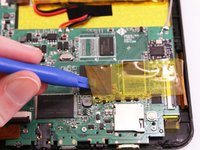
    3. ProScan PLT7223G Motherboard Replacement: шаг 3, изображение 1 из 2 ProScan PLT7223G Motherboard Replacement: шаг 3, изображение 2 из 2
      • Remove all yellow tape from the motherboard.

      Спросите у FixBot

      Добавить комментарий

    4. ProScan PLT7223G Motherboard Replacement: шаг 4, изображение 1 из 3 ProScan PLT7223G Motherboard Replacement: шаг 4, изображение 2 из 3 ProScan PLT7223G Motherboard Replacement: шаг 4, изображение 3 из 3
      • With the soldering tool remove the speaker wires, battery wires and gray wire that are connected to the motherboard.

      • Pay close attention to where each wire goes, so that you reconnect them in the correct order.

      Спросите у FixBot

      Добавить комментарий

    5. ProScan PLT7223G Motherboard Replacement: шаг 5, изображение 1 из 3 ProScan PLT7223G Motherboard Replacement: шаг 5, изображение 2 из 3 ProScan PLT7223G Motherboard Replacement: шаг 5, изображение 3 из 3
      • Lift all three ZIF connectors to disconnect the ribbon wire.

      Спросите у FixBot

      Добавить комментарий

    6. ProScan PLT7223G Motherboard Replacement: шаг 6, изображение 1 из 1
      • Use a PH00 screw driver to remove the three 4 mm screws holding the motherboard down.

      Спросите у FixBot

      Добавить комментарий

    7. ProScan PLT7223G Motherboard Replacement: шаг 7, изображение 1 из 1
      • Lift the motherboard off the device.

      Спросите у FixBot

      Добавить комментарий

Заключение

To reassemble your device, follow these instructions in reverse order.

Отменить: Я не выполнил это руководство.

2 человек успешно провели ремонт по этому руководству.

Daniel Hernandez

Участник с: 01/12/16

327 Репутация

1 руководство автора

Команда

Eastern Washington University, Team 1-4, Rowley Winter 2016 Участник Eastern Washington University, Team 1-4, Rowley Winter 2016

EWU-ROWLEY-W16S1G4

4 членов

Автор 10 руководств

1 Комментарий к руководству

Once the motherboard is out, what do you do ? Where do I go? More information would be appreciated.

rainbowsend14 - Ответить Поделиться

Добавить комментарий

Статистика просмотров:

За последние 24 часов: 1

За последние 7 дней: 10

За последние 30 дней: 38

За всё время: 1,878