Перейти к основному содержанию
Присоединяйся к сообществу ремонтников - Создай аккаунт

Razer Phone Charging Port Replacement

Выберете то, что вам нужно

  1. Razer Phone Charging Port Replacement, Display Assembly: шаг 1, изображение 1 из 3 Razer Phone Charging Port Replacement, Display Assembly: шаг 1, изображение 2 из 3 Razer Phone Charging Port Replacement, Display Assembly: шаг 1, изображение 3 из 3
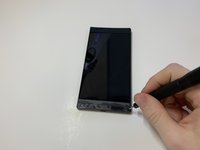
    • Remove the plastic speaker grills by using the metal spudger to pry underneath the strips.

    • Peel off the plastic speaker grill to reveal the screws.

    • Heating up the plastic grills make them easier to remove.

    • Peeling off the plastic speaker grill will ruin the adhesive used to keep it in place. A new adhesive must be used to put the grill back on the device.

    Спросите у FixBot
  2. Razer Phone Charging Port Replacement: шаг 2, изображение 1 из 2 Razer Phone Charging Port Replacement: шаг 2, изображение 2 из 2
    • Pry the top plastic grill off with the metal spudger and reveal the screws.

    Спросите у FixBot
  3. Razer Phone Charging Port Replacement: шаг 3, изображение 1 из 3 Razer Phone Charging Port Replacement: шаг 3, изображение 2 из 3 Razer Phone Charging Port Replacement: шаг 3, изображение 3 из 3
    • Remove five (two bottom, three top) 2.5 mm screws with the Phillips #000 screwdriver.

    • Remove five (four bottom, one top) 5.5 mm screws with the Torx Head T5 screwdriver.

    Спросите у FixBot
  4. Razer Phone Charging Port Replacement: шаг 4, изображение 1 из 2 Razer Phone Charging Port Replacement: шаг 4, изображение 2 из 2
    • Remove the display assembly by using the Jimmy to separate the assembly from the phone's frame.

    • Lift the display assembly away from the other half of the phone.

    Спросите у FixBot
  5. Razer Phone Charging Port Replacement: шаг 5, изображение 1 из 3 Razer Phone Charging Port Replacement: шаг 5, изображение 2 из 3 Razer Phone Charging Port Replacement: шаг 5, изображение 3 из 3
    Инструмент, используемый на этом этапе:
    Tweezers
    $4.99
    • Remove one 2.5 mm screw holding down the metal bracket connector using the Phillips #000 screwdriver.

    • Peel back the metallic shielding over the connector using tweezers.

    • Remove the metal bracket connector.

    Спросите у FixBot
  6. Razer Phone Charging Port Replacement: шаг 6, изображение 1 из 2 Razer Phone Charging Port Replacement: шаг 6, изображение 2 из 2
    • Grab hold of the the screen ribbon with the tweezers and remove it from the rest of the phone to free the assembly display.

    Спросите у FixBot
  7. Razer Phone Charging Port Replacement, Battery: шаг 7, изображение 1 из 3 Razer Phone Charging Port Replacement, Battery: шаг 7, изображение 2 из 3 Razer Phone Charging Port Replacement, Battery: шаг 7, изображение 3 из 3
    Инструмент, используемый на этом этапе:
    Tweezers
    $4.99
    • Grab hold of the connector on the right side of the phone (just above the battery) using the tweezers.

    • Remove the connector.

    Спросите у FixBot
  8. Razer Phone Charging Port Replacement: шаг 8, изображение 1 из 2 Razer Phone Charging Port Replacement: шаг 8, изображение 2 из 2
    • Remove the 2.5 mm screw holding down the bracket with a Phillips #000 screwdriver.

    • Grab the bracket with the tweezers and remove it.

    Спросите у FixBot
  9. Razer Phone Charging Port Replacement: шаг 9, изображение 1 из 3 Razer Phone Charging Port Replacement: шаг 9, изображение 2 из 3 Razer Phone Charging Port Replacement: шаг 9, изображение 3 из 3
    • Peel off and pull out the elastic tabs at the bottom of the battery.

    Спросите у FixBot
  10. Razer Phone Charging Port Replacement: шаг 10, изображение 1 из 2 Razer Phone Charging Port Replacement: шаг 10, изображение 2 из 2
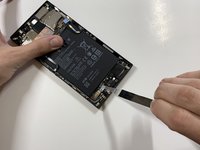
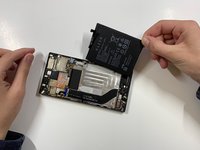
    • Carefully use the Jimmy to wedge the battery out of the phone.

    Спросите у FixBot
  11. Razer Phone Charging Port Replacement, Charging Port: шаг 11, изображение 1 из 2 Razer Phone Charging Port Replacement, Charging Port: шаг 11, изображение 2 из 2
    • Using a Phillips #000 screwdriver, take out the seven 1 mm screws on the bottom panel of the device.

    • There are a few gold brackets under some of the screws. Make sure to remove these and keep them for reassembly.

    Спросите у FixBot
  12. Razer Phone Charging Port Replacement: шаг 12, изображение 1 из 2 Razer Phone Charging Port Replacement: шаг 12, изображение 2 из 2
    Инструмент, используемый на этом этапе:
    Tweezers
    $4.99
    • Grab hold of the blue connector on the upper left side of the phone with the tweezers.

    • Remove the connector.

    Спросите у FixBot
  13. Razer Phone Charging Port Replacement: шаг 13, изображение 1 из 2 Razer Phone Charging Port Replacement: шаг 13, изображение 2 из 2
    • Use the tweezers to grab hold of the connector for the blue wire (bottom of the device), and remove the connector.

    • Use the tweezers to grab hold of the connector for the white wire, and remove the connector.

    Спросите у FixBot
  14. Razer Phone Charging Port Replacement: шаг 14, изображение 1 из 1
    • Using the tweezers, grab the detached charging port and ribbon.

    Спросите у FixBot
Заключение

To reassemble your device, follow these instructions in reverse order.

14 человек успешно провели ремонт по этому руководству.

Bryan

Участник с: 01/24/19

777 Репутация

Автор 2 руководств

Команда

Cal Poly, Team S19-G6, White Winter 2019 Участник Cal Poly, Team S19-G6, White Winter 2019

CPSU-WHITE-W19S19G6

4 членов

Автор 10 руководств

10 Комментарии к руководству

Who i can find one replacement…pls a link

Flims LP - Ответить Поделиться

Search it on Amazon.c

HolaSoy Guapo - Ответить Поделиться

hi how much you guys charge for the charging port thanks

johnny rodas - Ответить Поделиться

Does this tutorial also work for the Razer phone 2?

Derrick - Ответить Поделиться

Nah, even step one looks different for me.

Edsknife - Ответить Поделиться

Добавить комментарий

Статистика просмотров:

За последние 24 часов: 2

За последние 7 дней: 27

За последние 30 дней: 142

За всё время: 26,822