Введение
From creating macros to mapping controls, the Redragon Impact M908's programmable side buttons are a core feature of the mouse. Malfunctioning side buttons can be a critical issue, especially when performing time-sensitive tasks, such as playing online video games, leading to frustration during use. This replacement guide will walk you through the steps to replace the Redragon Impact M908's programmable side buttons.
Additionally, we use a metal spudger; however, any flat object with a pointed edge will work. Before beginning, ensure your mouse is unplugged from all devices.
Выберете то, что вам нужно
-
-
-
Pick up your mouse and flip it over.
-
Reposition the mouse so that the four feet pads are facing you.
 Спросите у FixBot
-
-
-
Place the pointed edge of a spudger under the corner of one of the feet pads.
-
Press the tool forward, lifting the foot pad until it is fully removed.
-
-
-
-
-
-
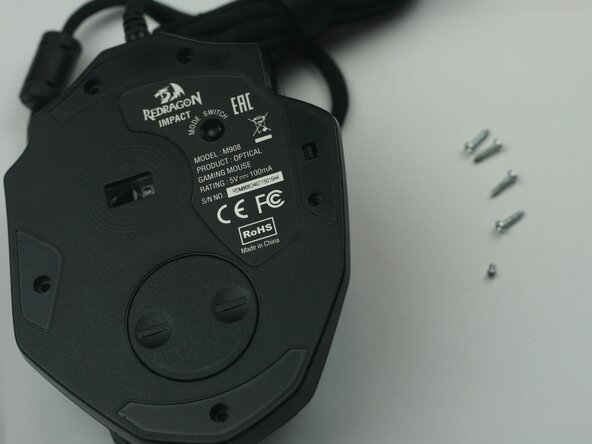
Unscrew the right 3mm screw using a Phillips #000 screwdriver.
-
Unscrew the remaining four 4mm screws using a Phillips #00 screwdriver.
-
-
-
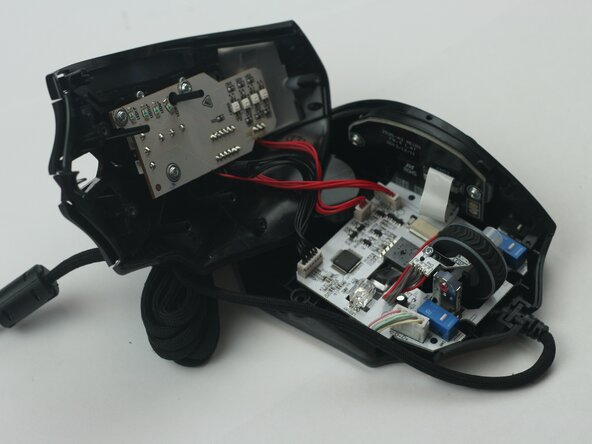
Lift the mouse's top and remove it from the bottom.
-
Place the top to the side, out of the way.
-
-
-
Identify the 12-button side panel inside the mouse on the left edge.
-
Unscrew both of the 3.5mm screws holding the 12-button side panel down using a Phillips #00 screwdriver.
-
Push the panel toward the inside of the mouse to remove it.
-
-






To reassemble your device, follow these instructions in reverse order.
Отменить: Я не выполнил это руководство.
Еще один человек закончил это руководство.

Команда

Texas Tech, Team 16-2, Samson Spring 2026 Участник Texas Tech, Team 16-2, Samson Spring 2026
TTU-SAMSON-S26S16G2
5 членов
Автор 10 руководств
