Перейти к основному содержанию
Присоединяйся к сообществу ремонтников - Создай аккаунт

Rocketfish RF-WHTIB-A Receiver Wireless Audio Module Chip Replacement

Выберете то, что вам нужно

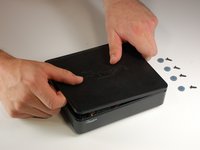
    1. Rocketfish RF-WHTIB-A Receiver Wireless Audio Module Chip Replacement, How to Open the Rocketfish RF-WHTIB-A Receiver: шаг 1, изображение 1 из 1
      • Remove the 4 rubber tabs on the bottom side of the receiver.

      Спросите у FixBot

      Добавить комментарий

    2. Rocketfish RF-WHTIB-A Receiver Wireless Audio Module Chip Replacement: шаг 2, изображение 1 из 1
      • Unscrew the four 12 mm screws on the bottom side of the receiver.

      • Use a Phillips #1 screwdriver for this step.

      Спросите у FixBot

      Добавить комментарий

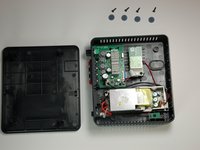
    3. Rocketfish RF-WHTIB-A Receiver Wireless Audio Module Chip Replacement: шаг 3, изображение 1 из 2 Rocketfish RF-WHTIB-A Receiver Wireless Audio Module Chip Replacement: шаг 3, изображение 2 из 2
      • Remove top casing from the receiver.

      • The receiver top casing is difficult to remove. Internal clasps may have to be broken in order to remove the top casing (this will not effect the device's function)

      Спросите у FixBot

      Добавить комментарий

    1. Rocketfish RF-WHTIB-A Receiver Wireless Audio Module Chip Replacement, Receiver Wireless Audio Module Chip: шаг 4, изображение 1 из 1
      • Unscrew the 10 mm screw holding the wireless audio module.

      Спросите у FixBot

      Добавить комментарий

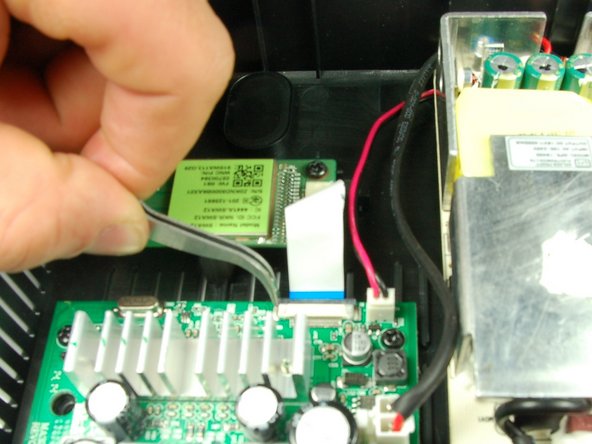
    2. Rocketfish RF-WHTIB-A Receiver Wireless Audio Module Chip Replacement: шаг 5, изображение 1 из 2 Rocketfish RF-WHTIB-A Receiver Wireless Audio Module Chip Replacement: шаг 5, изображение 2 из 2
      Инструмент, используемый на этом этапе:
      Tweezers
      $4.99
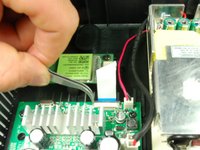
      • Slide the black retaining flap securing the ribbon cable away from the white bar.

      • There should be only a small space between the white bar and black retaining flap.

      • You may want to use tweezers for this step.

      Спросите у FixBot

      Добавить комментарий

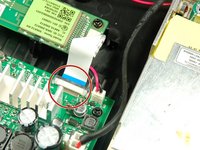
    3. Rocketfish RF-WHTIB-A Receiver Wireless Audio Module Chip Replacement: шаг 6, изображение 1 из 1
      • Using your fingers, slide the ribbon cable out from the under the black retaining flap to completely disconnect it from the device.

      Спросите у FixBot

      Добавить комментарий

Заключение

To install the new wireless audio module chip, follow these instructions in reverse order.

Отменить: Я не выполнил это руководство.

Еще один человек закончил это руководство.

Caitlin Charlton

Участник с: 03/22/15

756 Репутация

Автор 6 руководств

Команда

Baylor, Team 4-2, Williams Spring 2015 Участник Baylor, Team 4-2, Williams Spring 2015

BU-WILLIAMS-S15S4G2

3 членов

Автор 12 руководств

1 Комментарий к руководству

This is a very long time later, but where do you get the receiver chip??? Rocket fish doesn't support the product anymore

Michael Jay - Ответить Поделиться

Добавить комментарий

Статистика просмотров:

За последние 24 часов: 0

За последние 7 дней: 4

За последние 30 дней: 24

За всё время: 2,552