Перейти к основному содержанию
Присоединяйся к сообществу ремонтников - Создай аккаунт

Roku 4 Remote Control Motherboard Replacement

Выберете то, что вам нужно

  1. Roku 4 Remote Control Motherboard Replacement, Remote Control Motherboard: шаг 1, изображение 1 из 1
    • Place the remote control facing down on the table, so that the buttons are facing downwards.

    Спросите у FixBot

    Добавить комментарий

  2. Roku 4 Remote Control Motherboard Replacement: шаг 2, изображение 1 из 2 Roku 4 Remote Control Motherboard Replacement: шаг 2, изображение 2 из 2
    • Remove the battery compartment cover from the back of the remote by sliding it outwards. This should reveal the batteries.

    Спросите у FixBot

    Добавить комментарий

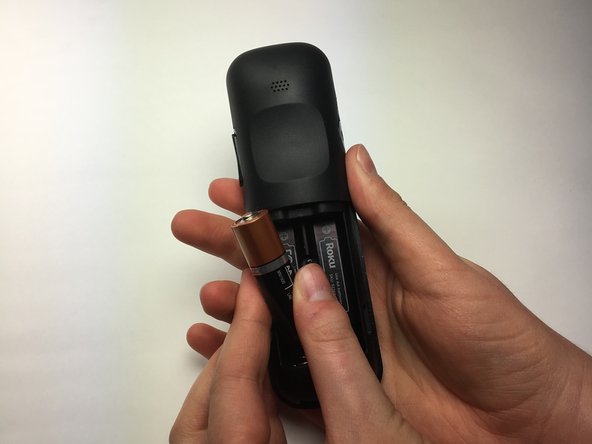
  3. Roku 4 Remote Control Motherboard Replacement: шаг 3, изображение 1 из 2 Roku 4 Remote Control Motherboard Replacement: шаг 3, изображение 2 из 2
    • Remove the batteries from the battery compartment.

    Спросите у FixBot

    Добавить комментарий

  4. Roku 4 Remote Control Motherboard Replacement: шаг 4, изображение 1 из 1
    • Turn the Phillips PH0 screwdriver counterclockwise to carefully remove the 6.9 mm screw located between both battery compartments .

    Спросите у FixBot

    Добавить комментарий

  5. Roku 4 Remote Control Motherboard Replacement: шаг 5, изображение 1 из 1
    • Wedge a plastic opening tool into the seam between the top cover and bottom casing of the device to create a gap.

    • Prying open the remote is quite difficult and requires a large amount of force. Use caution to avoid breaking the device or hurting yourself.

    • Once you have created a gap large enough for your fingers to fit between, separate the top cover from the bottom plastic casing by pulling them apart gently.

    Спросите у FixBot

    Добавить комментарий

  6. Roku 4 Remote Control Motherboard Replacement: шаг 6, изображение 1 из 3 Roku 4 Remote Control Motherboard Replacement: шаг 6, изображение 2 из 3 Roku 4 Remote Control Motherboard Replacement: шаг 6, изображение 3 из 3
    • Using your right thumb, lift up on the left side of the motherboard to remove it from the bottom plastic casing.

    Спросите у FixBot

    Добавить комментарий

Заключение

To reassemble your device, follow these instructions in reverse order.

Отменить: Я не выполнил это руководство.

2 человек успешно провели ремонт по этому руководству.

Hank Harrison

Участник с: 03/26/17

476 Репутация

Автор 3 руководств

Команда

Baylor, Team S5-G4, Williams Spring 2017 Участник Baylor, Team S5-G4, Williams Spring 2017

BU-WILLIAMS-S17S5G4

3 членов

Автор 4 руководств

0 Комментарии к руководству

Добавить комментарий

Статистика просмотров:

За последние 24 часов: 1

За последние 7 дней: 4

За последние 30 дней: 38

За всё время: 2,055