Введение
Saitek X52 Pro is a great Flight System Controller, however it is not without flaws.
For me as well as for some other users, the shooting trigger sometimes stops working. This doesn't mean you have to throw it away, instead with a little bit of patience, you can fix it yourself.
Выберете то, что вам нужно
-
-
Patience :)
-
You need 2 small screw drives with a Phillips (cross) PH1 head and Torx (star) T10 head.
-
A list of screw drive heads can be hound here http://en.wikipedia.org/wiki/List_of_scr...
 Спросите у FixBot
-
-
-
With the Phillips screwdrive unscrew the #1 to #4 screws in Fig. 1.
-
Using the Torx T10 head, unscrew the #5 (Fig. 1), #6, #7 and #8 screws (Fig. 2)
-
Using your hand, unscrew #9 (Fig. 2). Please note that you cannot completely remove this screw, but you don't need to do this anyway.
-
-
-
-
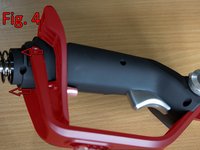
Carefully remove the plastic bracket and the support holding the "Pinkie trigger" by pushing it towards the trigger (Fig. 4).
-
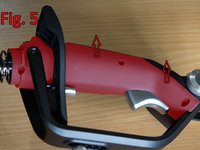
Remove the stick cover that will expose the contacts and wiring (Fig. 5)
-
-
-
Note the small metal plate.
-
Bend it just a little from the middle so that pushing the trigger actually pushes the small blue switch inside the stick.
-
Test the trigger before putting back the plastic cover
-
-
-
Note: Inside the trigger there is two screws which can be used instead of either extend or retract the pin that presses the metal plate. Try adjusting this first.
-



To reassemble your device, follow these instructions in reverse order.
Отменить: Я не выполнил это руководство.
22 человек успешно провели ремонт по этому руководству.

25 Комментарии к руководству
Amazing this is what I was exactly looking for!! My trigger stopped work but only heard a single click. Once i opened it up one of the contacts was stuck down. A little adjustment and once again it was working. Getting the hand guard off was very tricky. I did damage the cable guide thing for the pinky switch but it still works. Thank you soo much!!!
Glad it helped you! It appears to be a common fault with this joystick.
Sorry to hear about the damaging cable, but I imagine is fixable if it breaks over time.
Fixed it!! Thank you so much for this guide! I ended up over bending it and then tried to straighten it out again and then it shot off somewhere, but luckily the piece fits back in and then i tweaked it until it worked! -Nate
This helped a great deal! The Thumb POV had a screw that dropped out and prevented it from going left. By using this I found out why it wasn't working by disassembling it and solved my problem. Thanks!
I was kind of hoping this would be a full Disassembly, as i have much more intricate problem with mine.
