Перейти к основному содержанию
Присоединяйся к сообществу ремонтников - Создай аккаунт

Samsung ATIV Smart PC 500T Front-Facing Camera Replacement

Выберете то, что вам нужно

  1. Samsung ATIV Smart PC 500T Front-Facing Camera Replacement, Backplate: шаг 1, изображение 1 из 2 Samsung ATIV Smart PC 500T Front-Facing Camera Replacement, Backplate: шаг 1, изображение 2 из 2
    • Remove the stylus from the device.

    • Place the device screen-up on a hard surface, like a table.

    Спросите у FixBot
  2. Samsung ATIV Smart PC 500T Front-Facing Camera Replacement: шаг 2, изображение 1 из 3 Samsung ATIV Smart PC 500T Front-Facing Camera Replacement: шаг 2, изображение 2 из 3 Samsung ATIV Smart PC 500T Front-Facing Camera Replacement: шаг 2, изображение 3 из 3
    • Insert a plastic pry tool or opening pick between the glass and plastic case.

    • Work your way around the plastic edge, unclipping the backplate.

    • Once the clips are loosened, remove the backplate. Some force may be necessary.

    • Though you may need to use force, be careful of the pry tool slipping and hurting you!

    Спросите у FixBot
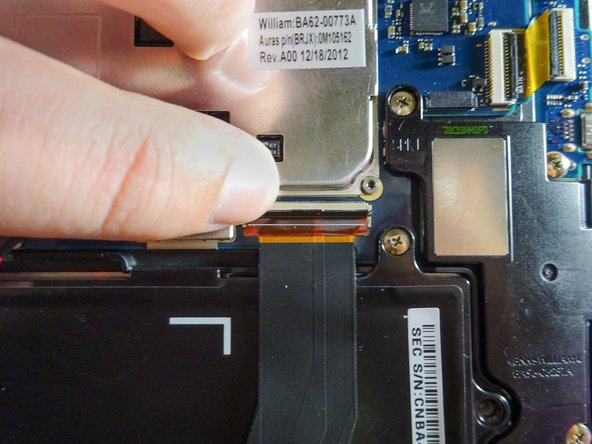
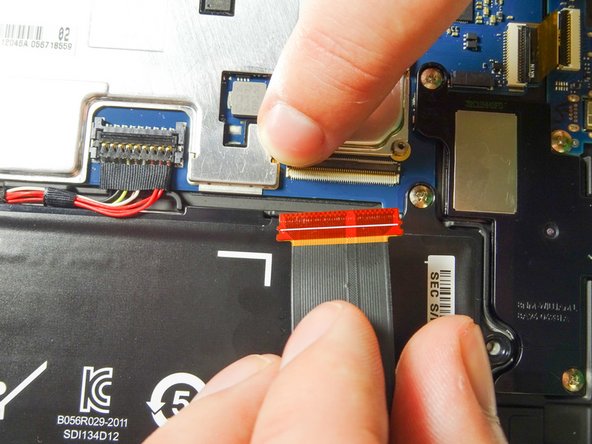
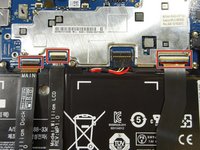
  3. Samsung ATIV Smart PC 500T Front-Facing Camera Replacement, Battery: шаг 3, изображение 1 из 3 Samsung ATIV Smart PC 500T Front-Facing Camera Replacement, Battery: шаг 3, изображение 2 из 3 Samsung ATIV Smart PC 500T Front-Facing Camera Replacement, Battery: шаг 3, изображение 3 из 3
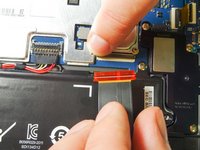
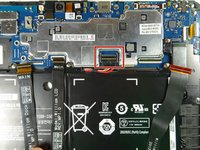
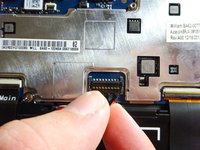
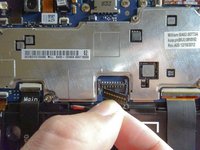
    • Disconnect the three ribbon cables from the motherboard to free the battery.

    • Use your finger to lift the flap securing each ZIF connector.

    • Slide the ribbon cable out and towards you. Now it should be completely detached.

    • Repeat with the other two cables.

    Спросите у FixBot
  4. Samsung ATIV Smart PC 500T Front-Facing Camera Replacement: шаг 4, изображение 1 из 3 Samsung ATIV Smart PC 500T Front-Facing Camera Replacement: шаг 4, изображение 2 из 3 Samsung ATIV Smart PC 500T Front-Facing Camera Replacement: шаг 4, изображение 3 из 3
    • Get a firm hold of the power cable as close to the clip as you can.

    • Pull the power cable up and out of the clip.

    Спросите у FixBot
  5. Samsung ATIV Smart PC 500T Front-Facing Camera Replacement: шаг 5, изображение 1 из 3 Samsung ATIV Smart PC 500T Front-Facing Camera Replacement: шаг 5, изображение 2 из 3 Samsung ATIV Smart PC 500T Front-Facing Camera Replacement: шаг 5, изображение 3 из 3
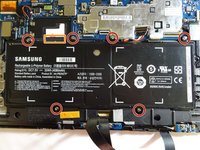
    • Remove the six 3.5-mm screws using the Phillips #00 screwdriver.

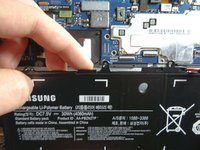
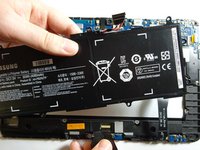
    • Lift the battery out by hooking your finger under the tab on the top side of the battery and pulling it up and towards you. The battery should come out easily.

    Спросите у FixBot
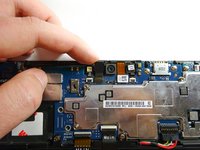
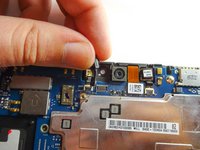
  6. Samsung ATIV Smart PC 500T Front-Facing Camera Replacement, Front-Facing Camera: шаг 6, изображение 1 из 3 Samsung ATIV Smart PC 500T Front-Facing Camera Replacement, Front-Facing Camera: шаг 6, изображение 2 из 3 Samsung ATIV Smart PC 500T Front-Facing Camera Replacement, Front-Facing Camera: шаг 6, изображение 3 из 3
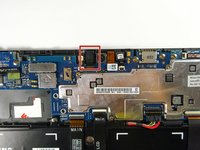
    • Gently lift the front-facing camera with your forefinger.

    • Grip the camera with your thumb and forefinger and lift up to remove the camera from the socket at its base.

    Спросите у FixBot
Заключение

To reassemble your device, follow these instructions in reverse order.

Еще один человек закончил это руководство.

Crystal Dinh

Участник с: 09/23/15

1 062 Репутация

Автор 4 руководств

Команда

Baylor, Team 6-6, Williams Fall 2015 Участник Baylor, Team 6-6, Williams Fall 2015

BU-WILLIAMS-F15S6G6

3 членов

Автор 10 руководств

0 Комментарии к руководству

Добавить комментарий

Статистика просмотров:

За последние 24 часов: 2

За последние 7 дней: 6

За последние 30 дней: 47

За всё время: 1,954