Перейти к основному содержанию
Присоединяйся к сообществу ремонтников - Создай аккаунт

Samsung Galaxy J1 Volume Button Replacement

Выберете то, что вам нужно

    1. Samsung Galaxy J1 Volume Button Replacement, Midframe: шаг 1, изображение 1 из 1
      • Insert a finger nail or plastic opening tool between the back cover and the device.

      • Gently pry the rear cover off of the back of the phone.

      Спросите у FixBot

      Добавить комментарий

    2. Samsung Galaxy J1 Volume Button Replacement: шаг 2, изображение 1 из 2 Samsung Galaxy J1 Volume Button Replacement: шаг 2, изображение 2 из 2
      • Using a finger, pull the SIM card down out of its slot.

      • Remove the SIM card.

      • The pictured device is missing the SIM card and battery.

      Спросите у FixBot

      Добавить комментарий

    3. Samsung Galaxy J1 Volume Button Replacement: шаг 3, изображение 1 из 1
      • Using a Phillips #00 screwdriver remove the eleven 3 mm screws.

      Спросите у FixBot

      Добавить комментарий

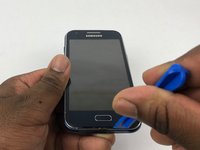
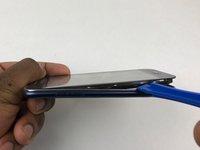
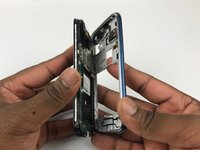
    4. Samsung Galaxy J1 Volume Button Replacement: шаг 4, изображение 1 из 3 Samsung Galaxy J1 Volume Button Replacement: шаг 4, изображение 2 из 3 Samsung Galaxy J1 Volume Button Replacement: шаг 4, изображение 3 из 3
      • Insert a plastic opening tool between the screen and the back of the device.

      • Starting at the bottom of the device, gently slide the tool along the edges of the screen.

      • Gently pry the main assembly from the midframe of the device.

      • When removing the main assembly, pry gently so as to not crack the glass screen or break any clips within the device.

      Спросите у FixBot

      Добавить комментарий

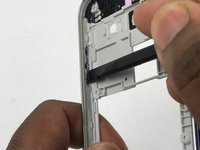
    1. Samsung Galaxy J1 Volume Button Replacement, Volume Button: шаг 5, изображение 1 из 2 Samsung Galaxy J1 Volume Button Replacement, Volume Button: шаг 5, изображение 2 из 2
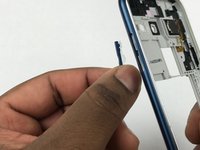
      • Use the flat edge of a spudger to push the volume button out.

      • Remove the volume button.

      Спросите у FixBot

      Добавить комментарий

Заключение

To reassemble your device, follow these instructions in reverse order.

Отменить: Я не выполнил это руководство.

6 человек успешно провели ремонт по этому руководству.

Sean Kramer

Участник с: 02/14/18

1 632 Репутация

Автор 6 руководств

Команда

USF Tampa, Team S5-G4, Eyestone Spring 2018 Участник USF Tampa, Team S5-G4, Eyestone Spring 2018

USFT-EYESTONE-S18S5G4

3 членов

Автор 54 руководств

0 Комментарии к руководству

Добавить комментарий

Статистика просмотров:

За последние 24 часов: 0

За последние 7 дней: 9

За последние 30 дней: 46

За всё время: 2,559