Перейти к основному содержанию
Присоединяйся к сообществу ремонтников - Создай аккаунт

Samsung Galaxy Tab 4 7.0 Camera Replacement

Выберете то, что вам нужно

    1. Samsung Galaxy Tab 4 7.0 Camera Replacement, Back Panel: шаг 1, изображение 1 из 2 Samsung Galaxy Tab 4 7.0 Camera Replacement, Back Panel: шаг 1, изображение 2 из 2
      • Starting at any corner, insert the pry tool between the chrome screen frame and black phone housing.

      • Slide the pry tool around the tablet while applying force to pry the screen away from the phone housing.

      Спросите у FixBot

      Добавить комментарий

    2. Samsung Galaxy Tab 4 7.0 Camera Replacement: шаг 2, изображение 1 из 1
      • Carefully separate the rear housing from the front panel assembly.

      Спросите у FixBot

      Добавить комментарий

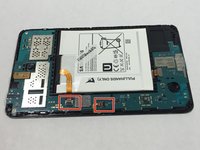
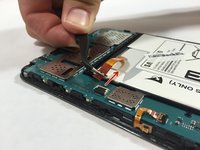
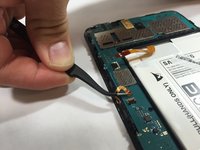
    1. Samsung Galaxy Tab 4 7.0 Camera Replacement, Motherboard: шаг 3, изображение 1 из 3 Samsung Galaxy Tab 4 7.0 Camera Replacement, Motherboard: шаг 3, изображение 2 из 3 Samsung Galaxy Tab 4 7.0 Camera Replacement, Motherboard: шаг 3, изображение 3 из 3
      Инструмент, используемый на этом этапе:
      Tweezers
      $4.99
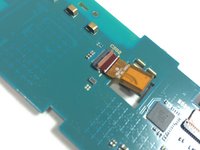
      • Using the bent tweezers, carefully pull the flat cables away from the connectors.

      • Do not bend the flat cables at the tips as they may become permanently deformed.

      Спросите у FixBot

      Добавить комментарий

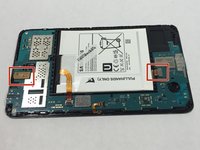
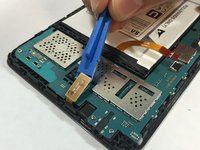
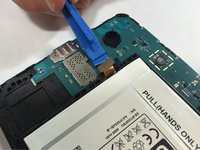
    2. Samsung Galaxy Tab 4 7.0 Camera Replacement: шаг 4, изображение 1 из 3 Samsung Galaxy Tab 4 7.0 Camera Replacement: шаг 4, изображение 2 из 3 Samsung Galaxy Tab 4 7.0 Camera Replacement: шаг 4, изображение 3 из 3
      • Using the plastic opening tool, gently pry the chip connections away from the motherboard.

      Спросите у FixBot

      Добавить комментарий

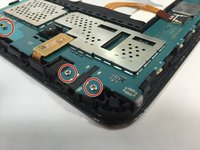
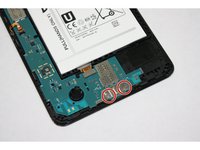
    3. Samsung Galaxy Tab 4 7.0 Camera Replacement: шаг 5, изображение 1 из 2 Samsung Galaxy Tab 4 7.0 Camera Replacement: шаг 5, изображение 2 из 2
      • Use the Phillips 000 screwdriver to remove the remaining five 1.2 mm screws.

      Спросите у FixBot

      Добавить комментарий

    4. Samsung Galaxy Tab 4 7.0 Camera Replacement: шаг 6, изображение 1 из 2 Samsung Galaxy Tab 4 7.0 Camera Replacement: шаг 6, изображение 2 из 2
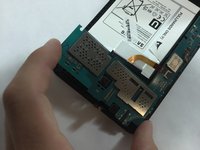
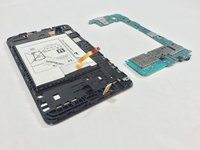
      • Use extreme care while removing the motherboard to avoid damaging the component.

      • Remove the motherboard by rotating it away from the rest of the phone as shown in the first photo.

      Спросите у FixBot

      Добавить комментарий

    1. Samsung Galaxy Tab 4 7.0 Camera Replacement, Camera: шаг 7, изображение 1 из 3 Samsung Galaxy Tab 4 7.0 Camera Replacement, Camera: шаг 7, изображение 2 из 3 Samsung Galaxy Tab 4 7.0 Camera Replacement, Camera: шаг 7, изображение 3 из 3
      Инструмент, используемый на этом этапе:
      Tweezers
      $4.99
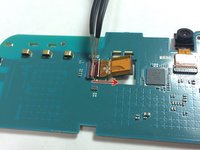
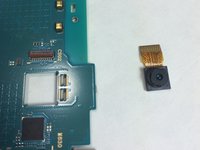
      • With the tweezers grab the base of the wire harness and slide it outward in the direction shown.

      • This can be done for either camera on the tablet.

      Спросите у FixBot

      Добавить комментарий

Заключение

To reassemble your device, follow these instructions in reverse order.

Отменить: Я не выполнил это руководство.

9 человек успешно провели ремонт по этому руководству.

Aubrey Goodwin

Участник с: 08/31/15

2 741 Репутация

Автор 3 руководств

Команда

USF Tampa, Team 1-3, Remmell Fall 2015 Участник USF Tampa, Team 1-3, Remmell Fall 2015

USFT-REMMELL-F15S1G3

4 членов

Автор 12 руководств

3 Комментарии к руководству

My camera on the Tab 4 is fine, but the len on the back is scratched. Can I get a replacement for the lens? If so where can I purchase this and is it comparable with other Tabs or Cells lens. I am not looking for a camera, Im look for the glass that protects the said camera.

Amanda Ellenberger - Ответить Поделиться

पॉप आर्ट मुझे चाहिये

Jagdish Mote - Ответить Поделиться

टॅब पार्ट खरेदी करना है मुझको

Jagdish Mote - Ответить Поделиться

Добавить комментарий

Статистика просмотров:

За последние 24 часов: 1

За последние 7 дней: 9

За последние 30 дней: 47

За всё время: 4,956