Перейти к основному содержанию
Присоединяйся к сообществу ремонтников - Создай аккаунт

Samsung SGH A707 Keypad Replacement

Выберете то, что вам нужно

  1. Samsung SGH A707 Keypad Replacement, Battery: шаг 1, изображение 1 из 1
    • Press on the markings on the cover and pull it down to reveal the battery.

    Спросите у FixBot

    Добавить комментарий

  2. Samsung SGH A707 Keypad Replacement: шаг 2, изображение 1 из 1
    • Use your fingers to pull the battery out of its position. You may also flip the phone and the battery will fall out.

    Спросите у FixBot

    Добавить комментарий

  3. Samsung SGH A707 Keypad Replacement: шаг 3, изображение 1 из 1
    • Here is the phone without the battery.

    Спросите у FixBot

    Добавить комментарий

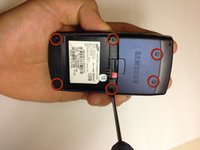
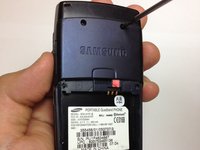
  4. Samsung SGH A707 Keypad Replacement, Motherboard: шаг 4, изображение 1 из 2 Samsung SGH A707 Keypad Replacement, Motherboard: шаг 4, изображение 2 из 2
    • Unscrew the six screws on the back of the phone using the Phillips #0 screw driver.

    Спросите у FixBot

    Добавить комментарий

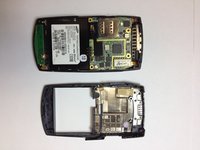
  5. Samsung SGH A707 Keypad Replacement: шаг 5, изображение 1 из 1
    • Use the prying tool the pry off the phone's plastic frame.

    Спросите у FixBot

    Добавить комментарий

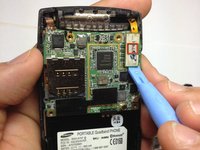
  6. Samsung SGH A707 Keypad Replacement: шаг 6, изображение 1 из 3 Samsung SGH A707 Keypad Replacement: шаг 6, изображение 2 из 3 Samsung SGH A707 Keypad Replacement: шаг 6, изображение 3 из 3
    • Use the prying tool to disconnect the rectangular connector.

    Спросите у FixBot

    Добавить комментарий

  7. Samsung SGH A707 Keypad Replacement: шаг 7, изображение 1 из 1
    • Use the prying tool to disconnect the small connector.

    Спросите у FixBot

    Добавить комментарий

  8. Samsung SGH A707 Keypad Replacement: шаг 8, изображение 1 из 1
    • Gently pull off the circuit board.

    Спросите у FixBot

    Добавить комментарий

  9. Samsung SGH A707 Keypad Replacement: шаг 9, изображение 1 из 1
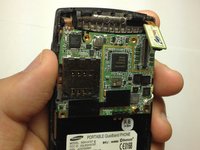
    • Here is the phone without the logic board.

    Спросите у FixBot

    Добавить комментарий

  10. Samsung SGH A707 Keypad Replacement, Keypad: шаг 10, изображение 1 из 1
    • Hold the phone and gently separate the circuit board that holds the dome switches and the front face of the phone, revealing the rubber keyboard.

    Спросите у FixBot

    Добавить комментарий

  11. Samsung SGH A707 Keypad Replacement: шаг 11, изображение 1 из 1
    • Here is the phone without the dome switch circuit board.

    Спросите у FixBot

    Добавить комментарий

  12. Samsung SGH A707 Keypad Replacement: шаг 12, изображение 1 из 2 Samsung SGH A707 Keypad Replacement: шаг 12, изображение 2 из 2
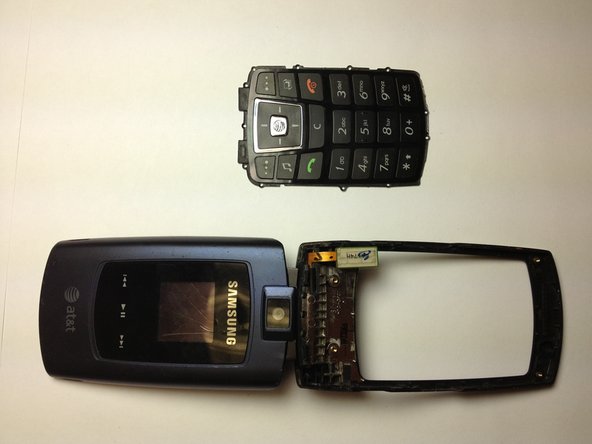
    • Here is the phone and the rubber keyboard.

    Спросите у FixBot

    Добавить комментарий

  13. Samsung SGH A707 Keypad Replacement: шаг 13, изображение 1 из 1
    • Here is the rubber keyboard and the dome switch circuit board. A quick inspection of these elements can reveal keypad malfunctions. Look for dirt or debris that do not belong there.

    Спросите у FixBot

    Добавить комментарий

Заключение

To reassemble your device, follow these instructions in reverse order.

Отменить: Я не выполнил это руководство.

yfm

Участник с: 11/06/12

25 Репутация

Автор 7 руководств

Команда

University of Maryland, Team 1-1, Calloway Fall 2012 Участник University of Maryland, Team 1-1, Calloway Fall 2012

UMD-CALLOWAY-F12S1G1

4 членов

Автор 15 руководств

0 Комментарии к руководству

Добавить комментарий

Статистика просмотров:

За последние 24 часов: 1

За последние 7 дней: 4

За последние 30 дней: 37

За всё время: 879