Перейти к основному содержанию
Присоединяйся к сообществу ремонтников - Создай аккаунт

Samsung WB1100F LCD Screen Replacement

Выберете то, что вам нужно

  1. Samsung WB1100F LCD Screen Replacement, LCD Screen Cover: шаг 1, изображение 1 из 2 Samsung WB1100F LCD Screen Replacement, LCD Screen Cover: шаг 1, изображение 2 из 2
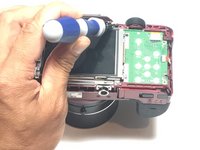
    • Remove six 1.2 mm Phillips #00 screws connected to the tripod dock and adjacent screws.

    • Remove six 1.2 mm Phillips #00 screws from the side of the camera.

  2. Samsung WB1100F LCD Screen Replacement: шаг 2, изображение 1 из 2 Samsung WB1100F LCD Screen Replacement: шаг 2, изображение 2 из 2
    • Use a plastic opening tool or spudger if available.

    • Using the flat end of a spudger, loosen the connection between the back panel and the device. Remove the back panel using your hands.

  3. Samsung WB1100F LCD Screen Replacement, LCD Screen: шаг 3, изображение 1 из 2 Samsung WB1100F LCD Screen Replacement, LCD Screen: шаг 3, изображение 2 из 2
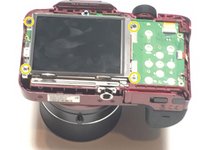
    • Remove four 1.2 mm Phillips #1 screws connected to the LCD screen.

  4. Samsung WB1100F LCD Screen Replacement: шаг 4, изображение 1 из 3 Samsung WB1100F LCD Screen Replacement: шаг 4, изображение 2 из 3 Samsung WB1100F LCD Screen Replacement: шаг 4, изображение 3 из 3
    Инструмент, используемый на этом этапе:
    Tweezers
    $4.99
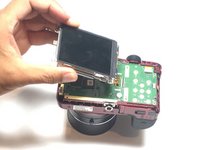
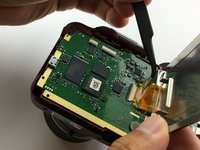
    • Flip the LCD screen over to reveal the display cable.

    • Use the tip of a spudger or your fingernail to flip up the small retaining flap on the display cable ZIF connector.

    • Be sure you are prying up on the hinged retaining flap, not the connector itself.

    • Using a pair of tweezers, remove the ribbon cable from its socket on the motherboard.

    • The white line on this ribbon cable marks the edge of the connection area. To reinstall, insert the cable into the connector up to this line, and then close the retaining flap. If the cable doesn’t insert easily up to (or very near to) this line, it’s probably misaligned and needs to be gently removed and repositioned.

Заключение

To reassemble your device, follow these instructions in reverse order.

Еще один человек закончил это руководство.

Jesse Lindsey

Участник с: 05/13/16

581 Репутация

Автор 5 руководств

Команда

Metro State, Team 1-1, Carpenter SU 2016 Участник Metro State, Team 1-1, Carpenter SU 2016

MSU-CARPENTER-SU16S1G1

3 членов

Автор 5 руководств

0 Комментарии к руководству

Добавить комментарий

Статистика просмотров:

За последние 24 часов: 0

За последние 7 дней: 7

За последние 30 дней: 21

За всё время: 591