Этот перевод был сделан машиной и пока не проверен человеком. Говорите на этом языке? Просмотрите его.
Введение
В этом руководстве по ремонту описано, как снять заднюю крышку YP-P3, извлечь плату (к которой подключен аккумулятор) и заменить сам аккумулятор.
Выберете то, что вам нужно
-
-
-
Подденьте маленькую черную пластиковую деталь, расположенную между кнопкой уменьшения громкости [-] и переключателем HOLD/ON.
 Спросите у FixBot
-
-
-
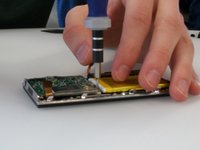
Под только что снятой пластиковой деталью находится маленький винт (Phillips #000, длина 2,0 мм). Выкрутите его с помощью отвертки Phillips #000.
-
-
-
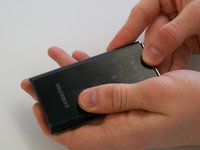
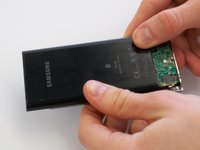
Надавите на заднюю панель обоими большими пальцами, сдвигая ее в сторону верхней части устройства.
-
Как только панель начнет двигаться, слегка приподнимите ее. После этого вы сможете полностью сдвинуть и снять заднюю панель.
-
-
-
-
-
-
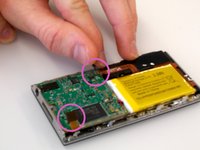
Перед снятием печатной платы необходимо отсоединить шлейфы, прикрепленные к двум сторонам платы.
-
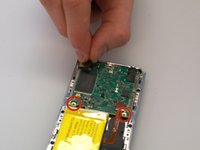
Печатная плата закреплена двумя винтами (Phillips #000, длина 2,0 мм). Выкрутите эти винты с помощью отвертки Phillips #000.
-
-
-
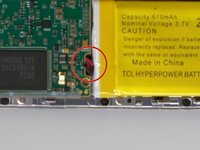
Аккумулятор также прикреплен к печатной плате с помощью шлейфа. Отсоединить шлейф, когда оба компонента установлены на место, затруднительно. Лучше частично извлечь печатную плату, чтобы освободить место для отсоединения разъема.
-
Провод, который идет к печатной плате, подсоединен с помощью пластикового элемента с двумя металлическими контактами.
-
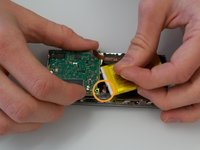
Острым концом пластиковой лопатки (spudger) подденьте пластиковый элемент, вставив ее между печатной платой и этим элементом, и аккуратно отсоедините контакты от печатной платы.
-
-
-
Наконец, отсоедините шлейф от нижней части платы. После этого вы сможете полностью извлечь плату.
-
-
-
-
-
Аккуратно подденьте аккумулятор с помощью спуджера. Аккумулятор закреплен несколькими точками клея, поэтому поначалу он может не поддаваться.
-
-








Для сборки устройства выполните эти действия в обратном порядке.
Отменить: Я не выполнил это руководство.
4 человек успешно провели ремонт по этому руководству.

Команду

Michigan Tech, Team 5-7, Lauer Spring 2014 Участник Michigan Tech, Team 5-7, Lauer Spring 2014
MTU-LAUER-S14S5G7
3 членов
Автор 24 руководств
2 Комментарии к руководству
I had to replace the battery two years ago and again today. This guide made it very easy for me. I was able to change batteries without completely removing the circuit board, but did remove the two screws and ribbon cables on the top of the board to lift up one end of the board.
Thanks for creating this guide!
Well done, thank you, now to find a digitizer screen, do you know?
