Перейти к основному содержанию
Присоединяйся к сообществу ремонтников - Создай аккаунт

Sharp Aquos Crystal Screen Replacement

Выберете то, что вам нужно

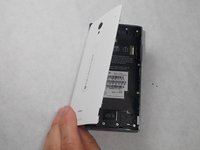
  1. Sharp Aquos Crystal Screen Replacement, Back Panel: шаг 1, изображение 1 из 3 Sharp Aquos Crystal Screen Replacement, Back Panel: шаг 1, изображение 2 из 3 Sharp Aquos Crystal Screen Replacement, Back Panel: шаг 1, изображение 3 из 3
    • Peel back the back cover of the phone from the access point to remove it. It should come off easily using your hands.

    Спросите у FixBot

    Добавить комментарий

  2. Sharp Aquos Crystal Screen Replacement, USB Port: шаг 2, изображение 1 из 2 Sharp Aquos Crystal Screen Replacement, USB Port: шаг 2, изображение 2 из 2
    • Remove seven 3mm Star #5 screws shown in the picture with a screwdriver.

    • Remove two 3.5mm Star #5 screws shown in the picture with a screwdriver.

    • Remove two 5mm Star #5 screws shown in the picture with a screwdriver.

    Спросите у FixBot

    Добавить комментарий

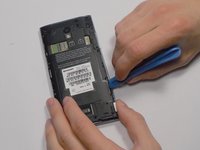
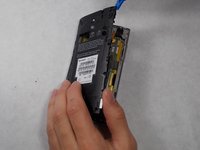
  3. Sharp Aquos Crystal Screen Replacement: шаг 3, изображение 1 из 2 Sharp Aquos Crystal Screen Replacement: шаг 3, изображение 2 из 2
    • Pry open the back panel using a plastic opening tool. Do this around the edges until you are able to lift it off.

    Спросите у FixBot

    Добавить комментарий

  4. Sharp Aquos Crystal Screen Replacement: шаг 4, изображение 1 из 2 Sharp Aquos Crystal Screen Replacement: шаг 4, изображение 2 из 2
    • Disconnect the wire by lifting it up with a plastic opening tool.

    Спросите у FixBot

    Добавить комментарий

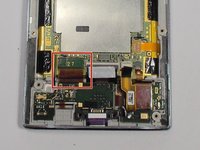
  5. Sharp Aquos Crystal Screen Replacement: шаг 5, изображение 1 из 3 Sharp Aquos Crystal Screen Replacement: шаг 5, изображение 2 из 3 Sharp Aquos Crystal Screen Replacement: шаг 5, изображение 3 из 3
    • To disconnect the cable, use the tip of a spudger or your fingernail to flip up the small retaining flap. Then, you can safely pull the ribbon cable out.

    Спросите у FixBot

    Добавить комментарий

  6. Sharp Aquos Crystal Screen Replacement: шаг 6, изображение 1 из 1
    • After removing the wires, carefully snap out the usb port with your hands. It is held down by some plastic clips, so some force may be needed.

    Спросите у FixBot

    Добавить комментарий

  7. Sharp Aquos Crystal Screen Replacement, Motherboard: шаг 7, изображение 1 из 1
    • Peel off the black pieces of tape.

    Спросите у FixBot

    Добавить комментарий

  8. Sharp Aquos Crystal Screen Replacement: шаг 8, изображение 1 из 1
    Инструмент, используемый на этом этапе:
    Tweezers
    $4.99
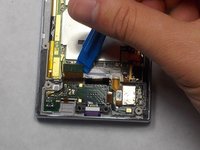
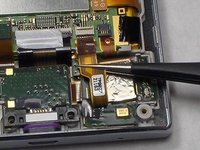
    • Use the tip of a spudger or your fingernail to flip up the small retaining flap. Then pull the cable out using tweezers.

    Спросите у FixBot

    Добавить комментарий

  9. Sharp Aquos Crystal Screen Replacement: шаг 9, изображение 1 из 2 Sharp Aquos Crystal Screen Replacement: шаг 9, изображение 2 из 2
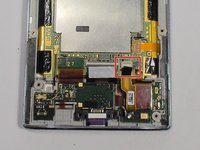
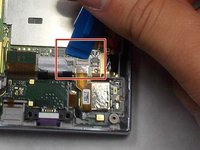
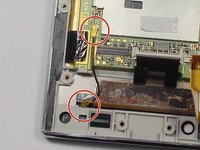
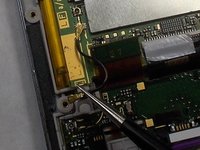
    • Remove the wire from the two marked connections using tweezers to pull the wire apart from the device.

    Спросите у FixBot

    Добавить комментарий

  10. Sharp Aquos Crystal Screen Replacement: шаг 10, изображение 1 из 1
    • Peel the tape off with your hands.

    Спросите у FixBot

    Добавить комментарий

  11. Sharp Aquos Crystal Screen Replacement: шаг 11, изображение 1 из 1
    • Lift the motherboard out with your hands.

    Спросите у FixBot

    Добавить комментарий

  12. Sharp Aquos Crystal Screen Replacement, Battery: шаг 12, изображение 1 из 1
    • Peel off the tape holding the battery down.

    Спросите у FixBot

    Добавить комментарий

  13. Sharp Aquos Crystal Screen Replacement: шаг 13, изображение 1 из 2 Sharp Aquos Crystal Screen Replacement: шаг 13, изображение 2 из 2
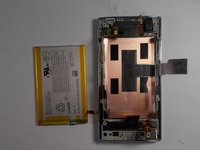
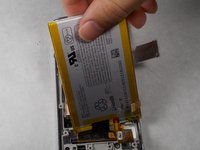
    • Lift the battery out with your hands.

    Спросите у FixBot

    Добавить комментарий

  14. Sharp Aquos Crystal Screen Replacement, Screen: шаг 14, изображение 1 из 1
    • Replace this component with the new one.

    Спросите у FixBot

    Добавить комментарий

Заключение

To reassemble your device, follow these instructions in reverse order.

Отменить: Я не выполнил это руководство.

4 человек успешно провели ремонт по этому руководству.

Felicia Imbriano

Участник с: 03/08/16

1 266 Репутация

Автор 8 руководств

Команда

UMass Dartmouth, Team 7-4, Catania Spring 2016 Участник UMass Dartmouth, Team 7-4, Catania Spring 2016

UMASSD-CATANIA-S16S7G4

3 членов

Автор 24 руководств

1 Комментарий к руководству

Thanks! I did it!

Matteo Favero - Ответить Поделиться
Добавить комментарий

Статистика просмотров:

За последние 24 часов: 2

За последние 7 дней: 17

За последние 30 дней: 78

За всё время: 11,208