Перейти к основному содержанию
Присоединяйся к сообществу ремонтников - Создай аккаунт

Sharper Image SVC430 SD Card Replacement

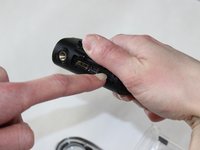
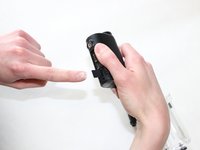
  1. Sharper Image SVC430 SD Card Replacement, SD Card: шаг 1, изображение 1 из 2 Sharper Image SVC430 SD Card Replacement, SD Card: шаг 1, изображение 2 из 2
    • Power off your device before you begin this SD card replacement.

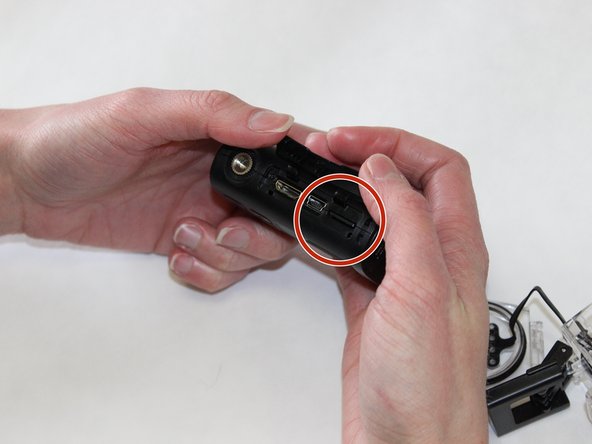
    • Use your thumb to push down on the lever that says "open" while simultaneously pushing up the latch with your other thumb.

    Спросите у FixBot

    Добавить комментарий

  2. Sharper Image SVC430 SD Card Replacement: шаг 2, изображение 1 из 2 Sharper Image SVC430 SD Card Replacement: шаг 2, изображение 2 из 2
    • Once the latch is free, simply pull the front of the waterproof case off and slide the camera out.

    Спросите у FixBot

    Добавить комментарий

  3. Sharper Image SVC430 SD Card Replacement: шаг 3, изображение 1 из 2 Sharper Image SVC430 SD Card Replacement: шаг 3, изображение 2 из 2
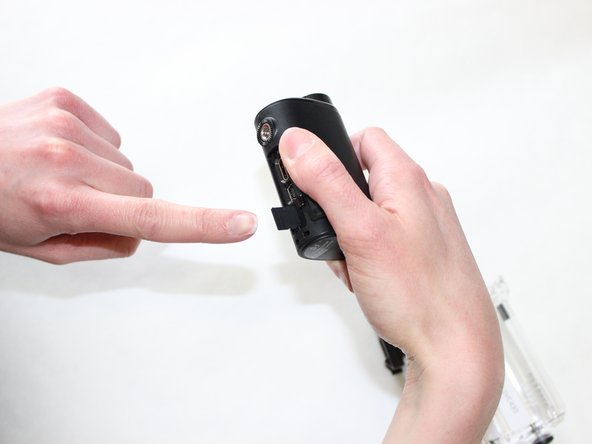
    • Locate the micro SD port at the bottom of the device by lifting up the panel.

    Спросите у FixBot

    Добавить комментарий

  4. Sharper Image SVC430 SD Card Replacement: шаг 4, изображение 1 из 2 Sharper Image SVC430 SD Card Replacement: шаг 4, изображение 2 из 2
    • To remove the micro SD card from the device, gently push the SD card and release. The SD card will pop out.

    • Be sure to gently push the SD card, pushing harder than necessary can cause the SD card or port to break.

    Спросите у FixBot

    Добавить комментарий

  5. Sharper Image SVC430 SD Card Replacement: шаг 5, изображение 1 из 1
    • When putting a micro SD card back into the device, be sure to place the exposed metal side up, as well as have the device LCD screen side up.

    Спросите у FixBot

    Добавить комментарий

  6. Sharper Image SVC430 SD Card Replacement: шаг 6, изображение 1 из 1
    • Gently push the micro SD back into the SD port until you hear a click!

    • Do not push the SD card hard. If it doesn't click, you may have the card the wrong way. Too much pressure can break the SD card or the SD port.

    Спросите у FixBot

    Добавить комментарий

Заключение

To reassemble your device, follow these instructions in reverse order.

Отменить: Я не выполнил это руководство.

2 человек успешно провели ремонт по этому руководству.

Kathryn Mattingly

Участник с: 01/29/16

698 Репутация

Автор 6 руководств

Команда

University of Kentucky Louisville, Team 1-6, Matravers Spring 2016 Участник University of Kentucky Louisville, Team 1-6, Matravers Spring 2016

LOUISVILLE-MATRAVERS-S16S1G6

4 членов

Автор 6 руководств

0 Комментарии к руководству

Добавить комментарий

Статистика просмотров:

За последние 24 часов: 1

За последние 7 дней: 13

За последние 30 дней: 30

За всё время: 574