Перейти к основному содержанию
Присоединяйся к сообществу ремонтников - Создай аккаунт

Smart Parts Ion Battery Replacement

Выберете то, что вам нужно

  1. Smart Parts Ion Battery Replacement, Hopper and the Air Tank: шаг 1, изображение 1 из 3 Smart Parts Ion Battery Replacement, Hopper and the Air Tank: шаг 1, изображение 2 из 3 Smart Parts Ion Battery Replacement, Hopper and the Air Tank: шаг 1, изображение 3 из 3
    • Remove the air tank by rotating it counterclockwise.

    • Do not pull the trigger or jostle the gun, there will still be pressurized air inside the gun that could be expelled and cause bodily harm if injected into eyes and/or skin.

    • The pressure gauge will indicate the leftover air in the gun.

    Спросите у FixBot

    Добавить комментарий

  2. Smart Parts Ion Battery Replacement: шаг 2, изображение 1 из 2 Smart Parts Ion Battery Replacement: шаг 2, изображение 2 из 2
    • Remove the hopper by pulling it out of the feed tube, located on the top of the body. The hopper should easily come off when pulled straight up.

    Спросите у FixBot

    Добавить комментарий

  3. Smart Parts Ion Battery Replacement, Smart Parts Ion De-Gassing: шаг 3, изображение 1 из 1
    • Turn the gun on by pressing the power button until the red light blinks.

    • Turn vision mode off by pressing the power button again.

    • Red light should be flashing in a double blink sequence.

    Спросите у FixBot

    Добавить комментарий

  4. Smart Parts Ion Battery Replacement: шаг 4, изображение 1 из 1
    • Pull the trigger to release the air in the gun.

    • Pressurized air can be forceful, causing particles to be ejected from the gun into your eyes and/or skin. When air bubbles enter the bloodstream, they can block blood vessels, causing embolisms. To avoid this, make sure to point the gun in a safe direction when pulling the trigger because air will be released from the gun.

    Спросите у FixBot

    Добавить комментарий

  5. Smart Parts Ion Battery Replacement, Grip: шаг 5, изображение 1 из 1
    • Remove the four 8mm screws on each side of the gun's grip using a Phillips #2 screwdriver.

    Спросите у FixBot

    Добавить комментарий

  6. Smart Parts Ion Battery Replacement: шаг 6, изображение 1 из 1
    • Remove the grip by sliding it towards the front of the gun.

    Спросите у FixBot

    Добавить комментарий

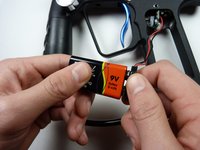
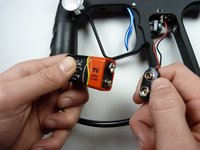
  7. Smart Parts Ion Battery Replacement, Battery: шаг 7, изображение 1 из 2 Smart Parts Ion Battery Replacement, Battery: шаг 7, изображение 2 из 2
    • Remove the 9V battery by unsnapping it.

    Спросите у FixBot

    Добавить комментарий

Заключение

To reassemble your device, follow these instructions in reverse order.

Отменить: Я не выполнил это руководство.

Shane Villalpando

Участник с: 02/02/15

1 031 Репутация

Автор 10 руководств

Команда

Cal Poly, Team 8-42, Amido Winter 2015 Участник Cal Poly, Team 8-42, Amido Winter 2015

CPSU-AMIDO-W15S8G42

4 членов

Автор 10 руководств

0 Комментарии к руководству

Добавить комментарий

Статистика просмотров:

За последние 24 часов: 1

За последние 7 дней: 6

За последние 30 дней: 35

За всё время: 2,263