Перейти к основному содержанию
Присоединяйся к сообществу ремонтников - Создай аккаунт

Sony DVP-NS325 Power Cable Replacement

Выберете то, что вам нужно

    1. Sony DVP-NS325 Power Cable Replacement, Outer Case: шаг 1, изображение 1 из 3 Sony DVP-NS325 Power Cable Replacement, Outer Case: шаг 1, изображение 2 из 3 Sony DVP-NS325 Power Cable Replacement, Outer Case: шаг 1, изображение 3 из 3
      • Use a Phillips screwdriver to unscrew the five screws.

      Спросите у FixBot

      Добавить комментарий

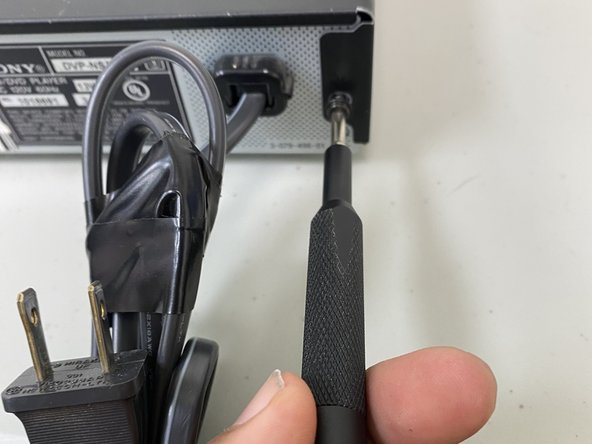
    2. Sony DVP-NS325 Power Cable Replacement: шаг 2, изображение 1 из 3 Sony DVP-NS325 Power Cable Replacement: шаг 2, изображение 2 из 3 Sony DVP-NS325 Power Cable Replacement: шаг 2, изображение 3 из 3
      • Use the Philips screwdriver to remove the screws located on the sides and the back.

      • Not shown are the right side screw and the middle screw.

      Спросите у FixBot

      Добавить комментарий

    3. Sony DVP-NS325 Power Cable Replacement: шаг 3, изображение 1 из 1
      • Use a spudger to separate the case from the chassis.

      • Remove the case.

      Спросите у FixBot

      Добавить комментарий

    1. Sony DVP-NS325 Power Cable Replacement, Power Cable: шаг 4, изображение 1 из 2 Sony DVP-NS325 Power Cable Replacement, Power Cable: шаг 4, изображение 2 из 2
      • Unscrew all screws using a Phillips screwdriver removing the outer case to access the power cable.

      Спросите у FixBot

      Добавить комментарий

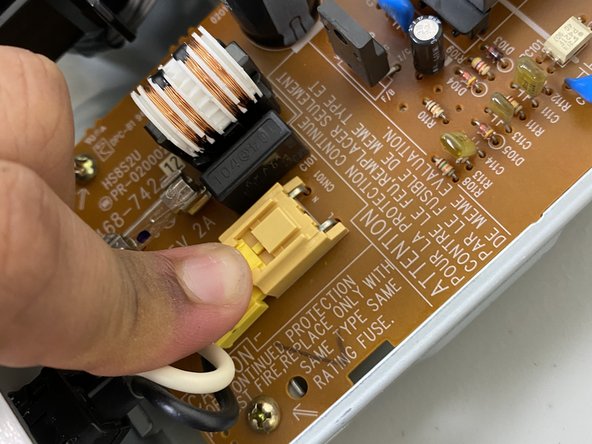
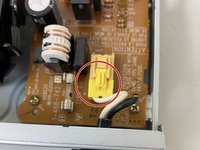
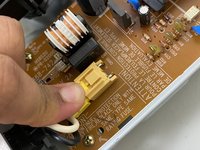
    2. Sony DVP-NS325 Power Cable Replacement: шаг 5, изображение 1 из 2 Sony DVP-NS325 Power Cable Replacement: шаг 5, изображение 2 из 2
      • Using a finger, press down on the clip to remove the connector for the cable.

      Спросите у FixBot

      Добавить комментарий

    3. Sony DVP-NS325 Power Cable Replacement: шаг 6, изображение 1 из 1
      • Using two fingers, press in both the top and bottom clips to release the holder for the power cable to remove the cable completely.

      Спросите у FixBot

      Добавить комментарий

    4. Sony DVP-NS325 Power Cable Replacement: шаг 7, изображение 1 из 1
      • Pull the cable out of the case to fully replace the cable.

      Спросите у FixBot

      Добавить комментарий

Заключение

To reassemble your device, follow these instructions in reverse order.

Отменить: Я не выполнил это руководство.

Еще один человек закончил это руководство.

isaiah davila

Участник с: 09/13/23

520 Репутация

Автор 4 руководств

Команда

University of North Texas, Team 6-7, Kilpatrick Fall 2023 Участник University of North Texas, Team 6-7, Kilpatrick Fall 2023

UNT-KILPATRICK-F23S6G7

1 член

Автор 8 руководств

0 Комментарии к руководству

Добавить комментарий

Статистика просмотров:

За последние 24 часов: 1

За последние 7 дней: 10

За последние 30 дней: 31

За всё время: 314