Перейти к основному содержанию
Присоединяйся к сообществу ремонтников - Создай аккаунт

Sony DVP-SR200P DVD Reader Replacement

Выберете то, что вам нужно

    1. Sony DVP-SR200P DVD Reader Replacement, Top Cover: шаг 1, изображение 1 из 2 Sony DVP-SR200P DVD Reader Replacement, Top Cover: шаг 1, изображение 2 из 2
      • Remove the five #1 Phillips screws (black, 3/16") attaching the cover to the DVD player.

      • One 3/16" screw on the right side of the DVD player.

      • One 3/16" screw on the left side of the DVD player (directly opposite of other screw).

      • Three 3/16" screws on the back of the DVD player.

      Спросите у FixBot

      Добавить комментарий

    2. Sony DVP-SR200P DVD Reader Replacement: шаг 2, изображение 1 из 2 Sony DVP-SR200P DVD Reader Replacement: шаг 2, изображение 2 из 2
      • Slide the cover away from the front of the DVD player until it is off.

      Спросите у FixBot

      Добавить комментарий

    1. Sony DVP-SR200P DVD Reader Replacement, Processing Board: шаг 3, изображение 1 из 1
      • Remove the blue tape from the processing board by gently pulling upward.

      Спросите у FixBot

      Добавить комментарий

    2. Sony DVP-SR200P DVD Reader Replacement: шаг 4, изображение 1 из 2 Sony DVP-SR200P DVD Reader Replacement: шаг 4, изображение 2 из 2
      Инструмент, используемый на этом этапе:
      Tweezers
      $4.99
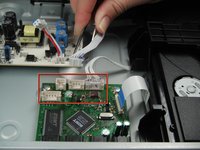
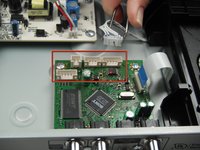
      • Use the tweezers to remove the four sets of wires connected to the processing board. Start with the cord located in front of the row of three cords.

      • The wires may be difficult to remove. Wiggling them while lifting them up may help remove them.

      Спросите у FixBot

      Добавить комментарий

    3. Sony DVP-SR200P DVD Reader Replacement: шаг 5, изображение 1 из 1
      • Handle the processing board with care. It is fragile.

      • Unscrew the two #1 Phillips screws (silver, 3/16") located on the two edge corners of the processing board.

      Спросите у FixBot

      Добавить комментарий

    4. Sony DVP-SR200P DVD Reader Replacement: шаг 6, изображение 1 из 1
      • Orient the DVD player so that you are facing the video and audio jacks.

      • Unscrew the two #1 Phillips screws (silver, 3/16") located on the outside of the DVD player

      • The processing board is now free to be removed and replaced.

      Спросите у FixBot

      Добавить комментарий

    1. Sony DVP-SR200P DVD Reader Replacement, DVD Drive: шаг 7, изображение 1 из 1
      • Orient the DVD player so the front of the DVD player is opposite of you.

      • Remove the two #1 Phillips screws (silver, 3/16") that attach the DVD drive to the bottom of the DVD player.

      Спросите у FixBot

      Добавить комментарий

    2. Sony DVP-SR200P DVD Reader Replacement: шаг 8, изображение 1 из 1
      • Remove the DVD drive by pulling it backward and upward while ensuring that it is free of any braces.

      Спросите у FixBot

      Добавить комментарий

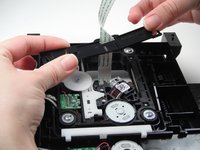
    1. Sony DVP-SR200P DVD Reader Replacement, DVD Reader: шаг 9, изображение 1 из 3 Sony DVP-SR200P DVD Reader Replacement, DVD Reader: шаг 9, изображение 2 из 3 Sony DVP-SR200P DVD Reader Replacement, DVD Reader: шаг 9, изображение 3 из 3
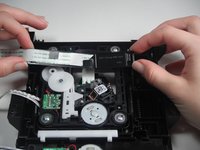
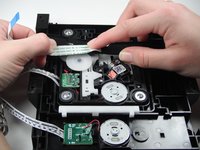
      • Flip the DVD drive upside down, to match the orientation of the first picture.

      • Carefully remove the white ribbon cable from the brace holding it in place by sliding it out towards you.

      • Next remove the brace from the DVD drive. Carefully wiggle and pull the brace upward as the white ribbon cable slides out through the brace.

      Спросите у FixBot

      Добавить комментарий

    2. Sony DVP-SR200P DVD Reader Replacement: шаг 10, изображение 1 из 1
      • Remove the four silver #1 Phillips 3/16''screws to free the DVD reader from the DVD drive.

      Спросите у FixBot

      Добавить комментарий

    3. Sony DVP-SR200P DVD Reader Replacement: шаг 11, изображение 1 из 1
      • Remove the DVD reader from the DVD drive by pulling it upwards off of the drive.

      • The DVD reader can now be replaced.

      Спросите у FixBot

      Добавить комментарий

Заключение

To reassemble your device, follow these instructions in reverse order.

Отменить: Я не выполнил это руководство.

3 человек успешно провели ремонт по этому руководству.

Jose Coronel

Участник с: 01/11/13

84 Репутация

1 руководство автора

Команда

Cal Poly, Team 5-17, Forte Winter 2013 Участник Cal Poly, Team 5-17, Forte Winter 2013

CPSU-FORTE-W13S5G17

5 членов

Автор 18 руководств

1 Комментарий к руководству

Which part help to play games in dvd player

WWE Final Fighters - Ответить Поделиться

Добавить комментарий

Статистика просмотров:

За последние 24 часов: 2

За последние 7 дней: 15

За последние 30 дней: 51

За всё время: 5,577