Этот перевод был сделан машиной и пока не проверен человеком. Говорите на этом языке? Просмотрите его.
Введение
Используйте это руководство, чтобы вернуть к жизни ваш Sony Ericsson W810i.
В этом руководстве всего три простых шага, которые покажут, как заменить аккумулятор на вашем Sony Ericsson W810i.
Это руководство может понадобиться, если аккумулятор вашего устройства работает некорректно или его емкость стала меньше, чем была при покупке устройства.
После завершения замены аккумулятора устройство должно включаться и работать в штатном режиме.
Никаких специальных инструментов или навыков не требуется.
Информация об аккумуляторе:
- Li-Po 900 мА·ч (BST-37)
- В режиме ожидания: до 350 ч
- В режиме разговора: до 8 ч
-
-
-
Положите Sony Ericsson W810I экраном вниз так, чтобы крышка аккумуляторного отсека была направлена вверх, как показано на рисунке.
 Спросите у FixBot
-
-
-
-
Снимите крышку аккумулятора: надавите на Singular Symbol, а затем сместите усилие в сторону нижнего края телефона.
-
-
-
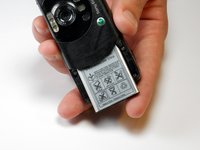
Приподнимите нижнюю часть аккумулятора большим пальцем и наклоните его так, чтобы отверстие в нижней части корпуса было направлено вниз. Аккумулятор должен выскользнуть.
-
-


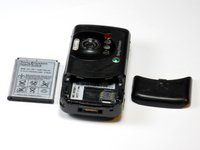
Для сборки устройства выполните эти действия в обратном порядке.
Отменить: Я не выполнил это руководство.
2 человек успешно провели ремонт по этому руководству.

Команда

Cuesta, Team 1-7, Zipperian Fall 2011 Участник Cuesta, Team 1-7, Zipperian Fall 2011
CUESTA-ZIPPERIAN-F11S1G7
1 член
Автор 84 руководств
