Перейти к основному содержанию
Присоединяйся к сообществу ремонтников - Создай аккаунт

Sony M-430 Microcassette-Corder Back Cover Replacement

Выберете то, что вам нужно

    1. Sony M-430 Microcassette-Corder Back Cover Replacement, Battery: шаг 1, изображение 1 из 1
      • Find the arrow on the battery cover on the back of the device.

      • While pressing down on the arrow, slide the cover towards the bottom of the recorder until it clicks.

      Спросите у FixBot

      Добавить комментарий

    2. Sony M-430 Microcassette-Corder Back Cover Replacement: шаг 2, изображение 1 из 2 Sony M-430 Microcassette-Corder Back Cover Replacement: шаг 2, изображение 2 из 2
      • Lift the cover and remove the batteries.

      Спросите у FixBot

      Добавить комментарий

    1. Sony M-430 Microcassette-Corder Back Cover Replacement, Back Cover: шаг 3, изображение 1 из 2 Sony M-430 Microcassette-Corder Back Cover Replacement, Back Cover: шаг 3, изображение 2 из 2
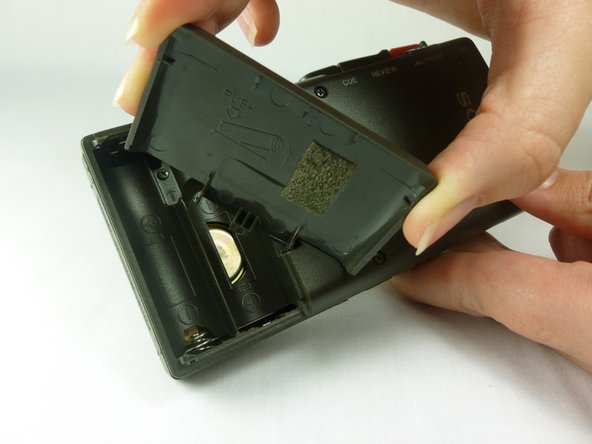
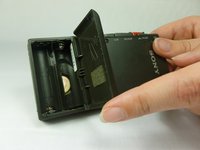
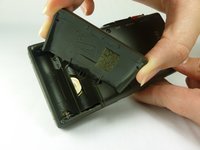
      • Remove the battery cover by first tilting it so it is at a right angle with the rest of the device.

      • Next, twist it to the side as shown in the second picture. The lid should simply snap off.

      • Potential for device damage: be careful not to apply too much force, as the lid may break.

      Спросите у FixBot

      Добавить комментарий

    2. Sony M-430 Microcassette-Corder Back Cover Replacement: шаг 4, изображение 1 из 2 Sony M-430 Microcassette-Corder Back Cover Replacement: шаг 4, изображение 2 из 2
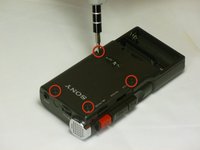
      • Use a #00 Phillips head screwdriver to remove the four (1.7x16 mm) screws from the back case.

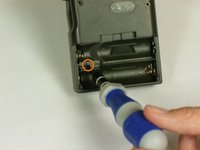
      • Next, use the same screwdriver to unscrew the (1.7X5 mm) screw, which is located inside the battery compartment.

      Спросите у FixBot

      Добавить комментарий

    3. Sony M-430 Microcassette-Corder Back Cover Replacement: шаг 5, изображение 1 из 1
      • Use a spudger to push in the two tabs located on the bottom of the device.

      • It works best to push the tabs at an upward angle (towards the top of the battery compartment). It may take a decent amount of force in order to push in the tabs.

      Спросите у FixBot

      Добавить комментарий

    4. Sony M-430 Microcassette-Corder Back Cover Replacement: шаг 6, изображение 1 из 1
      • With a firm grip on the larger half, remove the back cover by lifting first on the battery area.

      • The back cover should lift cleanly off.

      Спросите у FixBot

      Добавить комментарий

Заключение

To reassemble your device, follow these instructions in reverse order.

Отменить: Я не выполнил это руководство.

Еще один человек закончил это руководство.

Matt Teare

Участник с: 01/20/12

35 Репутация

Автор 3 руководств

Команда

Cal Poly, Team 10-34, Amido Winter 2012 Участник Cal Poly, Team 10-34, Amido Winter 2012

CPSU-AMIDO-W12S10G34

4 членов

Автор 70 руководств

0 Комментарии к руководству

Добавить комментарий

Статистика просмотров:

За последние 24 часов: 0

За последние 7 дней: 4

За последние 30 дней: 36

За всё время: 2,703