Введение
When working with electrical components, be sure to avoid loose wires.
Выберете то, что вам нужно
-
-
-
Locate the left side designation on the headband-earpiece junction.
-
The battery is in the right earpiece.
-
The motherboard is in the left earpiece.
 Спросите у FixBot
-
-
-
Gently pull around the perimeter of the left ear cushion until it comes off.
-
-
-
-
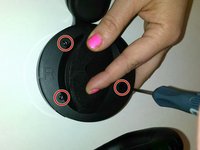
Use the PH00 Screwdriver to remove the three Phillips 6mm screws around the perimeter of the ear cup.
-
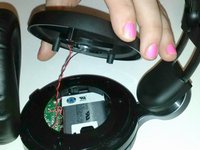
Gently pull the outer ear rim off of the headset assembly.
-
-
Инструмент, используемый на этом этапе:Tweezers$4.99
-
Using tweezers, gently pry the red and black speaker wires from the attached socket.
-
-
-
-
Инструмент, используемый на этом этапе:Tweezers$4.99
-
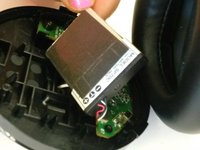
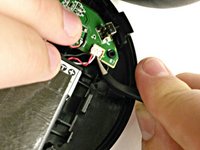
Lift up battery and disconnect wires using tweezers.
-
Use a new battery for reconstruction.
-
-




To reassemble your device, follow these instructions in reverse order.
Отменить: Я не выполнил это руководство.
8 человек успешно провели ремонт по этому руководству.

8 Комментарии к руководству
Where can I buy the replacement battery for this?
Pretty hard to find...
Replacement batteries can be found by googling "SP70C battery". It is a Lithium battery with 900mAh and a 3.7v output. AliExpress shows them for $11 including shipping.
Can I mod and replace the battery with a bigger one with no white connection, just positive and negative? Thanks!
Thank you so much for this guide. I got a 1000mAh batter from Amazon for 10 dollars. It lasts way longer and was extremely easy to install. Very thankful for this. Thanks!
i just attempted... the connector to the battery just pulled off. NOTE: Pull up from PCB not out. The connector sets down into it.
