Перейти к основному содержанию
Присоединяйся к сообществу ремонтников - Создай аккаунт

Sony Pulse Elite Edition Speaker Replacement

Выберете то, что вам нужно

    1. Sony Pulse Elite Edition Speaker Replacement, Identifying Earpiece: шаг 1, изображение 1 из 1
      • Locate the left side designation on the headband-earpiece junction.

      • The battery is in the right earpiece.

      • The motherboard is in the left earpiece.

      Спросите у FixBot

      Добавить комментарий

    2. Sony Pulse Elite Edition Speaker Replacement, Ear Cushion Removal: шаг 2, изображение 1 из 2 Sony Pulse Elite Edition Speaker Replacement, Ear Cushion Removal: шаг 2, изображение 2 из 2
      • Gently pull around the perimeter of the left ear cushion until it comes off.

      Спросите у FixBot

      Добавить комментарий

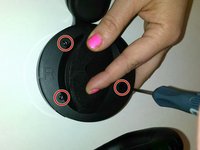
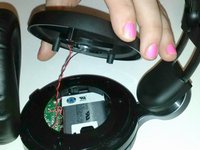
    3. Sony Pulse Elite Edition Speaker Replacement, Outer Ear Rim Removal: шаг 3, изображение 1 из 2 Sony Pulse Elite Edition Speaker Replacement, Outer Ear Rim Removal: шаг 3, изображение 2 из 2
      • Use the PH00 Screwdriver to remove the three Phillips 6mm screws around the perimeter of the ear cup.

      • Gently pull the outer ear rim off of the headset assembly.

      • Harsh removal may cause permanent damage to the speaker wires.

      Спросите у FixBot

      Добавить комментарий

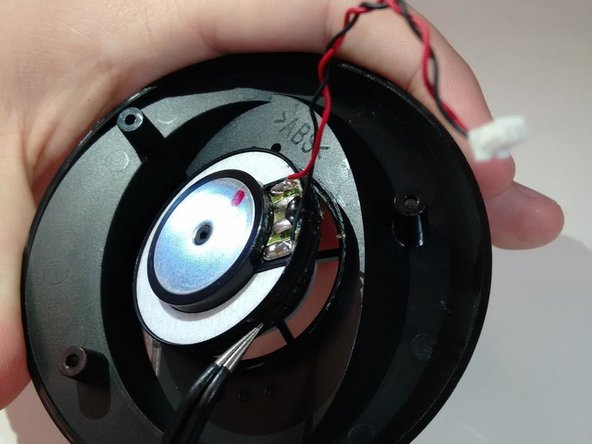
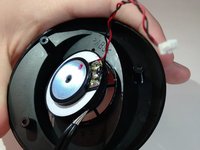
    4. Sony Pulse Elite Edition Speaker Replacement, Remove Speaker Housing: шаг 4, изображение 1 из 1
      Инструмент, используемый на этом этапе:
      Tweezers
      $4.99
      • Using tweezers, gently pry the red and black speaker wires from the attached socket.

      Спросите у FixBot

      Добавить комментарий

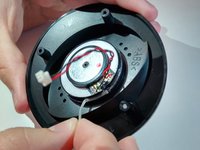
    1. Sony Pulse Elite Edition Speaker Replacement, Speaker: шаг 5, изображение 1 из 2 Sony Pulse Elite Edition Speaker Replacement, Speaker: шаг 5, изображение 2 из 2
      • Locate the junction of the electrical speaker and the plastic speaker housing.

      • Use the spudger to sever the glue at this junction.

      • Remove the electrical speaker from the speaker housing.

      Спросите у FixBot

      Добавить комментарий

    2. Sony Pulse Elite Edition Speaker Replacement: шаг 6, изображение 1 из 1
      • Use super glue to fasten the replacement speaker into the speaker housing.

      Спросите у FixBot

      Добавить комментарий

Заключение

To reassemble your device, follow these instructions in reverse order.

Отменить: Я не выполнил это руководство.

4 человек успешно провели ремонт по этому руководству.

Armon Davani

Участник с: 01/29/15

400 Репутация

Автор 2 руководств

0 Комментарии к руководству

Добавить комментарий

Статистика просмотров:

За последние 24 часов: 0

За последние 7 дней: 8

За последние 30 дней: 42

За всё время: 3,672