Перейти к основному содержанию
Присоединяйся к сообществу ремонтников - Создай аккаунт

Sony a7 Rear Disassembly Replacement

Выберете то, что вам нужно

  1. Sony a7 Rear Disassembly  Replacement, Rear Disassembly: шаг 1, изображение 1 из 1
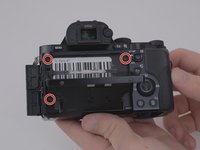
    • Remove the eyepiece cover by removing the four M1.5x4mm screws with a PH00 Phillips screwdriver.

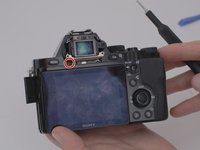
    • Remove the M1.5x4mm screw that retains the adjustment wheel with a PH00 Phillips screwdriver.

  2. Sony a7 Rear Disassembly  Replacement: шаг 2, изображение 1 из 3 Sony a7 Rear Disassembly  Replacement: шаг 2, изображение 2 из 3 Sony a7 Rear Disassembly  Replacement: шаг 2, изображение 3 из 3
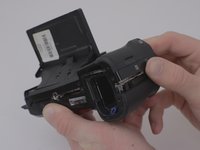
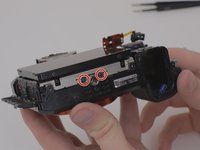
    • Remove the six M1.5x4mm screws with a PH00 Phillips screwdriver.

  3. Sony a7 Rear Disassembly  Replacement: шаг 3, изображение 1 из 1
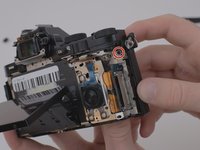
    • Remove one M1.5x4mm screw with a PH00 Phillips screwdriver.

  4. Sony a7 Rear Disassembly  Replacement: шаг 4, изображение 1 из 2 Sony a7 Rear Disassembly  Replacement: шаг 4, изображение 2 из 2
    • Remove the four M 1.5x2mm screws.

  5. Sony a7 Rear Disassembly  Replacement: шаг 5, изображение 1 из 3 Sony a7 Rear Disassembly  Replacement: шаг 5, изображение 2 из 3 Sony a7 Rear Disassembly  Replacement: шаг 5, изображение 3 из 3
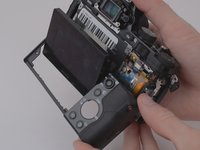
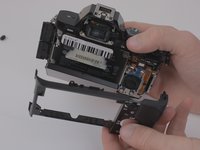
    • Once the screws have been removed, unsnap and lift the rear plastic cover off of the camera.

  6. Sony a7 Rear Disassembly  Replacement: шаг 6, изображение 1 из 1
    Инструмент, используемый на этом этапе:
    Tweezers
    $4.99
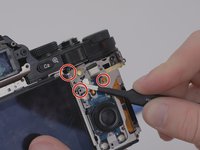
    • Using the blunt tweezers, remove the blue ribbon cable.

    • For additional guidance and tips on how to properly attach and detach connector cables, please reference iFixit's guide to connector cables here.

  7. Sony a7 Rear Disassembly  Replacement: шаг 7, изображение 1 из 2 Sony a7 Rear Disassembly  Replacement: шаг 7, изображение 2 из 2
    • Place the tweezers on the side of the circuit board and lift it from underneath so as to free it from the three retaining tabs.

  8. Sony a7 Rear Disassembly  Replacement: шаг 8, изображение 1 из 3 Sony a7 Rear Disassembly  Replacement: шаг 8, изображение 2 из 3 Sony a7 Rear Disassembly  Replacement: шаг 8, изображение 3 из 3
    • Remove four M1.5x4mm screws using a PH00 Phillips screwdriver.

  9. Sony a7 Rear Disassembly  Replacement: шаг 9, изображение 1 из 1
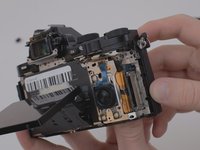
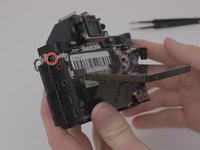
    • Lift the metal plate and LCD screen away from the camera body.

  10. Sony a7 Rear Disassembly  Replacement: шаг 10, изображение 1 из 1
    • Detach the amber ribbon cable from the motherboard.

    • For additional guidance and tips on how to properly attach and detach connector cables, please reference iFixit's guide to connector cables here.

Заключение

To reassemble your device, follow these instructions in reverse order.

9 человек успешно провели ремонт по этому руководству.

Jeffrey Coleman

Участник с: 01/14/20

1 364 Репутация

Автор 6 руководств

Команда

0 Комментарии к руководству

Добавить комментарий

Статистика просмотров:

За последние 24 часов: 8

За последние 7 дней: 34

За последние 30 дней: 137

За всё время: 9,350