Перейти к основному содержанию
Присоединяйся к сообществу ремонтников - Создай аккаунт

TRS-80 Color Computer Motherboard Replacement

Выберете то, что вам нужно

    1. TRS-80 Color Computer Motherboard Replacement, Outside Casing: шаг 1, изображение 1 из 1
      • Flip the computer over.

      • Remove the two 24.1mm Phillips screws near the front of the case.

      • Remove the five 33.0 mm Phillips screws towards the back of the case.

      Спросите у FixBot

      Добавить комментарий

    2. TRS-80 Color Computer Motherboard Replacement: шаг 2, изображение 1 из 2 TRS-80 Color Computer Motherboard Replacement: шаг 2, изображение 2 из 2
      • Carefully flip the computer right side up.

      • Lift off the top half of the case.

      Спросите у FixBot

      Добавить комментарий

    1. TRS-80 Color Computer Motherboard Replacement, Keyboard: шаг 3, изображение 1 из 2 TRS-80 Color Computer Motherboard Replacement, Keyboard: шаг 3, изображение 2 из 2
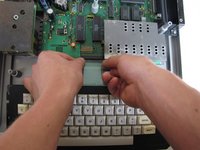
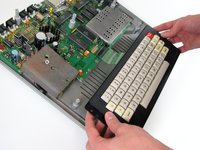
      • Near the motherboard, gently pull the keyboard ribbon cable until it becomes free.

      • Lift the keyboard out of the case.

      Спросите у FixBot

      Добавить комментарий

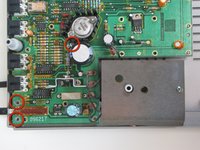
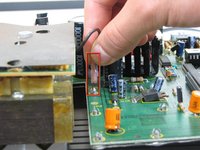
    1. TRS-80 Color Computer Motherboard Replacement, Motherboard: шаг 4, изображение 1 из 3 TRS-80 Color Computer Motherboard Replacement, Motherboard: шаг 4, изображение 2 из 3 TRS-80 Color Computer Motherboard Replacement, Motherboard: шаг 4, изображение 3 из 3
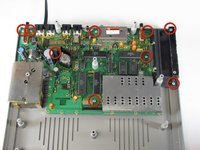
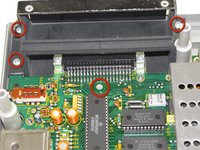
      • Remove the nine 15.24 mm Phillips screws securing the motherboard in place.

      • When removing the spring door, make sure to keep the door closed.

      Спросите у FixBot

      Добавить комментарий

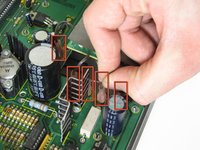
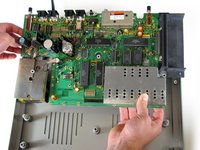
    2. TRS-80 Color Computer Motherboard Replacement: шаг 5, изображение 1 из 3 TRS-80 Color Computer Motherboard Replacement: шаг 5, изображение 2 из 3 TRS-80 Color Computer Motherboard Replacement: шаг 5, изображение 3 из 3
      • Remove the 5 jumper cables from the motherboard.

      • Once the jumper cables lift the motherboard up gently; it should lift out easily.

      Спросите у FixBot

      Добавить комментарий

Заключение

To reassemble your device, follow these instructions in reverse order.

Отменить: Я не выполнил это руководство.

5 человек успешно провели ремонт по этому руководству.

Andrew

Участник с: 01/23/11

530 Репутация

Автор 2 руководств

Команда

Cal Poly, Team 11-24, Maness Winter 2011 Участник Cal Poly, Team 11-24, Maness Winter 2011

CPSU-MANESS-W11S11G24

4 членов

Автор 25 руководств

0 Комментарии к руководству

Добавить комментарий

Статистика просмотров:

За последние 24 часов: 2

За последние 7 дней: 8

За последние 30 дней: 42

За всё время: 4,597