Введение
This replacement guide will walk you through the steps needed to replace the battery on your Toshiba Encore Mini and will serve as the first step for any other replacements you may need to perform. Prior to removing any parts on your device, backing-up all data and photos to an external storage device is recommended. In this guide, you will be removing the following:
- Back Cover
- Battery
Выберете то, что вам нужно
-
-
-
Using the flat end of the spudger, gently pry open the back case from the rest of the device.
 Спросите у FixBot
-
-
-
-
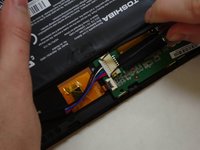
Carefully remove the electrical tape that holds the battery in place.
-
-
Инструмент, используемый на этом этапе:Tweezers$4.99
-
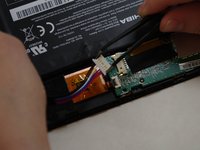
Using needle-nose tweezers, gently push the large white wire connector (connected to the black, red and blue wires) out of its housing.
-
-



To reassemble your device, follow these instructions in reverse order.
Отменить: Я не выполнил это руководство.
5 человек успешно провели ремонт по этому руководству.

Команда

UW Tacoma, Team 1-3, Liner SU 2015 Участник UW Tacoma, Team 1-3, Liner SU 2015
UWT-LINER-SU15S1G3
4 членов
Автор 6 руководств
2 Комментарии к руководству
Be sure to remove any SD cards you have first.
But where do i buy the battery?
